Serverless VPC Access: ACE Exam Study Guide

Image source: Dilbert.com
1. Overview
Serverless VPC Access allows your Google Cloud serverless services to communicate with resources in your VPC network using internal (private) IP addresses.
Supported Services (The “Serverless” side):
- Cloud Run (Services and Jobs)
- Cloud Functions (1st and 2nd Gen)
- App Engine (Standard Environment)
Target Resources (The “VPC” side):
- Compute Engine VMs
- Cloud SQL (with private IP)
- Memorystore (Redis/Memcached)
- Internal Load Balancers
- On-premises resources (via Cloud VPN or Cloud Interconnect)
2. Direct VPC Egress vs Serverless VPC Access Connector
| Feature | Direct VPC Egress | Serverless VPC Access Connector |
|---|---|---|
| Subnet required | No | Yes (/28 dedicated subnet) |
| Performance | Lower latency | Higher latency |
| Cost | Pay per use | Always-on minimum instances |
| All traffic egress | Native support | Requires “All traffic” mode |
| Simplicity | Simpler | More complex |
Use Direct VPC Egress when:
- Building new deployments
- Only need outbound (egress) connectivity to VPC
- Want to avoid managing connector infrastructure
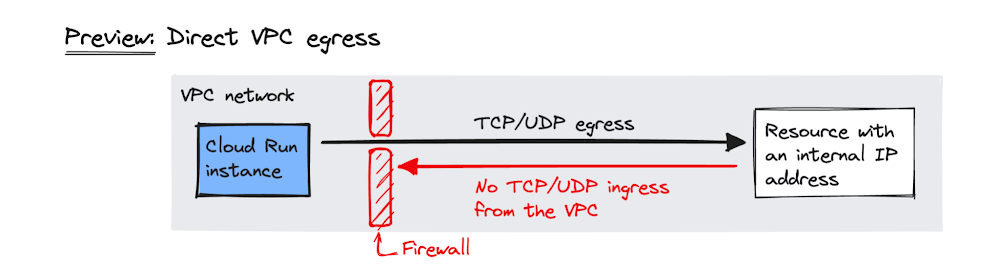
Image source: Google Cloud Blog
Use Serverless VPC Access Connector when:
- Need inbound connectivity from VPC to serverless service
- Must use Shared VPC (connector in host project)
- Exam question specifically mentions a connector
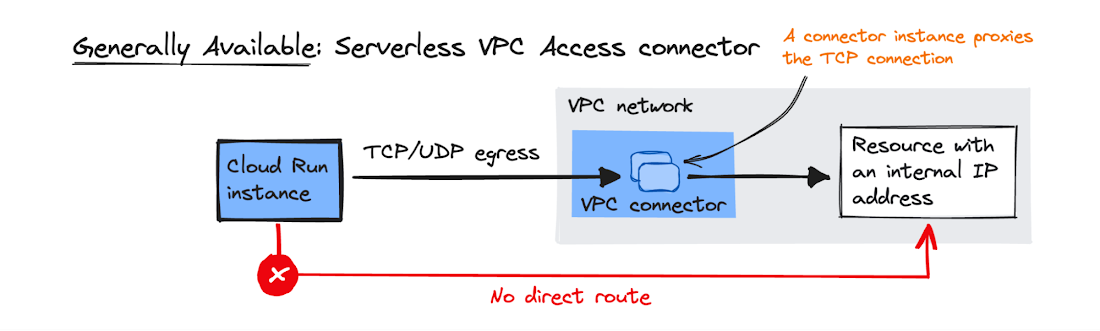
Image source: Google Cloud Blog
2.1. Key Characteristics
- Managed Connector: Acts as a bridge between serverless environment and VPC.
- Regional Resource: Created in a specific region; only works with services in that same region.
- Dedicated Subnet: Requires a
/28subnet that must not overlap with existing VPC ranges. - Always-on Cost: Minimum 2 instances run even if set to 0 (billed regardless).
- Throughput Scaling: Specify min/max instances to control throughput.
4. Configuration
4.1. Egress Settings
| Mode | Behavior |
|---|---|
| Private ranges only (default) | Only RFC 1918 traffic goes through connector. Internet traffic uses standard public gateway. |
| All traffic | All outbound traffic routes through connector. Required for static outbound IP. |
4.2. Static Outbound IP for Cloud Run
To give Cloud Run a static IP (e.g., for third-party firewall whitelisting):
- Create Serverless VPC Access Connector with “All traffic” egress
- Configure Cloud NAT on the VPC
- All outbound traffic from Cloud Run exits via Cloud NAT’s static IP
5. Shared VPC
- Connector must be created in the Host Project (where VPC lives)
- Serverless service in Service Project references the connector
- Service Project Admin needs
roles/vpcaccess.useron the connector
6. IAM Roles
| Role | Permissions |
|---|---|
roles/vpcaccess.admin | Full control over connectors |
roles/vpcaccess.user | Use a connector (required for deployment) |
roles/vpcaccess.viewer | View-only access |
7. Firewall Rules
The connector’s /28 subnet must be allowed to reach target resources:
- Example: Allow port 3306 from connector subnet to Cloud SQL instance
- Without proper firewall rules, connectivity will fail silently
8. Common Exam Gotchas
- Wrong region: Connector and serverless service must be in the same region
- Subnet overlap:
/28must not conflict with any existing VPC subnet - Minimum instances: Even setting min to 0 still runs 2 instances (cost!)
- RFC 1918 only: By default, only private IP ranges route through connector
- Inbound vs Outbound: Connector handles outbound from serverless; for inbound to serverless from VPC, consider Direct VPC Egress or Serverless VPC Access (ingress mode)
9. Essential gcloud Commands
Create a Connector:
gcloud compute vpc-access connectors create [NAME] \
  --network=[VPC] \
  --region=[REGION] \
  --range=[CIDR_28]
List Connectors:
gcloud compute vpc-access connectors list --region=[REGION]
Deploy Cloud Run with Connector:
gcloud run deploy [SERVICE_NAME] --image [IMAGE] --vpc-connector [CONNECTOR_NAME]
Deploy Cloud Run with Direct VPC Egress:
gcloud run services update [SERVICE_NAME] --vpc-egress=all
10. Practice Questions
Q1: A Cloud Run service needs to connect to a Cloud SQL instance using Private IP only. What GCP feature is required?
Answer: Serverless VPC Access Connector
Q2: You want Cloud Run to use a static outbound IP for firewall whitelisting. What configuration is needed?
Answer: Serverless VPC Access Connector with “All traffic” egress + Cloud NAT gateway
11. When NOT to Use
- Public serverless services with no VPC dependencies (unnecessary cost and complexity)
- Egress-only scenarios where Direct VPC Egress is available (simpler, no connector needed)
- When service and target are in different regions (not supported)
12. Quick Reference Summary
| Item | Value |
|---|---|
| Subnet size | /28 exactly |
| Connector region | Must match service region |
| Always-on instances | 2 (even at min=0) |
| Default egress | RFC 1918 only |
| Static IP | Requires “All traffic” + Cloud NAT |
| Shared VPC connector location | Host Project |