Cloud DNS: ACE Exam Study Guide (2026)
Image source: Google Cloud Documentation
1. Cloud DNS Overview
Cloud DNS is a high-performance, resilient, and managed Domain Name System (DNS) service that runs on the same infrastructure as Google.
Key Characteristics
- Fully Managed: No DNS servers to manage or scale.
- Global Scope: DNS is a global service; managed zones are accessible from anywhere.
- Low Latency: Uses Google’s global network of Anycast name servers.
- 100% Availability SLA: Google guarantees 100% availability for its authoritative name servers.
Authoritative Name Server
An authoritative name server stores and serves the official DNS records for a domain (A, AAAA, CNAME, MX, TXT, SPF, DKIM, etc.). It provides final, non-recursive answers to DNS queries. In Cloud DNS, the authoritative name servers are the globally distributed Google name servers assigned to your DNS zone, each using Anycast IPs for low-latency resolution.
Anycast IP
Anycast IP means a single IP address is advertised from multiple global locations. Traffic is routed to the nearest or lowest‑latency Google edge. Cloud DNS uses Anycast for its public authoritative name servers, giving global low‑latency DNS resolution, built‑in failover, and high availability without extra configuration.
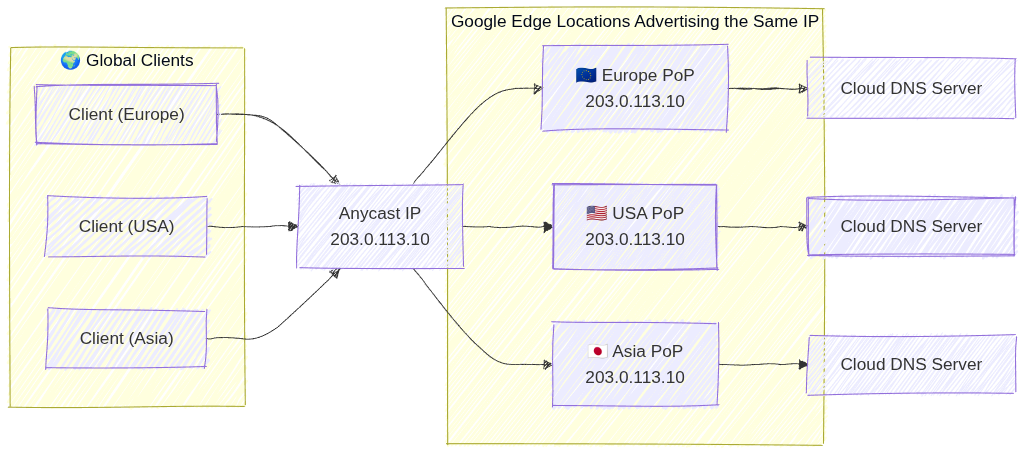
Image source: Own work (Mermaid diagram).
2. Managed Zones
A managed zone is a container for DNS records of the same DNS name suffix (e.g., example.com).
- Public Zones: Visible to the entire internet. You must register the domain with a registrar and point the registrar’s name servers to Google’s.
- Private Zones: Visible only to one or more VPC networks within your project or organization.
- Exam Tip: Use private zones for internal service discovery (e.g.,
db.internal.vpc).
- Exam Tip: Use private zones for internal service discovery (e.g.,
- Forwarding Zones: Used to forward DNS queries for a specific domain to an external DNS server (e.g., on-premises DNS).
- Peering Zones: Allows one VPC to use the DNS records defined in another VPC’s private zone.
3. Record Types
Cloud DNS supports common DNS record types:
- A: Maps a hostname to an IPv4 address.
- AAAA: Maps a hostname to an IPv6 address.
- CNAME: Maps an alias hostname to a canonical hostname.
- MX: Specifies mail servers for a domain.
- TXT: Arbitrary text data (often used for domain verification like SPF (Sender Policy Framework) or DKIM (DomainKeys Identified Mail)).
- SOA (Start of Authority): Contains administrative info about the zone.
4. DNS Forwarding and Peering
- Inbound Query Forwarding: Allows on-premises clients to resolve GCP private DNS records. Requires an Inbound Forwarding Policy on the VPC.
- Outbound Query Forwarding: Allows GCP instances to resolve on-premises DNS records. Accomplished via Forwarding Zones.
- DNS Peering: Connects the DNS namespace of two VPCs. Unlike VPC Peering, this only affects DNS resolution, not network connectivity.
4.1. DNS Inbound Forwarding Policy
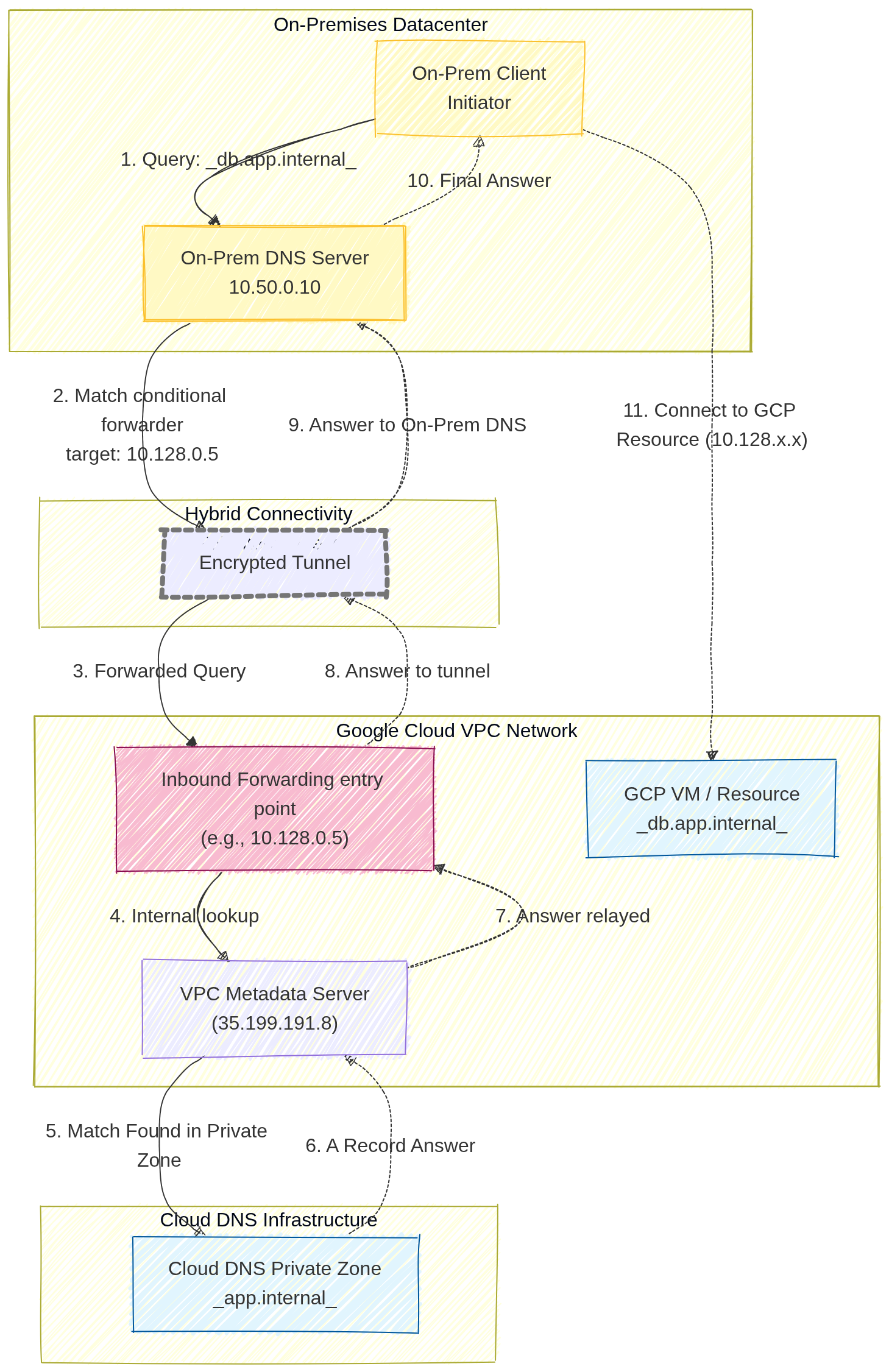
Image source: Own work (Mermaid diagram).
A user on-premises wants to access a GCP-hosted database (e.g., db.app.internal) using its friendly DNS name.
- The On-Prem Client sends a query to its local On-Prem DNS Server (e.g.,
10.50.0.10). - The On-Prem DNS server is configured with a conditional forwarder. It knows that any request ending in
.internal(or specificallyapp.internal) must be forwarded to a specific GCP entry point IP address (in this diagram,10.128.0.5). - The DNS query travels across the private hybrid connection (VPN or Interconnect) and reaches the Inbound Forwarding Policy IP.
- This entry point IP address acts as a bridge, forwarding the query to the VPC Metadata Server.
- The Metadata Server identifies the query for
db.app.internalas belonging to a configured Cloud DNS Private Zone. - Cloud DNS retrieves the correct
ARecord (e.g., the IP10.128.2.3) from the Private Zone database - and relays it back to the entry point.
- The answer is relayed back through the tunnel
- to the On-Prem DNS server,
- which finally provides the internal GCP IP address to the on-prem user.
4.2. DNS Formawring Zone
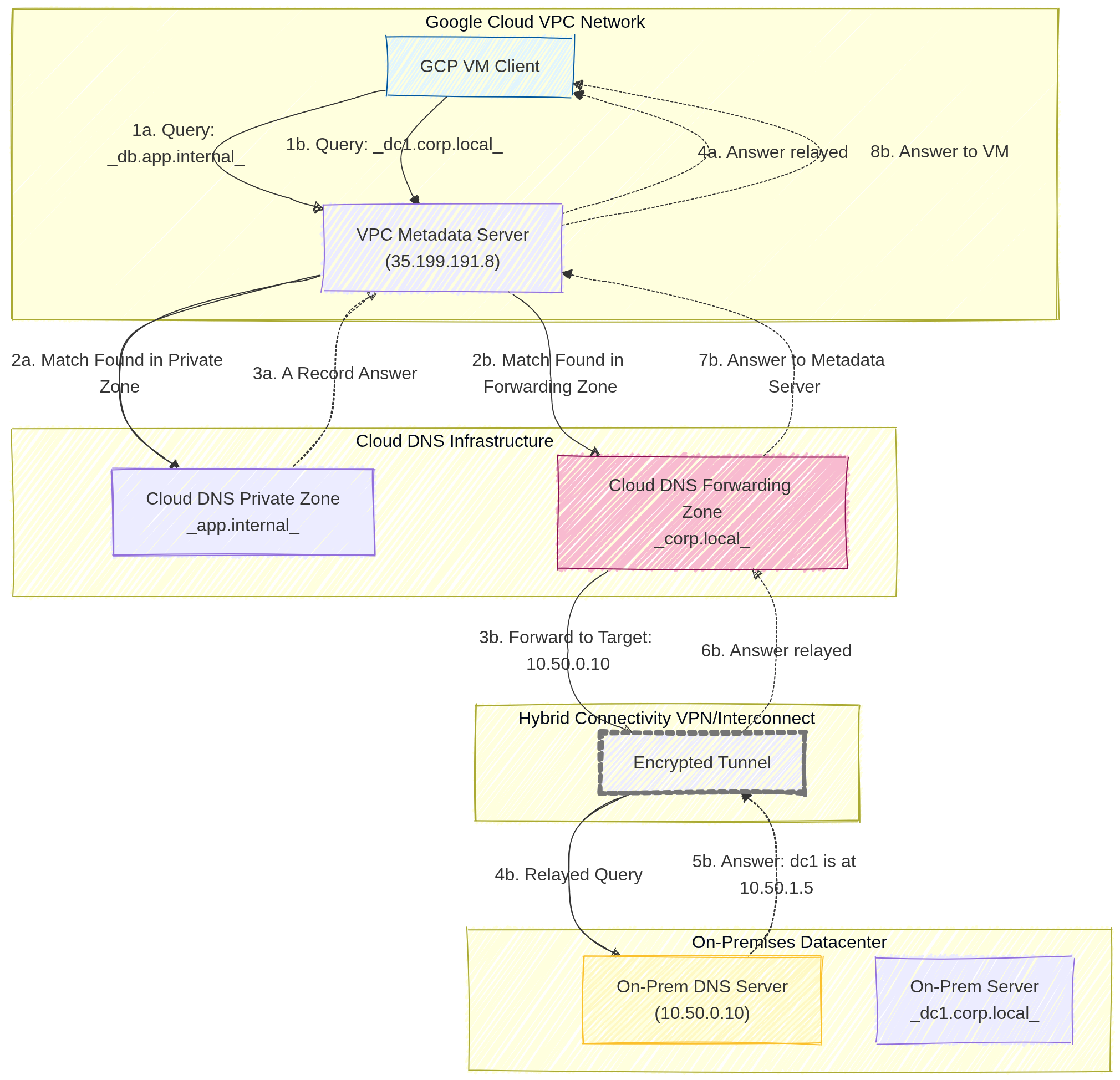
Image source: Own work (Mermaid diagram).
Scenario A: Query Resolved by Cloud DNS (GCP Internal)
This path covers how Google Cloud resolves names for resources that live entirely within your cloud environment.
- Query: A GCP VM Client sends a DNS request for
db.app.internalto the VPC Metadata Server (35.199.191.8). - Match: The Metadata Server checks its local configuration and finds a Match in a configured Cloud DNS Private Zone.
- Answer: Cloud DNS retrieves the specific
ARecord (IP address) for that resource from its internal database. - Relay: The Metadata Server relays the final answer back to the VM, allowing it to connect to the internal database.
Scenario B: Query Resolved by On-Prem DNS (Forwarded)
This path demonstrates the Forwarding Zone in action, where Cloud DNS acts as a middleman between the cloud and your physical datacenter.
- Query: The GCP VM Client sends a DNS request for
dc1.corp.local(an on-premises server) to the VPC Metadata Server. - Match: The Metadata Server finds a match in the Cloud DNS Forwarding Zone specifically created for the
.corp.localsuffix. - Forward: Cloud DNS identifies the Target Name Server (e.g.,
10.50.0.10) and forwards the DNS packet. - Hybrid Transit: The query travels through the Encrypted Tunnel (Cloud VPN or Interconnect).
- On-Prem Resolution: The On-Prem DNS Server receives the query, looks up its local record, and finds the answer (e.g.,
dc1is at10.50.1.5). - Return: The answer is sent back through the hybrid connection.
- Processing: The Forwarding Zone receive the result and passes it back to the Metadata Server.
- Final Relay: The Metadata Server provides the on-prem IP address to the original GCP VM.
5. DNS Policies
DNS policies allow you to control how the VPC handles DNS queries.
- Server Policies: Can enable inbound DNS forwarding or specify alternative DNS servers for the VPC.
- Client Policies: Can be used to apply specific DNS settings to VM instances.
- DNS over HTTPS (DoH): Support for encrypted DNS queries between clients and Cloud DNS to enhance privacy and security.
6. Security
- DNSSEC (DNS Security Extensions): Protects your domains from spoofing and cache poisoning by digitally signing DNS records.
- Exam Tip: DNSSEC is available for Public Zones only.
- IAM Roles:
roles/dns.admin: Full control over Cloud DNS resources.roles/dns.reader: View access only.
7. Essential gcloud Commands
- Create a Public Managed Zone:
gcloud dns managed-zones create [ZONE_NAME] --dns-name="example.com." --description="My public zone" - Create a Private Managed Zone:
gcloud dns managed-zones create [ZONE_NAME] --dns-name="internal.com." --description="My private zone" --visibility=private --networks=[VPC_NAME] - Add an A Record:
gcloud dns record-sets transaction start --zone=[ZONE_NAME] gcloud dns record-sets transaction add [IP_ADDRESS] \ --name="www.example.com." --ttl=300 --type=A --zone=[ZONE_NAME] gcloud dns record-sets transaction execute --zone=[ZONE_NAME] - List Records:
gcloud dns record-sets list --zone=[ZONE_NAME]
8. Exam Tips
- Visibility: Always distinguish between Public (Internet) and Private (VPC only) zones.
- Forwarding vs. Peering:
- Use Forwarding for GCP <-> On-Premises.
- Use Peering for GCP VPC <-> GCP VPC.
- Split-Horizon DNS: Cloud DNS supports split-horizon, where you have a public zone and a private zone with the same name but different records.
- Registration: Cloud DNS is not a domain registrar. You buy the domain elsewhere (or through Google Domains/Squarespace) and use Cloud DNS for management.
Split-Horizon DNS (Cloud DNS)
Split-horizon DNS lets you create a public zone and a private zone with the same domain name (e.g. example.com) but different DNS records. Public clients receive the public IPs (e.g. 203.0.113.10) from the public zone, while internal VPC clients receive private IPs (e.g. 10.0.0.5) from the private zone. Cloud DNS automatically selects the correct zone based on the source of the query.
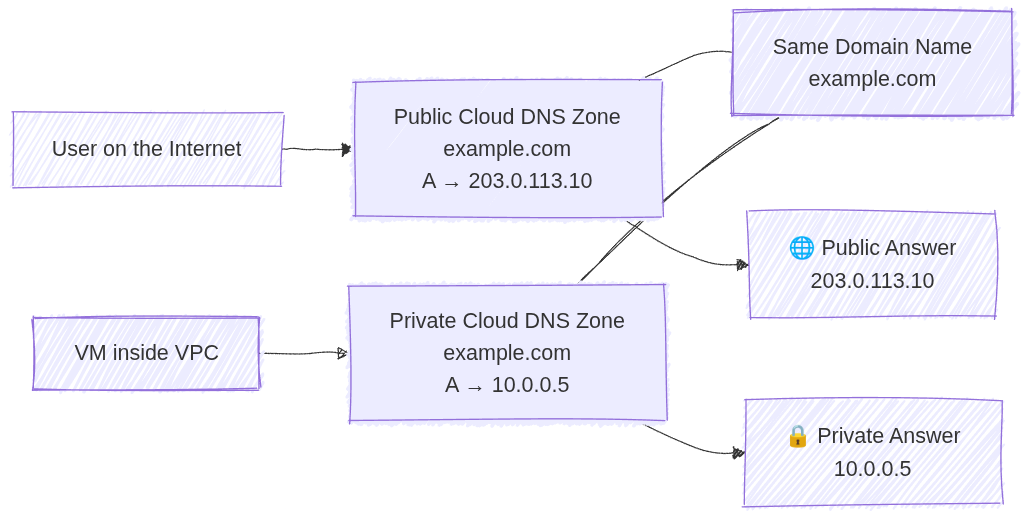
Image source: Own work (Mermaid diagram).