Google Cloud Associate Cloud Engineer (ACE) Study Guide
Note: These are my personal study notes that I am using to prepare myself for the Google Cloud Associate Cloud Engineer (ACE) certification exam.
Read the Book
The notes in this repository are compiled into a highly readable, searchable online book using mdBook.
Read the live study guide here
e-book
If you preffer the offline mode you can download epub file.
Project Structure
The study material is organized into specific Google Cloud services and concepts. All source material is written in Markdown and located in the src/ directory. Key areas covered include:
- Compute Services: Compute Engine, GKE, Cloud Run, App Engine, Cloud Functions.
- Storage & Databases: Cloud Storage, Cloud SQL, Cloud Spanner, BigQuery, Firestore, Bigtable, Memorystore.
- Networking: VPC Networks, Load Balancers, Cloud DNS, Hybrid Connectivity (Cloud VPN, Cloud Interconnect).
- Operations & Security: IAM, Cloud Logging, Cloud Monitoring, VPC Service Controls, Cloud Armor, Secret Manager.
- Migration Tools: Migrate to Virtual Machines, Database Migration Service, Storage Transfer Service.
Building Locally
If you want to run this book locally to study offline or modify the notes, you will need the mdBook command-line tool.
- Install mdBook (requires the Rust toolchain):
cargo install mdbook mdbook-epub - Serve the book locally:
This compiles the Markdown files and opens a local web server at http://localhost:3000 with hot-reloading enabled.mdbook serve --open
Content Generation
The core content and technical facts within these Markdown files were initially structured and generated with the assistance of AI, then curated, reviewed, and formatted specifically for this mdBook layout.
Mock Tests
License
This project is licensed under the GNU General Public License v3.0 (GPLv3).
You are free to use, modify, and distribute this study guide, provided that any modifications or derivative works are also distributed under the same open-source GPLv3 license. See the LICENSE file for more details.
Compute Services

Image source: Google Cloud Documentation
Compute Engine
Infrastructure as a Service (IaaS) providing fully customizable Virtual Machines (VMs). Best for legacy apps, custom OS requirements, or high-performance databases.
Google Kubernetes Engine (GKE)
Managed Kubernetes for orchestrating containerized applications. Choose Autopilot for a fully managed experience or Standard for full node-level control.
Cloud Run
Fully managed serverless platform for running request-aware containers. Features scale-to-zero, integrated traffic splitting, and support for sidecars.
Cloud Functions
Event-driven serverless platform for executing small snippets of code (glue logic). Ideal for processing GCS uploads, Pub/Sub messages, or Firestore triggers.
App Engine
Platform as a Service (PaaS) for building web apps and APIs. Available in Standard (sandboxed, fast scaling) and Flexible (Docker-based, custom runtimes) environments.
Compute Engine: ACE Exam Study Guide (2026)

Image source: Google Cloud Documentation
1. Compute Engine Overview
Compute Engine is Google Cloud’s Infrastructure as a Service (IaaS) offering, providing customizable Virtual Machines (VMs).
- Machine Families (2026 Standards)
- General-purpose: Best price-performance. Includes E2, N2, and the new N4 (optimized for modern workloads with flexible sizing).
- Compute-optimized: High performance per core. Includes C2, C3, and C4 (the latest generation for high-performance computing).
- Memory-optimized: High memory/vCPU ratio. Includes M1, M2, and M3.
- Accelerator-optimized: GPUs attached (e.g., A2, A3).
- Custom Machine Types: Variable vCPU and RAM configurations when preset types don’t fit your needs.
2. Pricing and Discounts
- Cost of Stopped VMs: If you stop a VM, you stop paying for CPU and RAM, but you still pay for attached Persistent Disks and any reserved Static External IPs.
- External IPs:
- Ephemeral: Automatically assigned when VM starts, released when VM stops/deletes
- Static: Reserved IP address that persists independently of VM lifecycle (incurs charges when unused)
- Sustained Use Discounts (SUD): Automatic discounts for running instances for a significant portion of the month (N1, N2).
- Committed Use Discounts (CUD): 1 or 3-year commitment for a predictable workload.
- Spot VMs: Up to 91% discount. These can be terminated by Google at any time with a 30-second notice. Best for fault-tolerant, stateless batch jobs.
- Use shutdown scripts to handle graceful termination and save state.
- Preemption of a Spot VM is called a preemption, not a system crash.
- Reservations: Ensure resources are available when needed. Often used with CUDs to guarantee capacity.
3. Instance Templates and Managed Instance Groups (MIGs)
- Instance Templates: Immutable resources that define VM properties (machine type, image, labels). Used to create MIGs.
- Managed Instance Groups (MIGs): A collection of identical VMs that offer high availability and scalability.
- Auto-healing: Automatically recreates VMs that fail health checks.
- Auto-scaling: Dynamically adds or removes VMs based on CPU utilization, load balancing capacity, or custom metrics.
- Regional MIGs: Highly recommended for production as they distribute VMs across multiple zones in a region.
Live migration is the process of moving a running VM from one physical host to another without downtime. Google uses this for infrastructure maintenance, allowing your VMs to keep running during host updates. It requires no action from you.
4. Persistent Disks, Snapshots and Images
- Persistent Disks (PD): Durable network storage. You can resize a disk up but never down.
- Disk Types:
- Standard PD: HDD-based, cost-effective for sequential read/write workloads
- SSD PD: Higher IOPS and throughput for demanding workloads (databases, apps)
- Hyperdisk: Independent performance scaling (see Section 4.1)
- Disk Encryption:
- Google-managed: Default, encryption handled by Google
- Customer-Managed Keys (CMEK): You control keys in Cloud KMS
- Customer-Supplied Keys (CSEK): You provide and manage encryption keys
- Snapshots: Incremental backups of disks, stored globally. Best for disaster recovery.
- Custom Images: A Gold Master boot disk with your OS and software pre-installed. Best for consistent deployments in MIGs.
- Local SSD: Physical drives attached directly to the host. Data is ephemeral and lost if the VM is stopped or deleted.
You can attach up to 24 local SSDs to a single VM, depending on the machine type. Each local SSD is 375 GB, providing up to 9 TB of local SSD storage per VM. Local SSDs provide high-performance ephemeral storage.
4.1. Hyperdisk
High-performance block storage with independent scaling of performance and capacity.
- Hyperdisk Balanced: SSD-like performance at lower cost. Good balance of price and performance.
- Hyperdisk Extreme: Ultra-high throughput and IOPS for demanding workloads (databases, AI/ML training, HPC).
- Performance scales independently from capacity (unlike standard Persistent Disks).
- Can be attached to sole-tenant nodes and used with MIGs.
5. Sole-Tenant Nodes
Dedicated, single‑tenant physical servers in Google Cloud that run only your project’s Compute Engine VMs. They provide hardware‑level isolation by ensuring no other customer’s workloads share the same underlying host.
Primary Use Cases
Regulatory or compliance requirements that mandate physical isolation (e.g., healthcare, finance, government). Security boundaries where you must avoid multi‑tenant hardware for risk or policy reasons. Bring‑Your‑Own‑License (BYOL) scenarios for software that is licensed per physical core, socket, or host. Workload placement control, such as pinning specific VMs to specific hardware types.
Node Groups & Placement
Nodes are organized into node groups, which act as pools of dedicated hosts. VMs use node affinity/anti‑affinity rules to control placement, ensuring they land on the correct physical nodes. You can enforce strict placement (must run on a specific node type) or preferred placement (try this node type first). Useful for keeping related workloads together or separating sensitive workloads across different hosts.
6. Connecting to Instances
- SSH Access:
gcloud compute ssh [VM_NAME]- Uses a direct SSH connection to the VM’s public IP
- Requires the VM to have an external IP
- Firewall must allow TCP on port
22from your client - Your machine connects over the public internet
- Identity-Aware Proxy (IAP):
gcloud compute ssh VM_NAME --zone=ZONE --tunnel-through-iap- Uses IAP TCP Tunneling (Zero‑Trust access)
- Works even when the VM has no external IP
- Requires IAM role:
roles/iap.tunnelResourceAccessor - Firewall must allow TCP on port
22from IAP’s IP range35.235.240.0/20 - SSH traffic goes through Google’s secure IAP tunnel to the VM’s internal IP
7. Service Accounts and Metadata
- Service Accounts: VMs use these to authenticate to other Google Cloud services (GCS, BigQuery). Always use custom service accounts with Least Privilege for production.
The default Compute Engine service account
PROJECT_NUMBER-compute@developer.gserviceaccount.comis automatically created and has the Editor role on the project. It is automatically attached to new VMs unless you specify a different service account or disable it. - Service Account Scopes: Control what APIs the service account can access
- Project-wide: Applies to all VMs using the default service account
- Instance-level: Set per-VM for granular control
- Metadata: Used to pass configuration data. Startup scripts are automated scripts that run every time the VM boots.
- Metadata Server: Accessible at
http://metadata.google.internal/computeMetadata/v1/.
7.1. VM Security and Availability
- Shielded VMs: Hardened VMs with security features to protect against boot-level malware/rootkits
- Secure Boot: Blocks untrusted boot loaders and drivers
- vTPM: Virtual Trusted Platform Module for key storage and measurement
- Integrity Monitoring: Verifies VM boot chain hasn’t been compromised
- Confidential Computing: Encryption at runtime using AMD SEV-SNP. Protects data while it’s being processed.
- Availability Policies:
- On-host maintenance: Controls behavior during host maintenance (Migrate/Terminate)
- Automatic restart: Whether GCP restarts VM after unexpected failure
- Provisioning model: Standard vs Spot (affects pricing and preemptibility)
- GPUs Available: T4, A100, H100. Each has specific licensing requirements and zone availability.
8. Essential gcloud Commands
- Create a VM:
gcloud compute instances create [NAME] --zone=[ZONE] --machine-type=[TYPE] - Resize a MIG:
gcloud compute instance-groups managed resize [NAME] --size=[NEW_SIZE] - List Instances:
gcloud compute instances list
9. Exam Tips
- Preemption: If a Spot VM is terminated, it is a preemption, not a system crash.
- Zonal vs. Regional MIG: Choose Regional MIG for the highest availability.
- Metadata Header: Requests to the metadata server require the header
Metadata-Flavor: Google. - Machine Type Selection: If a question asks for the best cost-performance for a general workload, consider E2 or N4. For high-performance databases, consider C4 or M3.
10. External Links
GKE: ACE Exam Study Guide (2026)

Image source: Google Cloud Documentation
1. GKE Fundamentals
Google Kubernetes Engine (GKE) is a managed environment for deploying, managing, and scaling containerized applications using Google infrastructure.
- Managed Kubernetes: Google manages the Kubernetes Control Plane, while you manage worker nodes in Standard mode.
- Cluster Types:
- Autopilot: The default and recommended mode for 2026. Fully managed; Google manages nodes, scaling, and security. You pay only for running pods.
- Standard: You manage the node infrastructure. Full control over nodes, SSH access, and custom machine types.
2. Cluster Configurations
- Regional Clusters: Control Plane and nodes replicated across multiple zones. Higher availability (99.95% SLA).
- Zonal Clusters: Control Plane and nodes in a single zone. Less expensive (99.5% SLA).
- Private Clusters: Nodes have internal IP addresses only. Communication with Control Plane via VPC peering. Requires Cloud NAT for outbound internet access.
3. Node Management and Scaling
- Node Pools: A group of nodes with the same configuration. Support for N4 (general purpose) and C4 (compute optimized) machine types in 2026 for optimized performance.
- Cluster Autoscaler: Automatically adds or removes nodes based on resource demands.
- Horizontal Pod Autoscaler (HPA): Scales pod replicas based on CPU or custom metrics.
- Vertical Pod Autoscaler (VPA): Adjusts CPU and memory reservations for pods.
Deployment → Manages app lifecycle: rolling updates, rollbacks, scaling. Creates and controls ReplicaSets. This is a recommented way to run stateless apps in GKE.
apiVersion: apps/v1
kind: Deployment
metadata:
  name: my-app
spec:
  replicas: 3
  strategy:
    type: RollingUpdate
    rollingUpdate:
      maxSurge: 1
      maxUnavailable: 1
  selector:
    matchLabels:
      app: my-app
  template:
    metadata:
      labels:
        app: my-app
    spec:
      containers:
        - name: app
          image: nginx:1.25
          ports:
            - containerPort: 80
ReplicaSet → Ensures a fixed number of Pods are running. Usually not used directly. Managed (created automatically) by Deployments.
apiVersion: apps/v1
kind: ReplicaSet
metadata:
  name: my-app-rs
spec:
  replicas: 3
  selector:
    matchLabels:
      app: my-app
  template:
    metadata:
      labels:
        app: my-app
    spec:
      containers:
        - name: app
          image: nginx:1.25
GKE → Use Deployments for stateless workloads. ReplicaSets are created automatically.
4. GKE Networking
-
Services:
- ClusterIP (default)
- Internal-only virtual IP.
- Accessible only inside the cluster.
- Used for pod‑to‑pod communication.
ClusterIP Service Definition for Internal Traffic
apiVersion: v1 kind: Service metadata: name: my-clusterip-service spec: type: ClusterIP selector: app: my-app ports: - port: 80 # service port targetPort: 8080 # container port- NodePort
- Opens port
30080on every node. - Accessible via
http://<node-ip>:30080. - Still load‑balances across pods.
- Opens port
NodePort Service Exposing Port 80 → 30080
apiVersion: v1 kind: Service metadata: name: my-nodeport-service spec: type: NodePort selector: app: my-app ports: - port: 80 targetPort: 8080 nodePort: 30080 # must be in range 30000–32767- LoadBalancer:
- GKE automatically creates a Google Cloud external Load Balancer
- Assigns a public IP
- Traffic → LB → NodePort → Pod
- This is the standard way to expose a service publicly
LoadBalancer Service Exposing Port 80
apiVersion: v1 kind: Service metadata: name: my-loadbalancer-service spec: type: LoadBalancer selector: app: my-app ports: - port: 80 targetPort: 8080 - ClusterIP (default)
-
Ingress: Manages external access (layer-7 HTTP/HTTPS) routing mechanism and creates a Google Cloud External Application Load Balancer.
-
Container-Native Load Balancing: Uses Network Endpoint Groups (NEGs) to route traffic directly to pods.
5. Storage in GKE
In Kubernetes, Pods are ephemeral — they can be rescheduled, recreated, or moved to another node at any time. Stateful apps (databases, queues, caches, file‑based apps) need persistent storage that survives pod restarts.
That’s where Persistent Volumes (PV) and Persistent Volume Claims (PVC) come in.
- Persistent Volumes and Persistent Volume Claims: Managed storage for stateful applications.
- Storage Classes: Defines storage types (e.g., standard HDD, SSD, or Balanced PD).
- Hyperdisk: Support for Google Cloud Hyperdisk in 2026 for high-performance GKE workloads.
For more details see Persistant Disk
6. Connecting GKE Pod to Memorystore (standard)
To connect a GKE Pod to a Google Cloud Memorystore (Redis) instance, you need to ensure they share a network and then inject the connection details into your Kubernetes deployment.
Network Prerequisites
- Same VPC: The Redis instance and GKE cluster must be in the same VPC network and same region.
- VPC-Native GKE: Your GKE cluster must be VPC-native (IP Aliasing enabled). Standard route-based clusters cannot natively route traffic to the Google-managed VPC where Redis lives.
Find Connection Details
Once the Redis instance is created, retrieve its internal IP address and port from the Google Cloud Console or CLI:
- Host IP:
10.x.x.x - Port:
6379(Default) - Auth String: If Auth is enabled, you will also need the password string.
Store Credentials in Kubernetes
The best practice is to store these details in a Kubernetes Secret so they aren’t hardcoded in your application code.
kubectl create secret generic redis-creds \
  --from-literal=REDIS_HOST=10.x.x.x \
  --from-literal=REDIS_PORT=6379 \
  --from-literal=REDIS_PASSWORD=your-auth-string
Update the GKE Deployment
Inject these values into your Pod as environment variables in your deployment.yaml.
spec:
  containers:
    - name: my-app
      image: gcr.io/my-project/my-app:v1
      env:
        - name: REDIS_HOST
          valueFrom:
            secretKeyRef:
              name: redis-creds
              key: REDIS_HOST
        - name: REDIS_PORT
          valueFrom:
            secretKeyRef:
              name: redis-creds
              key: REDIS_PORT
Verify Connectivity
You can test the connection by running a temporary “debug” pod with redis-cli installed:
kubectl run redis-test --rm -it --image=redis:7 -- \
  redis-cli -h [YOUR_REDIS_IP] -p 6379 ping
# Expected Output: PONG
Note on Security: By default, Memorystore does not have a firewall. Use Kubernetes
NetworkPoliciesto restrict which Pods in your cluster are allowed to send egress traffic to the Redis IP address.
7. GKE Security
- Workload Identity: The recommended way for GKE workloads to access Google Cloud services.
Workload Identity lets GKE pods access Google Cloud APIs without service account keys. It maps a Kubernetes Service Account to a Google Cloud Service Account, giving pods secure, short‑lived credentials managed automatically by GKE and IAM.
- Binary Authorization: Ensures only trusted container images are deployed.
Binary Authorization ensures only trusted, verified container images can run in GKE. It enforces deploy‑time security by requiring signed attestations from approved build or security systems, blocking unapproved or unscanned images before they reach the cluster.
- RBAC: Manages permissions inside the cluster.
Role‑Based Access Control in Kubernetes controls who can do what in the cluster. It uses Roles/ClusterRoles to define permissions and RoleBindings/ClusterRoleBindings to assign them to users, groups, or service accounts. It provides fine‑grained, namespace‑scoped or cluster‑wide access control without exposing unnecessary privileges.
- IAM: Manages permissions outside the cluster (e.g., cluster creation).
- Shielded GKE Nodes: Provides node identity and integrity.
8. Essential gcloud and kubectl Commands
- Create a Cluster:
gcloud container clusters create [CLUSTER_NAME] --zone [ZONE] --num-nodes [NUMBER] - Get Credentials:
gcloud container clusters get-credentials [CLUSTER_NAME] --zone [ZONE] - Resize a Cluster:
gcloud container clusters resize [CLUSTER_NAME] --node-pool [POOL_NAME] --num-nodes [NEW_SIZE] - Deploy an Application:
kubectl apply -f [FILENAME.YAML] - Check Pod Status:
kubectl get pods
9. Exam Tips and Gotchas
- Control Plane Upgrade: Google automatically upgrades the Control Plane. Define Maintenance Windows and Exclusions.
- Preemptible/Spot VMs: Use for cost savings in fault-tolerant workloads.
- Autopilot vs Standard: Choose Autopilot for reduced operational overhead unless specific node customization is required.
10. External Links
Cloud Run: ACE Exam Study Guide (2026)

Image source: Google Cloud Documentation
1. Cloud Run Overview
Cloud Run is a fully managed, serverless compute platform that enables you to run containerized applications that are stateless, request-driven. It is built on Knative, an open-source standard for serverless.
- Key Characteristics
- Serverless: No infrastructure to manage. It scales automatically based on incoming requests.
- Scale to Zero: If there is no traffic, Cloud Run scales down to zero instances.
- Stateless: Containers must be stateless. Persistent data should be stored in Cloud Storage, Filestore, or a database.
- Concurrency: Cloud Run can handle multiple concurrent requests per container instance (default is 80, up to 1000).
Knative Framework
Knative is an open‑source framework that brings serverless capabilities to Kubernetes by providing standardized components for building, deploying, and running containerized applications.
It abstracts complex Kubernetes operations and adds features such as automatic scaling (including scale‑to‑zero), traffic management, revisioning, and event‑driven execution through CloudEvents.
Knative consists of two main parts: Serving, which handles request‑driven workloads, and Eventing, which manages event routing and triggers. Cloud Run is built directly on Knative Serving, offering a fully managed version of its core serverless functionality.
2. Deployment & Sidecars (2026)
- Methods:
- Deploy from Container Image: Provide a URL to an image in Artifact Registry.
- Deploy from Source: Cloud Run uses Cloud Build to automatically create an image and deploy it.
- Sidecar Containers: Support for multiple containers in a single pod.
- Use Case: Running a Cloud SQL Auth Proxy alongside your app to handle database connections securely.
- Use Case: Running a logging or monitoring agent (e.g., OpenTelemetry) without modifying the main app code.
- Jobs vs. Services:
- Cloud Run Services: For code that handles requests (HTTP/gRPC).
- e.g. a Spring Boot application handling REST calls.
- Cloud Run Jobs: For code that performs work (data processing, backups) and exits when finished.
- e.g. a Spring Boot application with a
CommandLineRunner(see interface JavaDoc).
- e.g. a Spring Boot application with a
- Cloud Run Services: For code that handles requests (HTTP/gRPC).
3. Revisions and Traffic Management
- Revisions: Every time you deploy a change, Cloud Run creates a new immutable revision.
- Traffic Splitting: Simultaneously route percentages of traffic to different versions (e.g., 50/50 for A/B testing or 1% for Canary testing).
- Tagging: Assign a specific URL to a revision for testing before routing main traffic.
- Rollbacks: Instantly roll back to a previous revision by shifting 100% of traffic.
Deployment Strategies
Blue‑Green Deployment
Two identical environments exist: Blue (current) and Green (new).
- Deploy the new version to the Green environment.
- Test Green without affecting users.
- Switch 100% of traffic from Blue → Green in one action.
- Rollback is instant by switching traffic back to Blue.
Use cases: zero‑downtime releases, fast rollback, predictable behavior.
A/B Testing
Two versions run simultaneously, each receiving a portion of traffic.
- Version A = baseline.
- Version B = experimental variant.
- Users are split (e.g., 50/50 or 90/10).
- Compare metrics: conversions, latency, errors, user behavior.
Purpose: Experimentation and data‑driven decision‑making.
Traffic behavior: Parallel traffic to both versions for comparison.
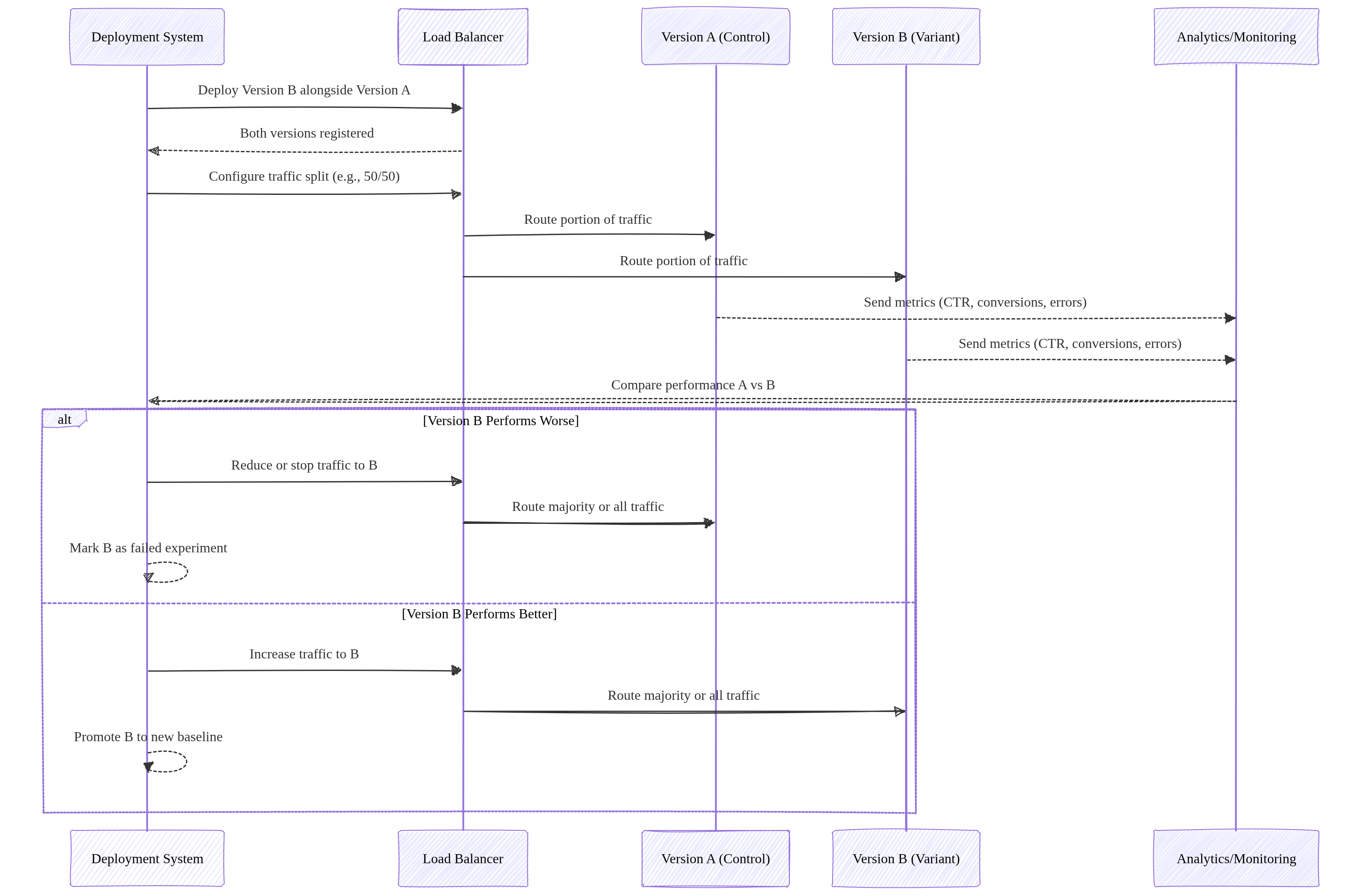
Image source: Own work (Mermaid diagram).
Canary Deployment
Gradually roll out a new version to a small subset of users.
- Start with a small percentage (e.g., 1%).
- Monitor errors, latency, logs.
- Increase traffic gradually (e.g., 1% → 10% → 50% → 100%).
- Rollback by shifting traffic back to the stable version.
Use cases: risk‑reduction, real‑world testing, incremental rollout.
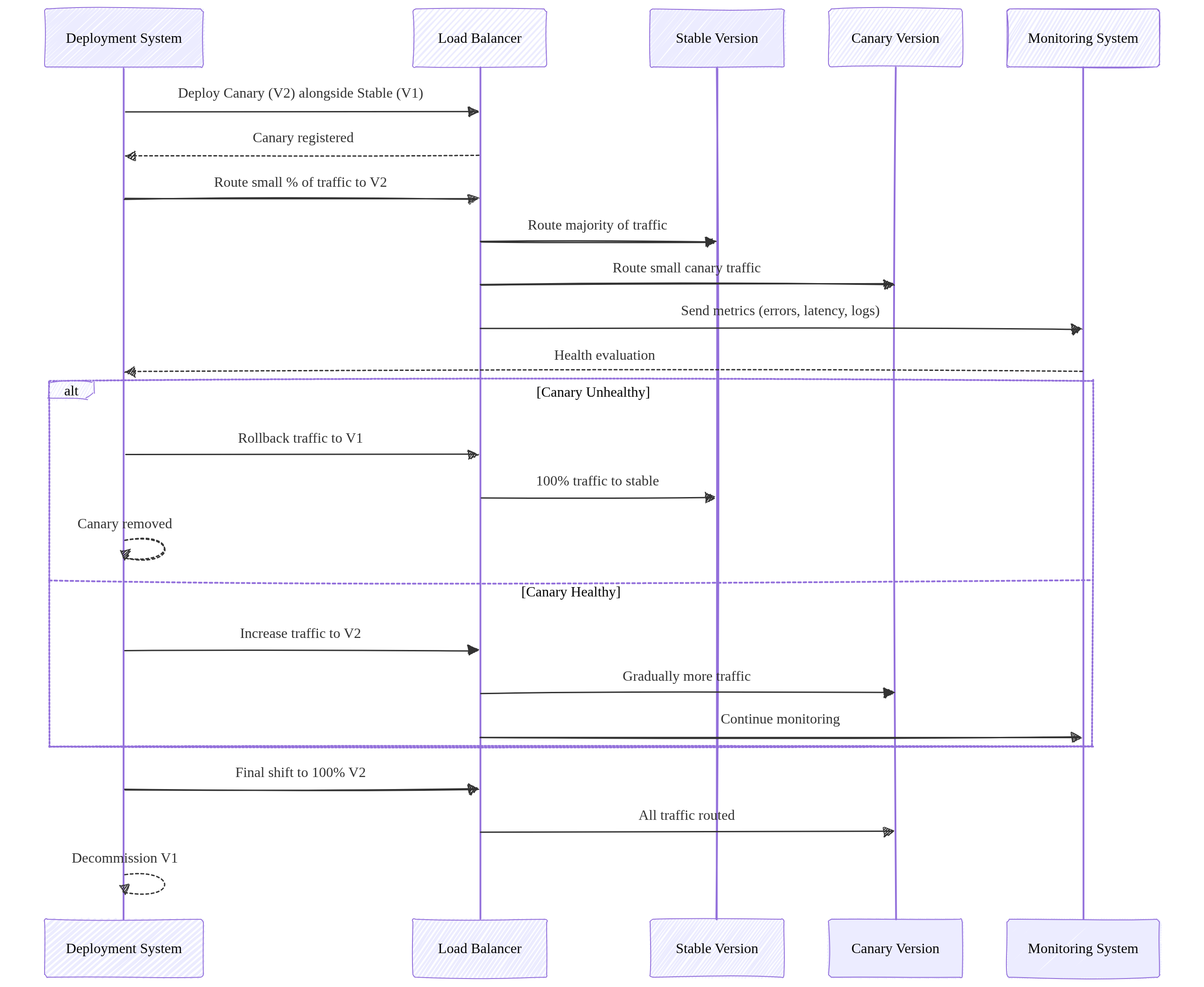
Image source: Own work (Mermaid diagram).
Rolling Update Deployment
A rolling update replaces application instances gradually, updating a few replicas at a time until the entire fleet runs the new version.
- New version is deployed in small batches (e.g., 1 pod at a time).
- Each new instance must pass readiness checks before receiving traffic.
- Old instances are terminated only after new ones become healthy.
- Traffic is continuously served throughout the process — zero downtime.
- Rollback is performed by reversing the rollout (deploying the previous version again), but it is slower than Blue‑Green.
Purpose: Safe, incremental rollout without requiring two full environments.
Traffic behavior: Traffic is always routed to a mix of old and new instances during the transition.
Rolling updates require strict backward compatibility because old and new versions run simultaneously. Breaking API changes cause runtime failures. Use versioning, tolerant readers, and the expand‑migrate‑contract pattern to safely evolve APIs.
Summary
- Blue‑Green Two full environments. Switch traffic all at once. Best for fast rollback.
- A/B Testing: Runs two versions in parallel to compare user behavior and performance metrics for data‑driven decisions.
- Canary: Gradual traffic shifting. Best for testing new versions with minimal risk.
- Rolling Update: Gradual replacement of old instances with new ones. Zero downtime, no duplicate environments, slower rollback than Blue‑Green but simpler and resource‑efficient.
4. Scaling, Resources & Probes
- Maximum Instances: Limits how far the service can scale up (prevents runaway costs).
- Minimum Instances: Keeps instances “warm” to eliminate cold start latency.
- CPU Allocation & Throttling
- Throttled (Default): CPU is only allocated during request processing. Once the response is sent, CPU is heavily “throttled” (reduced), which can cause background threads or asynchronous tasks to hang or fail.
- Always Allocated: CPU is available even when no requests are being processed. This is required for background tasks, WebSocket-like connections, or monitoring agents that need to run continuously.
- Probes (Health Checks)
- Startup Probe: Checks if the app is ready to serve traffic (prevents 503 errors during scale-up).
- Liveness Probe: Restarts the container if it becomes unhealthy or hangs.
- In Spring Boot this is achieved with an Actuator.
- GPU Support: Cloud Run now supports GPU acceleration for AI/ML inference workloads.
5. Networking and Ingress
- Ingress Settings:
All(Public),Internal(VPC only), orInternal and Cloud Load Balancing. - Direct VPC Egress: A faster, more direct way to connect to a VPC without requiring a Serverless VPC Access Connector.
- Static Outbound IP: Route traffic through a VPC and use Cloud NAT to give your service a fixed external IP.
6. Security and Authentication
- IAM Roles:
roles/run.invoker: Required to call/trigger a service.roles/run.admin: Full control over services and revisions.
- Service Account: Always assign a Custom Service Account with minimal permissions for production.
- Private Authentication (Critical):
- To call a private Cloud Run service, the requester must provide a Google-signed ID Token (not an Access Token).
curl --header "Authorization: Bearer $(gcloud auth print-identity-token)" [SERVICE_URL]
- To call a private Cloud Run service, the requester must provide a Google-signed ID Token (not an Access Token).
- Secrets: Use Secret Manager to mount sensitive data as environment variables or volumes.
6.1. Identity-Aware Proxy (IAP)
- IAP (Identity-Aware Proxy) adds an authentication layer in front of Cloud Run services, requiring users or apps to authenticate via Google Identity before accessing the service.
- How it works:
- IAP sits between the user and the Cloud Run service.
- All traffic passes through IAP, which validates the user’s identity (Google Account, OAuth 2.0).
- Only authenticated and authorized users can reach the backend service.
- The (Load Balancer’s) Backend Service receives requests with an
x-goog-authenticated-user-emailheader containing the user’s email.
- Key Benefits:
- Enforces authentication at the edge — no code changes needed.
- Integrates with IAM for fine-grained access control (grant/deny per user or group).
- Works with Cloud Load Balancing (HTTP/HTTPS).
- Use Cases:
- Internal tools requiring Google-only access.
- Adding an extra auth layer beyond IAM.
- Protecting services that don’t have built-in authentication.
For a usecase see Cloud Run & IAP.
7. Storage Options
- In-memory: Ephemeral filesystem limited by allocated RAM.
- Cloud Storage FUSE: Mount a Cloud Storage bucket as a local volume (best for large media files).
- NFS (Filestore): Use VPC egress to mount a Filestore instance for high-performance shared POSIX storage.
8. Common ACE Exam Scenarios
- Scenario: Call a private service from a local script? → Use
gcloud auth print-identity-tokento get a bearer token. - Scenario: Prevent Cold Start for a critical API? → Set
min-instancesto at least 1. - Scenario: Connect to Cloud SQL securely without hardcoded IPs? → Use a Sidecar with the Cloud SQL Auth Proxy.
- Scenario: Your application starts a background thread to process an image after sending the HTTP response, but the process never completes or runs extremely slowly. → Change CPU Allocation to “always allocated” to prevent CPU throttling after the request is returned to the user.
- Scenario: Deploy a background task that runs for 2 hours? → Use Cloud Run Jobs (not Services).
By default, each task runs for a maximum of 10 minutes: you can change this to a shorter time or a longer time up to 168 hours (7 days). For tasks using GPUs, the maximum available timeout is 1 hour.
- Scenario: Split traffic 10/90 for a new feature? → Use Traffic Splitting across revisions.
- Scenario: Mount a 1TB shared drive for multiple instances? → Use Filestore via Direct VPC Egress.
9. Essential gcloud Commands
- Deploy from Image:
gcloud run deploy [SERVICE] --image [IMAGE_URL] - Update Traffic:
gcloud run services update-traffic [SERVICE] --to-revisions [REV1=10,REV2=90] - Set CPU Allocation (Throttling):
gcloud run services update [SERVICE] --no-cpu-throttling(always on) or--cpu-throttling(default) - List Revisions:
gcloud run revisions list --service [SERVICE] - Describe Service:
gcloud run services describe [SERVICE]
Final ACE Tip: Cloud Run is the preferred choice for modern, containerized microservices that need to scale to zero. Use Sidecars for infrastructure logic and ID Tokens for private service-to-service communication.
10. External Links
- Cloud Run - Google Cloud Documentation
- Youtube - Andrew Brown - Cloud Run
- Cloud Run - The Cloud Girl
- Where should I run my staff - The Cloud Girl
- Google Cloud Documentation - Canary Deployment
- Blue-Green, Canary and Other K8s Deployment Strategies - Traefik Labs
- Most Common Kubernates Deployments Strategies (Example & Code) - Anton Putra - Youtube
Cloud Functions: ACE Exam Study Guide (2026)
Image source: Google Cloud Documentation
1. Cloud Functions Overview
Cloud Functions is a serverless, event-driven compute platform for executing snippets of code in response to events.
- Key Characteristics
- Serverless: No infrastructure management; automatic scaling.
- Single-purpose: Best for small, independent units of logic.
- Ephemeral: Instances are created, perform work, and are destroyed.
- Generations (2nd Gen is now the Default)
- 2nd Generation (Built on Cloud Run)
- Uses Eventarc as the unified eventing engine.
- Higher concurrency (up to 1000 requests per instance).
- Longer processing times (up to 60 minutes for HTTP).
- Larger instance sizes (up to 16GB RAM / 4 vCPUs) and support for C4 machine types.
- Traffic splitting between revisions.
- 1st Generation: Legacy model, limited concurrency (1 request per instance).
- 2nd Generation (Built on Cloud Run)
2. Triggers and Events (via Eventarc)
In 2nd Generation, Cloud Functions use Eventarc to deliver events from over 90+ Google Cloud sources.
- HTTP Triggers: Triggered via a direct URL (standard for webhooks or simple APIs).
- Event-Driven Triggers:
- Cloud Storage: Triggered by file creation, deletion, or metadata updates.
- Pub/Sub: Triggered when a message is published to a specific topic.
- Firestore: Triggered by document creation, updates, or deletions.
- Cloud Logging: Triggered by specific log entries (via Eventarc).
3. Runtimes and Deployment
- Supported Languages: Node.js, Python, Go, Java, Ruby, PHP, .NET Core.
- Deployment Source:
- Local machine via
gcloud. - Source repositories (GitHub, Bitbucket).
- Cloud Storage (ZIP file).
- Local machine via
- Cloud Build: When you deploy, Cloud Build automatically packages the function and stores it as a container image in Artifact Registry.
4. Scaling and Performance
- Max Instances: Limits scaling to prevent excessive costs.
- Min Instances: Keeps instances warm to eliminate cold start latency.
- Startup CPU Boost (2026): Temporarily allocates extra CPU during function startup to reduce cold start time — a cost-effective alternative to min-instances.
- Concurrency (2nd Gen Only): Allows a single instance to handle multiple simultaneous requests, reducing the total number of instances needed.
- Timeout: The maximum time a function can run before being terminated.
5. Networking
- Ingress Settings: Control whether the function is public or internal-only.
- VPC Access:
- Direct VPC Egress (Recommended for 2nd Gen): Faster, lower latency, and no connector overhead.
- Serverless VPC Access Connector: Required for 1st Gen or specific VPC requirements.
- Static Outbound IP: Requires a VPC Connector and Cloud NAT.
6. Security and IAM
- Permissions:
roles/cloudfunctions.invoker: Allows calling/triggering the function.roles/cloudfunctions.admin: Full control over functions.
- Service Accounts:
- Runtime Service Account: The identity the function uses when it runs (default is the App Engine default service account).
Best practice: Use a Custom Service Account with minimal permissions.
- Runtime Service Account: The identity the function uses when it runs (default is the App Engine default service account).
- Secrets: Integrate with Secret Manager to securely provide API keys or credentials.
7. Monitoring and Logging
- Cloud Logging: All
stdoutandstderroutput is automatically sent to Cloud Logging. - Error Reporting: Automatically captures unhandled exceptions.
- Cloud Monitoring: Tracks execution counts, execution times, and memory usage.
8. Essential gcloud Commands
- Deploy (HTTP):
gcloud functions deploy [NAME] --gen2 --runtime [RUNTIME] --trigger-http --allow-unauthenticated - Deploy (Pub/Sub):
gcloud functions deploy [NAME] --gen2 --runtime [RUNTIME] --trigger-topic [TOPIC_NAME] - List Functions:
gcloud functions list - Check Logs:
gcloud functions logs read [NAME] - Describe Function:
gcloud functions describe [NAME]
9. Java Cloud Functions – Required Interfaces
To write a Cloud Function in Java, you must implement one of Google’s functional interfaces. These are part of the Cloud Functions Framework, which allows you to run and test these functions locally or in any Knative-compatible environment.
dependencies {
    implementation platform("com.google.cloud:libraries-bom:26.79.0")
    implementation "com.google.cloud:google-cloud-functions"
}
Cloud Functions doesn’t run on Knative directly, but uses the Knative‑compatible Functions Framework, allowing the same function code to run on Cloud Run or any Knative environment.
For HTTP-triggered functions
com.google.cloud.functions.HttpFunction
public class HelloHttp implements HttpFunction {

    @Override
    public void service(HttpRequest request, HttpResponse response) throws Exception {
        BufferedWriter writer = response.getWriter();
        writer.write("Hello from HTTP Function!");
    }
}
For background (event-driven) functions
com.google.cloud.functions.BackgroundFunction<T>
public class HelloBackground implements BackgroundFunction<PubSubMessage> {

    @Override
    public void accept(PubSubMessage message, Context context) {
        var data = message.data();
        System.out.println("Received Pub/Sub message: " + data);
    }
}

// Simple POJO for Pub/Sub payload
record PubSubMessage(String data) {
}
For raw event payloads
com.google.cloud.functions.RawBackgroundFunction
public class HelloRawBackground implements RawBackgroundFunction {

    @Override
    public void accept(String json, Context context) {
        System.out.println("Raw event payload: " + json);
    }
}
These interfaces define the entry point that Google Cloud invokes when your function runs.
10. Exam Tips & Comparison
- Cloud Functions vs. Cloud Run
- Use Cloud Functions for event-driven snippets or simple glue logic.
Glue logic is small, simple code that connects components so they can work together. It adapts interfaces, transforms data, or coordinates calls between modules, acting as the plumbing that lets otherwise incompatible parts interoperate.
- Use Cloud Run for full web applications, containers with multiple routes, or complex dependencies.
- Use Cloud Functions for event-driven snippets or simple glue logic.
- Cold Starts: Occur when a new instance is spun up from zero. Mitigated by setting a
min-instancesvalue. - Idempotency: Event-driven functions should be idempotent to handle retries correctly.
Idempotency - An operation is idempotent if performing it multiple times produces the same result as performing it once.
11. External Links
- Cloud Run Functions - Google Cloud Documentation
- Youtube - Andrew Brown - Cloud Run
- Cloud Functions - The Cloud Girl
- Where should I run my staff - The Cloud Girl
App Engine: ACE Exam Study Guide (2026)

Image source: Google Cloud Documentation
1. App Engine Overview
App Engine is a fully managed Platform as a Service (PaaS) for building and deploying web applications and APIs.
- Key Characteristics
- Serverless: No server management; automatic scaling.
- Application-Centric: Focus on code, not infrastructure.
- Regional Resource: An App Engine application is created within a specific region and cannot be moved once created.
- Max One App per Project: You can only have one App Engine application per Google Cloud project.
2. Standard vs. Flexible Environment
This is the most frequent exam topic for App Engine.
2.1. Standard Environment
- Speed: Starts in seconds. Scale-to-zero is supported.
- Infrastructure: Runs in sandboxed environments (specific versions of Node.js, Python, Java, Go, PHP, Ruby).
- Instance Classes: M1 (high memory), M2 (high CPU), F1-F4 (default). Determines CPU/memory ratio.
Class Memory CPU Cost F1 256MB 600MHz Cheapest F2 512MB 1.2GHz F4 1GB 2.4GHz M1 1GB 600MHz High memory M2 2GB 1.2GHz High memory - Constraints: Cannot modify OS; write-only to local filesystem (
/tmp). No SSH access. - Cost: Cheaper for intermittent traffic; scale-to-zero saves money.
- Best For: Web apps, APIs with varying traffic, rapid development.
2.2. Flexible Environment
- Speed: Starts in minutes (uses Compute Engine VMs). No scale-to-zero.
- Infrastructure: Runs in Docker containers. Any language/version supported.
- Machine Types: Uses custom machine types (not N4/C4 - those are Compute Engine).
- Capabilities: Modify OS, access filesystem, SSH access.
- Health Checks:
readiness_check: When to route traffic to instanceliveness_check: When to restart unhealthy instance
- Connectivity: Easier VPC access than Standard.
- Cost: More expensive; min 1 instance always running.
- Best For: Apps with consistent traffic, custom dependencies, high CPU/memory needs.
3. App Engine Hierarchy
Understanding the relationship between components is essential for resource management.
- Project: The root Google Cloud resource.
- Application: The App Engine app within the project (one per project).
- Service: Microservices within the app (e.g., “frontend”, “api”, “worker”).
- Version: Different versions of a service (e.g., “v1”, “v2”).
- Instance: The actual running units of a version.
4. Scaling Types
| Type | Standard | Flexible | Description |
|---|---|---|---|
| Automatic | Yes | Yes | Based on CPU, throughput, latency targets |
| Basic | Yes | No | On-demand; scale to zero when idle |
| Manual | Yes | Yes | Fixed instance count |
4.1. Automatic Scaling Parameters
automatic_scaling:
  target_cpu_utilization: 0.6 # Scale when CPU > 60%
  target_throughput_concurrent_requests: 100 # Or use this
  min_instances: 0 # Standard: 0 allows scale-to-zero
  max_instances: 10
4.2. Basic Scaling Parameters
basic_scaling:
  max_instances: 5
  idle_timeout: 60s # Shutdown after idle
5. Traffic Management
- Traffic Migration - Gradually shifts all traffic from one version to another. Useful for controlled rollouts, such as moving traffic from
v1tov2without an abrupt cutover. - Traffic Splitting - Routes live traffic to multiple versions at the same time. Common use cases include A/B testing (e.g., 50/50 split), Canary releases (e.g., 1% to a new version), and progressive rollouts with real user traffic.
- Methods - App Engine can distribute traffic using:
- IP-based splitting — consistent routing for users behind the same IP.
gcloud app services set-traffic my-service \ --splits v1=0.9,v2=0.1 \ --split-by ip - Cookie-based splitting — sticky sessions (per user) for experiments or A/B tests. App Engine uses the
GOOGAPPUIDcookie.gcloud app services set-traffic my-service \ --splits v1=0.5,v2=0.5 \ --split-by cookie - Random splitting — evenly distributed, non-sticky traffic.
gcloud app services set-traffic my-service \
  --splits v1=0.99,v2=0.01 \
  --split-by random
- IP-based splitting — consistent routing for users behind the same IP.
6. Deployment and Configuration
app.yaml: The core configuration file used for deployment. Defines runtime, scaling, handlers, and more.
6.1. Standard Environment Example
runtime: python312
instance_class: F2
automatic_scaling:
  min_instances: 1
  max_instances: 10
  target_cpu_utilization: 0.7

env_variables:
  ENV_NAME: "production"

handlers:
  - url: /static
    static_dir: static_files
  - url: /.*
    script: auto

warmup: enabled
6.2. Flexible Environment Example
runtime: java21
env: flex

automatic_scaling:
  min_num_instances: 1
  max_num_instances: 5

resources:
  cpu: 1
  memory_gb: 2
  disk_size_gb: 10

readiness_check:
  path: /ready
  check_interval_sec: 5
- Deployment: Use
gcloud app deploy. By default, this promotes the new version to handle 100% of traffic. Use--no-promoteto deploy without switching traffic.
7. Networking and Security
- App Engine Firewall: Control access by IP range (Allow or Deny).
- IAP (Identity-Aware Proxy): Restrict access based on IAM identities without modifying application code.
- VPC Access: Use a Serverless VPC Access Connector to reach resources with private IPs (Cloud SQL, Memorystore).
- Flexible has easier VPC connectivity than Standard.
- Service Accounts:
- Default: App Engine Default Service Account (
project-id@appspot.gserviceaccount.com) with broad Editor permissions. - Best Practice: Create a custom service account with least-privilege permissions.
- Use
--service-account=YOUR-SA@PROJECT.iam.gserviceaccount.comin deployment.
- Default: App Engine Default Service Account (
- Security Best Practices:
- Never use the default service account in production
- Use IAP for user authentication
- Leverage firewall rules for IP-based access control
- Store secrets in Secret Manager, not in
app.yaml
8. Essential gcloud Commands
| Command | Description |
|---|---|
gcloud app create --region [REGION] | Initialize App Engine in a region |
gcloud app deploy [YAML_FILE] | Deploy application |
gcloud app deploy --no-promote | Deploy without shifting traffic |
gcloud app services set-traffic [SERVICE] --splits [V1=0.5,V2=0.5] | Split traffic |
gcloud app browse | Open app in browser |
gcloud app logs read | View application logs |
gcloud app versions list | List all versions |
gcloud app services list | List all services |
gcloud app instances list | List running instances |
9. When to Use App Engine vs Alternatives
| Use Case | Recommended Service |
|---|---|
| Traditional web apps, simple deployments | App Engine Standard |
| Containerized microservices, scale-to-zero | Cloud Run |
| Full Kubernetes control | GKE |
| Long-running processes, custom hardware | Compute Engine |
| App Engine Standard features + custom deps | App Engine Flexible |
9.1. App Engine vs Cloud Run Quick Reference
| Feature | App Engine | Cloud Run |
|---|---|---|
| Scale to zero | Standard only | Yes |
| Container support | Flexible only | Yes (primary) |
| Managed SSL | Yes | Yes |
| VPC access | Via connector | Native (Knative) |
| Warmup requests | Yes | No (cold starts) |
| Minimum cost | $0 (Standard) | ~$0 with scale-to-zero |
10. Cost Optimization Tips
- Use Standard environment for intermittent traffic (scale-to-zero)
- Set appropriate
min_instancesonly when cold start latency is critical - Choose correct instance classes (F1-F4 vs M1-M2) based on your memory/CPU needs
- Use
target_cpu_utilizationinstead of throughput for more efficient scaling - Deploy with
--no-promotewhen testing to avoid unnecessary traffic - Delete unused versions after migration
11. Exam Tips & Common Pitfalls
- Region Lock: Cannot change region after creation; must create new project.
- Always deploy new versions for major changes to enable instant rollbacks.
- Warmup requests reduce cold start latency (Standard environment).
- Flexible requires at least 1 instance - no scale-to-zero, factor this into cost.
- Handlers order matters - first matching handler wins.
- Static files must be served via handlers, not your application code.
- App Engine API: Use
google.appengine.applicationfor programmatic scaling config.
12. External Links
- App Engine - Google Cloud Documentation
- App Engine Standard - Google Cloud
- App Engine Flexible - Google Cloud
- Serverless VPC Access
- Youtube - Andrew Brown - App Engine
- App Engine - The Cloud Girl
Storage & Databases
Image source: Google Cloud Documentation
Cloud Storage
Scalable object storage for unstructured data (images, backups, logs). Features multiple storage classes (Standard, Nearline, Coldline, Archive) and automated lifecycle management.
Cloud SQL
Fully managed relational database (RDBMS) for MySQL, PostgreSQL, and SQL Server. Best for standard web applications and transactional (OLTP) workloads at a regional scale.
Cloud Spanner
Enterprise-grade, globally distributed relational database. Provides horizontal scalability for both reads and writes with strong global consistency and up to 99.999% availability.
Firestore / Datastore
Serverless, NoSQL document database built for mobile, web, and IoT apps. Supports real-time synchronization, offline data access, and ACID transactions at the document level.
Bigtable
High-performance, fully managed NoSQL wide-column database. Designed for petabyte-scale, low-latency workloads such as IoT telemetry, ad-tech, and financial data.
BigQuery
Serverless, cost-effective enterprise data warehouse (EDW) for OLAP analytics. Uses a columnar architecture to query petabytes of data using standard SQL.
Memorystore
Fully managed in-memory data store service for Redis, Valkey, and Memcached. Used for sub-millisecond latency caching, session management, and real-time analytics.
Filestore
Managed NFS file storage for applications that require a POSIX-compliant shared filesystem. Commonly used as shared storage for GKE pods and Compute Engine VMs.
Persistent Disk
Persistent Disk is durable, high‑performance block storage for VM instances. It’s replicated for reliability, supports snapshots, resizing, and can detach/reattach across VMs.
Cloud Storage: ACE Exam Study Guide (2026)
Image source: Google Cloud Documentation
1. Cloud Storage Overview
Cloud Storage is Google Cloud’s object storage service for storing unstructured data such as files, images, backups, and static website assets.
- Characteristics:
- Global Namespace: Bucket names must be globally unique across all of Google Cloud.
- Durability: Designed for 99.999999999% (11 nines) annual durability.
- Consistency: Provides strong global consistency for all operations (read-after-write, list-after-write).
2. Bucket Locations
- Regional: Stored in a single region. Lowest latency for compute in the same region.
- Dual-Region: Stored in two specific regions for high availability (99.99%) and disaster recovery.
- Multi-Region: Stored across large geographic areas (e.g., US, EU) for global content distribution.
3. Storage Classes
| Storage Class | Use Case | Min Duration |
|---|---|---|
| Standard | Hot data, frequent access | None |
| Nearline | Access ~once per month | 30 days |
| Coldline | Access ~once per quarter | 90 days |
| Archive | Rare access, long-term storage | 365 days |
Autoclass (2026 Standard): Automatically moves objects to colder storage classes based on access patterns to optimize costs without manual intervention.
4. Access Control
- IAM (Recommended): Controls access at the bucket or project level.
- Uniform Bucket-Level Access (UBLA): Recommended for most use cases. It disables ACLs entirely and relies solely on IAM for better security management.
- ACLs (Legacy): Provides object-level permissions but is harder to manage at scale.
- Signed URLs: Provide temporary access to a specific object without requiring a Google account for the recipient. Perfect for sharing private content via a link.
5. Object Versioning and Lifecycle Management
- Object Versioning: Keeps old versions of objects to protect against accidental deletions or overwrites.
- Lifecycle Rules: Automate actions such as moving objects to a cheaper storage class or deleting them.
- Common Conditions:
Age(days),CreatedBefore(date),IsLive(true/false),MatchesStorageClass.
- Common Conditions:
- Soft Delete (2026 Standard): A bucket-level setting that allows you to recover deleted objects for a configurable retention period (default 7 days) even after they are deleted.
6. Retention Policies and Holds
- Retention Policy: Ensures objects are not deleted or overwritten for a specific duration.
- Bucket Lock: Once a retention policy is locked, it cannot be removed or shortened.
- Object Holds: Prevents deletion of specific objects for legal or event-based reasons.
7. Encryption
- Google-Managed Keys: The default encryption for all data at rest.
- Customer-Managed Encryption Keys (CMEK): Keys stored in Cloud KMS. The KMS key must be in the same region as the bucket.
- Customer-Supplied Encryption Keys (CSEK): You provide the raw key with each request.
Data is always encrypted at rest in Cloud Storage.
8. Data Migration Tools
gcloud storage: The modern, multi-threaded CLI for interacting with Cloud Storage (replacesgsutil).gsutil: Legacy tool, still functional but slower thangcloud storage.- Storage Transfer Service: Move data from AWS S3, Azure, or other GCS buckets.
- Transfer Appliance: A physical device for massive data migration (petabytes).
9. Performance and Triggers
- Resumable Uploads: Allows you to resume an upload after a communication failure. Recommended for files > 10MB or unstable networks.
- Parallel Composite Uploads: The
gcloud storageCLI automatically splits large files into chunks, uploads them in parallel, and “composes” them into one final object. This significantly increases speed for large files. - Combined Approach: The modern
gcloud storage cpcommand combines both—it uploads chunks in parallel, and each individual chunk upload is resumable, ensuring both high speed and reliability for massive files. - Requester Pays: The person accessing the data pays the egress costs instead of the bucket owner.
- Cloud Storage Triggers: GCS can trigger Cloud Functions or Cloud Run jobs immediately after an object is created, deleted, or archived (via Pub/Sub notifications).
10. Common ACE Exam Scenarios
- Scenario: Upload a 100GB file over an unstable connection? → Use Resumable Uploads.
- Scenario: Speed up the upload of a 1TB file? → Use Parallel Composite Uploads (via
gcloud storage). - Scenario: Process a file as soon as it’s uploaded? → Use Cloud Storage Triggers (GCS → Pub/Sub → Cloud Functions).
- Scenario: Automatically reduce costs for old data? → Use Lifecycle Rules or Autoclass.
- Scenario: Avoid ACL complexity? → Enable Uniform Bucket-Level Access.
- Scenario: High Availability for a single region? → Use Dual-Region.
- Scenario: Protect against “fat-finger” accidental deletion? → Enable Soft Delete or Object Versioning.
- Scenario: Give a non-GCP user temporary access to a file? → Use a Signed URL.
11. External Links
- Cloud Storage - The Cloud Girl
- Which Storage Should I Use - The Cloud Girl
- What are different storage types - The Cloud Girl
Cloud SQL: ACE Exam Study Guide (2026)
Image source: Google Cloud Documentation
1. Core Overview
Cloud SQL is a fully managed relational database service (RDBMS) on Google Cloud.
- Supported Database Engines: MySQL, PostgreSQL, and SQL Server.
- Editions (2026 Standards):
- Cloud SQL Enterprise: Standard performance and reliability.
- Cloud SQL Enterprise Plus: Enhanced performance, higher availability (99.99% for regional), and near-zero downtime maintenance.
- Use Cases: Web frameworks, structured data, existing applications that require standard SQL, OLTP workloads.
Cloud SQL Index Advisor
Cloud SQL Index Advisor automatically analyzes query patterns and recommends new indexes to improve performance. It identifies slow or inefficient queries, suggests optimal indexes, and can show the expected impact before applying changes. It helps reduce manual tuning and keeps databases performing efficiently.
2. High Availability (HA) and Replication
Understanding the difference between HA and Read Replicas is heavily tested on the ACE exam.
High Availability (HA)
- Purpose: Protection against zone failures. Provides reliability, not performance scaling.
- Architecture: Regional configuration. Provisions a Primary instance in one zone and a Standby instance in another zone within the same region.
- Failover: Automatic. If the primary zone goes down, the standby takes over.
Read Replicas
- Purpose: Read performance scaling (offloading read queries from the primary instance).
- Architecture: Can be in the same region or a different region (Cross-Region Read Replica).
- Failover: Manual. You must manually promote a read replica to become a standalone primary instance if needed for disaster recovery.
3. Backups and Recovery
- Automated Backups: Taken daily within a configurable backup window. Retained for up to 365 days.
- On-Demand Backups: Taken manually at any time.
- Point-in-Time Recovery (PITR): Allows you to restore an instance to a specific fraction of a second.
- Cloning: You can clone a Cloud SQL instance to create an exact, independent copy.
4. Scaling
- Vertical Scaling: Increasing the machine type (vCPUs and RAM). Requires a restart of the database instance.
- Horizontal Scaling: Using Read Replicas to scale read capacity. Cloud SQL does not natively horizontally scale for write operations (use Cloud Spanner or AlloyDB for massive write scale).
- Storage Auto-Increase: Cloud SQL can automatically add storage capacity as you approach your limit.
- Important Fact: Cloud SQL storage can scale up (requires downtime), but it cannot scale down.
5. Security and Networking
- Private IP: Instances can have a private, internal IP via Private Services Access (VPC Peering).
- Cloud SQL Auth Proxy: The Gold Standard for secure connections. It uses IAM for authentication and automatically handles SSL/TLS. No need to whitelist IP addresses when using the proxy.
- IAM Authentication: Allows users and service accounts to log in using their Google Cloud identity instead of static database passwords.
6. Maintenance
- Maintenance Windows: You define a specific day and time when Google can perform updates.
- Impact: Maintenance usually results in a brief period of downtime (minimized in Enterprise Plus edition).
7. Decision Tree for the ACE Exam
- Structured data / Relational? -> Cloud SQL or Spanner.
- Local/Regional scale? -> Cloud SQL.
- High performance PostgreSQL requirements? -> AlloyDB.
- Global scale or massive writes? -> Cloud Spanner.
- Petabytes of data / Data Warehousing / OLAP? -> BigQuery.
- Unstructured data / NoSQL? -> Cloud Firestore or Cloud Bigtable.
8. Migration and Administrative Tasks
- Database Migration Service (DMS): The primary tool for migrations from on-premises or other clouds to Cloud SQL.
- Import/Export: You MUST store the SQL/CSV file in a Cloud Storage (GCS) bucket first before importing it into Cloud SQL.
- Service Account Permissions: The Cloud SQL Service Account must have
roles/storage.objectVieweron the GCS bucket for imports.
9. Using Cloud SQL in a Spring Boot App (Example)
Connect to Cloud SQL (PostgreSQL) using its IP, just like a regular PostgreSQL instance.
spring:
  datasource:
    url: jdbc:postgresql://10.0.0.10/DB_NAME?currentSchema=SCHEMA_NAME
    username: USER
    password: PASSWORD
    driver-class-name: org.postgresql.Driver

  jpa:
    hibernate:
      ddl-auto: update
    show-sql: true
When to Use Each Cloud SQL Connection Method
-
Private IP
Use it when your service runs inside a VPC (GKE, GCE, Cloud Run with VPC connector). Best security and lowest latency. No public exposure.
-
Cloud SQL Auth Proxy
Use for local development or when you want automatic IAM auth and secure TLS without managing certificates. Works anywhere but adds a sidecar/agent.
./cloud-sql-proxy INSTANCE_CONNECTION_NAME \
    --port=5432 \
    --credentials-file=key.json
For more details see Connect using the Cloud SQL Auth Proxy (Google Cloud Documentation).
-
Socket Factory (JDBC Connector)
Use in Java apps (Spring Boot) when you want secure IAM‑based connections without running the proxy. Common in Cloud Run and GKE.
spring:
datasource:
  url: jdbc:postgresql://google/DB_NAME?socketFactory=com.google.cloud.sql.postgres.SocketFactory&cloudSqlInstance=INSTANCE_CONNECTION_NAME
  username: USER
  password: PASSWORD
  driver-class-name: org.postgresql.Driver
10. Exam Tip
- Private IP → Best for production inside a VPC (GKE, GCE, Cloud Run + VPC connector)
- Auth Proxy → Easiest secure option for local dev or simple setups
- Socket Factory → Ideal for Java apps needing secure IAM auth without running the proxy
11. External Links
- Cloud SQL - The Cloud Girl
- Introduction to Databases - The Cloud Girl
- Which Database should I Use - The Cloud Girl
Cloud Spanner: ACE Exam Study Guide (2026)

Image source: Vecta.io
1. Core Overview
- Database Type: Fully managed, enterprise-grade relational database (RDBMS) with global scale.
- Key Features: Horizontal scalability, strong global consistency, and high availability (up to 99.999% SLA).
- Language: Supports Standard SQL (Google Standard SQL) and PostgreSQL-dialect.
2. When to Choose Cloud Spanner (Exam Scenarios)
- Massive Scale: Your relational database exceeds Cloud SQL storage limits (typically > 64 TB) or requires tens of thousands of reads/writes per second.
- Horizontal Scaling: You need a relational database that can scale horizontally (by adding more nodes/PUs) for both reads and writes.
- Global Geography: You need a globally distributed database with strong consistency across regions (e.g., global financial ledger, worldwide inventory system).
- Graph and Relational: With Spanner Graph, you can now store and query graph data alongside relational data in the same database using the ISO GQL standard.
3. Cloud Spanner vs. Cloud SQL vs. AlloyDB
The ACE exam frequently tests your ability to choose between these two services.
Cloud SQL vs AlloyDB vs Cloud Spanner (ACE Summary)
| Feature | Cloud SQL | AlloyDB | Cloud Spanner |
|---|---|---|---|
| Scope | Regional | Regional | Global / Multi‑regional |
| Scaling | Vertical (downtime) | Horizontal read scaling (read pools) | Horizontal read + write scaling |
| Performance | Standard | Much faster than Cloud SQL | Highest, globally consistent |
| Compatibility | MySQL / PostgreSQL / SQL Server | PostgreSQL‑compatible | Spanner SQL |
| Availability | HA optional (regional) | HA with primary + read pools | Built‑in global HA |
| Storage | Limited | High-performance, auto‑scaling | Virtually unlimited |
| Best For | Typical web apps, standard DB workloads | High‑performance transactional apps | Massive, global, mission‑critical systems |
4. Architecture and Compute
- Processing Units (PUs) and Nodes: Compute capacity is measured in PUs or nodes. 1 node = 1000 PUs.
- Scaling and Storage Limits (2026 Standards):
- Zero Downtime: Scaling nodes/PUs up or down is instantaneous and happens while the database is serving traffic.
- Storage Limit: Each 1,000 PUs (1 node) now supports up to 10 TB of storage in modern configurations. If your database grows beyond this, you MUST add more nodes even if CPU usage is low.
- Interleaved Tables: A unique Spanner feature where a child table’s rows are physically stored with the parent table’s rows. This drastically improves performance for related data joins by ensuring data is co-located on the same split.
- High Availability (SLA):
- Regional: 99.99% availability.
- Multi-regional: 99.999% availability (the famous five nines).
5. IAM and Security
- Access Control: IAM roles can be granted at the project, instance, or database level.
- Common Roles:
roles/spanner.admin: Full control of all Spanner resources.roles/spanner.databaseAdmin: Manage databases and schema, but cannot create/delete the Spanner instance itself.roles/spanner.databaseReader: Read data and schema.roles/spanner.viewer: View instance and database metadata (read-only).
- Security Features: Integrates with Cloud Audit Logs and supports CMEK (Customer-Managed Encryption Keys).
6. Backups and Recovery
- Point-in-Time Recovery (PITR): Allows you to read data from a specific microsecond in the past. The maximum retention period for PITR is 7 days.
- Backups: You can take on-demand backups of your database. These backups are retained for up to 1 year and are stored in the same geographic location as the database instance.
- Export/Import: Uses Dataflow to move data between Spanner and Cloud Storage (Avro or CSV formats).
7. Interacting with Cloud Spanner (CLI)
For the ACE exam, know the gcloud spanner command group:
gcloud spanner instances list: List all instances in a project.gcloud spanner databases create [DB_NAME] --instance=[INSTANCE_NAME]: Create a new database.gcloud spanner instances update [INSTANCE_NAME] --nodes=[COUNT]: Scale an instance horizontally.
8. External Links
- Youtube - Andrew Brown - GCP ACE
- Cloud Spanner - The Cloud Girl
- Introduction to Databases - The Cloud Girl
- Which Database should I Use - The Cloud Girl
Firestore: ACE Exam Study Guide (2026)

Image source: Google Cloud Documentation
1. What Firestore Is
Firestore is:
- A NoSQL document database
- Stores data as collections to documents to fields
- Serverless (auto-scaling, no servers to manage)
- Multi-regional by default
- Supports real-time listeners
- Strongly consistent
Firestore is the next generation of Cloud Datastore.
2. Firestore Modes
| Feature | Native Mode | Datastore Mode |
|---|---|---|
| Best For | Mobile & Web apps | Server-side workloads |
| Real-time | Yes (Listeners) | No |
| Offline | Yes (Caching) | No |
| Queries | Collection Group Queries | No Collection Group Queries |
| Consistency | Strong Consistency | Strong Consistency (2026 standard) |
| Use Case | Real-time dashboards, chat | High-throughput backend services |
ACE Tip: Choose Native Mode unless you specifically need backwards compatibility with legacy Cloud Datastore applications.
3. Data Model
Firestore stores data as:
- Collections
- Documents
- Fields
- Subcollections
Key points:
- Documents can contain subcollections
- Collections do not contain other collections directly
- Documents are limited to 1 MB
4. Consistency and Transactions
Firestore provides:
- Strong consistency for reads, writes, and queries
- ACID transactions (document-level)
- Automatic retries for transactions
Two write types:
- Transactions: read and write, atomic
- Batch writes: write-only, atomic
ACID — Atomicity, Consistency, Isolation, Durability — four properties that ensure database transactions are processed reliably and maintain data integrity even in the presence of failures.
- Atomicity - All operations in a Firestore transaction succeed or none do. If any write fails, Firestore rolls back the entire transaction.
- Consistency - Firestore ensures that any committed transaction leaves the data in a valid state according to your rules (security rules, schema expectations, constraints you enforce in code).
- Isolation - Transactions in Firestore run with snapshot isolation. Each transaction sees a consistent snapshot of the data and is retried automatically if conflicts occur.
- Durability - Once Firestore commits a write, it is stored redundantly across multiple Google data centers, ensuring it survives crashes or outages.
5. Write Limits (Major Exam Trap)
Firestore enforces:
- 1 write per second per document
- High-frequency writes require:
- Sharded counters
A counter is split into multiple shard documents. Each write updates a random shard and reads combine all shard values. This avoids hitting the write limit of a single document and prevents hotspots during heavy traffic.
- Randomized document IDs
Firestore auto generated IDs distribute documents evenly across storage. Randomized keys avoid sequential hotspots and improve write throughput for high volume collections.
- Sharded counters
This appears frequently in scenario questions.
6. Indexing
Firestore automatically creates:
- Single-field indexes
You can create:
- Composite indexes for complex queries
If a query needs an index:
- Firestore returns an error with a link to create it
7. Security
Firestore uses two layers of security:
7.1. IAM
- Controls administrative access
- Example: creating indexes, backups, exports
7.2. Security Rules
- Control data-level access
- Based on:
- User identity
- Document data
- Request time
- Custom conditions
ACE exam often tests the difference.
8. Networking and Access
Firestore is accessed via:
- HTTPS API
- Client SDKs (web, iOS, Android)
- Server SDKs
Firestore is not mounted like a filesystem.
9. Offline Support
Firestore supports offline caching for:
- Web
- iOS/Android
Datastore mode does not support offline mode.
10. Real-Time Updates
Firestore supports:
- Real-time listeners
- Automatic push updates to clients
Datastore mode does not support this.
11. Scaling and Performance
Firestore scales automatically using:
- Horizontal partitioning (sharding)
To avoid hotspots:
- Use randomized document IDs
- Avoid sequential keys
11.1 How Firestore Sharding Works
Firestore sharding spreads write operations across multiple shard documents instead of sending all writes to a single document. Each client writes to a randomly selected (or hash‑based) shard, which prevents write hotspots and avoids the 1‑write‑per‑second limit on individual documents. When reading, the application aggregates all shard documents (e.g., summing counters) to produce the final result. This allows Firestore to scale write throughput horizontally.
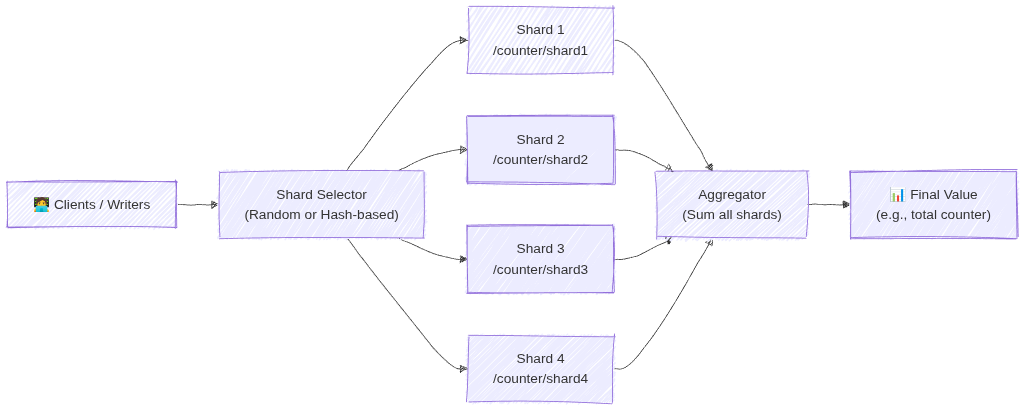
Image source: Own work (Mermaid diagram).
For more details see What is Database Sharding? - Anton Putra - Youtube.
12. Queries and Aggregations (2026 Update)
Firestore supports:
- Range, Compound, and Collection group queries.
- Server-side Aggregations:
COUNT(),SUM(), andAVG().Aggregations are highly efficient;
COUNT()costs 1 index read per 1,000 documents. - Vector Search: Supports similarity searches (KNN) for GenAI/LLM embeddings.
13. Backups and Exports
Firestore supports:
- Scheduled backups
- On-demand backups
- Stored in Cloud Storage
- Can restore to a new database
14. Data Retention and Recovery (Critical for ACE)
14.1. TTL (Time To Live)
- Automatically deletes documents based on a timestamp field.
- Used for cost optimization and cleaning up stale data (e.g., sessions, logs).
- Deletion typically happens within 24 hours of expiration.
14.2. PITR (Point-in-Time Recovery)
- Allows data recovery to any version from the last 7 days.
- Protects against accidental deletion or corruption.
- Must be explicitly enabled at the database level.
14.3. Named Databases
- You can create multiple Firestore databases in one project (e.g., (
default),test-db,prod-db). - Databases can be in different locations and even different modes (Native vs. Datastore).
15. Using in a Spring Boot App (Example)
Add the dependency: com.google.cloud:spring-cloud-gcp-starter-data-firestore.
@Service
public class FirestoreService {

    private final Firestore db;

    public void addDocument(String coll, String id, Map<String, Object> data) {
        db.collection(coll).document(id).set(data);
    }

    public DocumentSnapshot getDocument(String coll, String id) throws Exception {
        ApiFuture<DocumentSnapshot> query = db.collection(coll).document(id).get();
        return query.get();
    }
}
16. Common ACE Exam Scenarios
- Scenario: Automate deletion of 30-day-old logs? → Use TTL on a timestamp field.
- Scenario: Recover data from a mistake made 4 hours ago? → Use PITR (7-day window).
- Scenario: Isolate Dev/Prod data in one project? → Use Named Databases.
- Scenario: Count 1 million documents cheaply? → Use the native
COUNT()aggregation query. - Scenario: Build a GenAI chatbot with Firestore? → Use Vector Search for embeddings.
- Scenario: Migrate legacy Datastore app? → Firestore in Datastore mode.
- Scenario: Native vs Datastore mode? → Choose Native for mobile/web (real-time/offline).
- Scenario: Change database location after creation? → Not possible (must recreate).
17. Quick Summary Table
| Topic | Key Points |
|---|---|
| Data model | Collections to Documents to Fields (Max 1 MB) |
| Write limit | 1 write/sec per document |
| Consistency | Strong Consistency |
| Security | IAM (Admin) + Security Rules (Data Access) |
| Recovery | PITR (7 days) + Scheduled Backups (GCS) |
| Cleanup | TTL (Time-to-Live) via timestamps |
| Modes | Native (Real-time/Offline) vs Datastore (High-volume server) |
18. Final ACE Tips
- Firestore is the default NoSQL choice for most GCP apps.
- TTL = Cost savings (auto-delete).
- PITR = Disaster recovery (7-day window).
- Named Databases allow multiple DBs per project.
- Native mode is for mobile/web; Datastore mode is for high-volume server apps.
- Location is permanent once the database is created.
- Aggregations (
COUNT,SUM,AVG) are now built-in and server-side.
19. External Links
- Firestore - The Cloud Girl
- Introduction to Databases - The Cloud Girl
- Which Database should I Use - The Cloud Girl
Cloud Bigtable: ACE Exam Study Guide (2026)

Image source: Google Cloud Documentation
1. Core Overview
- Database Type: Fully managed, wide-column NoSQL database.
- Scale: Designed for massive datasets (Terabytes to Petabytes).
- Performance: Offers single-digit millisecond latency and extremely high throughput for both read and write operations.
- Compatibility: Natively exposes an Apache HBase API.
2. When to Choose Cloud Bigtable (Exam Scenarios)
- Time-Series Data: IoT sensor readings, server telemetry, and monitoring metrics.
- High Throughput / Low Latency: Ad-tech, financial market data, and massive multiplayer game state or analytics.
- Rule of Thumb: If an exam question explicitly mentions “sub-millisecond latency,” “petabytes of data,” or “HBase compatibility,” Bigtable is highly likely the correct answer.
3. When NOT to Choose Cloud Bigtable
- Relational Data: It does not support standard SQL queries, complex joins, or multi-row transactions.
- Small Datasets: It is not cost-effective or necessary for datasets under 1 Terabyte. Cloud Firestore, Cloud SQL, or Cloud Spanner are better suited for smaller workloads.
4. Architecture and Performance
- Compute and Storage Separation: Nodes handle compute, while data resides on Colossus. This allows you to scale nodes up or down with zero downtime without migrating data.
- Storage Types:
- SSD: Default choice. For high-performance, low-latency workloads.
- HDD: For massive amounts of data (>10 TB) where latency is not critical (e.g., batch processing).
- Immutability: You cannot change the storage type (SSD/HDD) after the instance is created.
- Row Key Design (Tested):
- Avoid Hotspotting: Do NOT use sequential IDs or timestamps as the start of a row key.
- Best Practice: Use “tall and skinny” tables. Use hashed values, reverse domain names (e.g.,
com.google.cloud), or salted keys to ensure data is distributed evenly across nodes.
5. Command Line Operations
- The
cbtTool: While you usegcloudto manage the Bigtable instances and clusters, the ACE exam expects you to know that you interact with the actual tables and data using thecbtcommand-line tool. - Common Commands:
cbt createtable,cbt read,cbt set.
6. High Availability and Replication
- Replication: Bigtable provides high availability by replicating data across multiple clusters in different zones or regions.
- App Profiles: Used to manage how your applications connect to a cluster.
- Single-Cluster Routing: Directs traffic to one cluster (consistent, but no automatic failover).
- Multi-Cluster Routing: Automatically fails over to the nearest available cluster (High Availability).
7. Administrative Tasks and Scaling
- Scaling: You can increase or decrease the number of nodes in a cluster via the Console or
gcloudwhile the cluster is serving traffic (zero downtime). - Monitoring: Use Key Visualizer (a tool within the GCP Console) to identify hotspots and troubleshoot performance issues visually.
- Backups: Bigtable allows you to take Backups of tables. These are stored within the Bigtable service (in the same region), NOT in Cloud Storage. They can only be used to Restore to a new table.
8. External Links
- Cloud Bigtable - The Cloud Girl
- Introduction to Databases - The Cloud Girl
- Which Database should I Use - The Cloud Girl
BigQuery: ACE Exam Study Guide (2026)

Image source: Google Cloud Documentation
1. Core Overview
- Database Type: Fully managed, serverless enterprise data warehouse (EDW).
- Workload Type: Designed specifically for OLAP (Online Analytical Processing) and massive data analytics, rather than transactional (OLTP) application workloads.
- Scale: Can query terabytes in seconds and petabytes in minutes.
- Architecture: Utilizes a columnar storage format and completely separates the compute processing from the underlying storage.
2. Interacting with BigQuery
For the ACE exam, you are expected to know how to interact with BigQuery beyond the Google Cloud Console.
- Command Line: The primary CLI tool for BigQuery is
bq(not the standardgcloudcommand used for most other services). - Common Commands:
bq query: Run a standard SQL query.bq load: Load data from a source file into a BigQuery table.bq extract: Export data from a BigQuery table out to Cloud Storage.bq show: Display the schema or metadata for a specific dataset or table.
3. Cost Optimization and Performance (Heavily Tested)
The exam frequently tests your ability to run queries efficiently without generating unexpected costs.
- Columnar Architecture: BigQuery charges by the amount of data scanned, not the amount of data returned. Using
SELECT *is a bad practice. Selecting only specific columns reduces costs. - The LIMIT Clause: Adding
LIMIT 10does not reduce costs. BigQuery scans the entire column first. - Cost Estimation: Use the
--dry_runflag in thebqCLI or the “Query Validator” in the Console to see how many bytes a query will scan before running it. - Partitioning: Segments tables by time (e.g.,
_PARTITIONTIME), date, or integer range. Drastically reduces costs by “pruning” partitions. - Clustering: Sorts data based on specific columns (up to 4). Best for queries using filters (
WHERE) or aggregations (GROUP BY). Unlike partitioning, clustering is “best effort” but highly effective for high-cardinality columns.
3.1. Partitioning
Partitioning divides a large table into smaller segments, called partitions, based on a specific column (usually a date, timestamp, or integer).
- How it works: When you run a query with a filter on the partition column (e.g.,
WHERE date = '2024-01-01'), BigQuery “prunes” the table and only scans the specific partition that matches the filter, ignoring everything else. - Best for: Time-series data or data with a natural “range” (like ID ranges).
- Impact: Significantly reduces the number of bytes billed and improves query speed for large datasets.
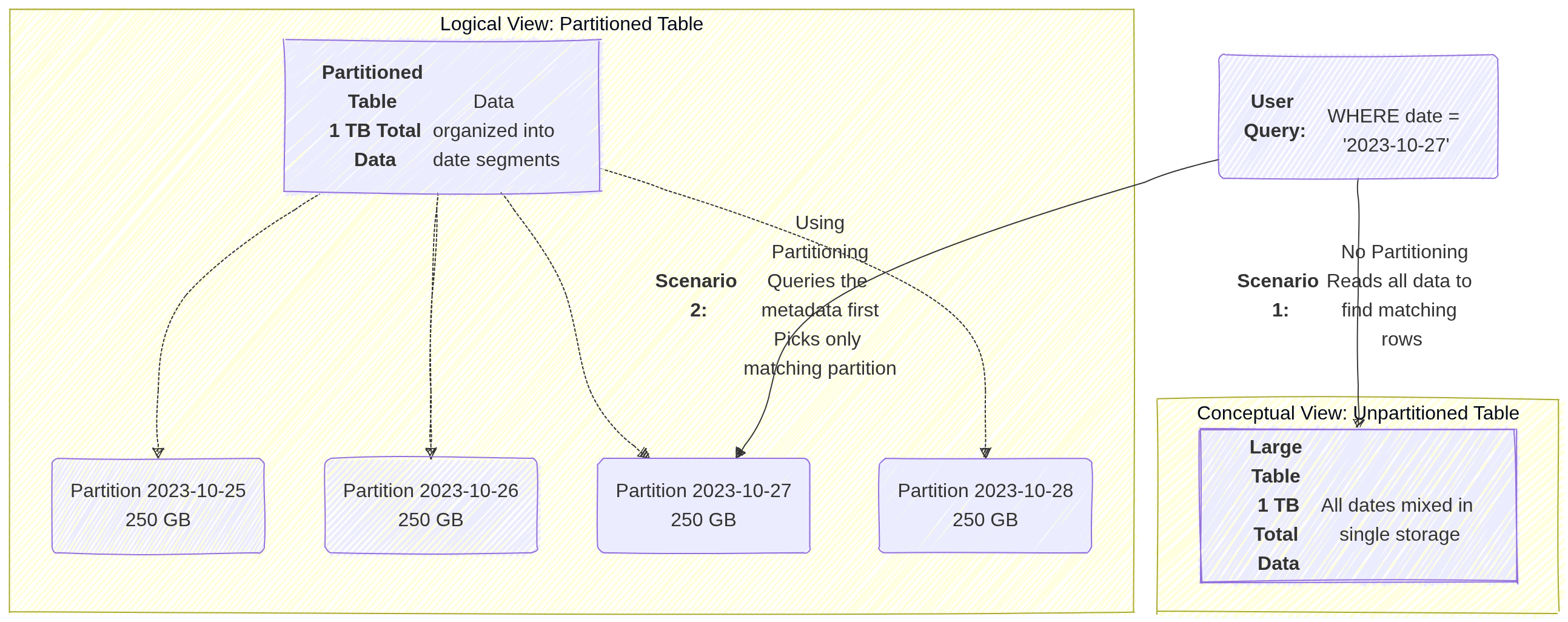
Image source: Own work (Mermaid diagram).
3.2. Clustering
Clustering sorts the data within your table (or within each partition) based on the values in one or more columns.
- How it works: BigQuery organizes the storage blocks so that similar values are physically stored together. When a query filters or aggregates based on a clustered column (e.g.,
WHERE customer_id = 123), BigQuery can quickly locate the specific blocks containing that data and skip the rest. - Best for: Columns with high cardinality (many unique values) that are frequently used for filtering, grouping, or joining.
- Impact: It improves performance for specific query patterns and can further reduce costs when used alongside partitioning by allowing “block pruning” within a partition.
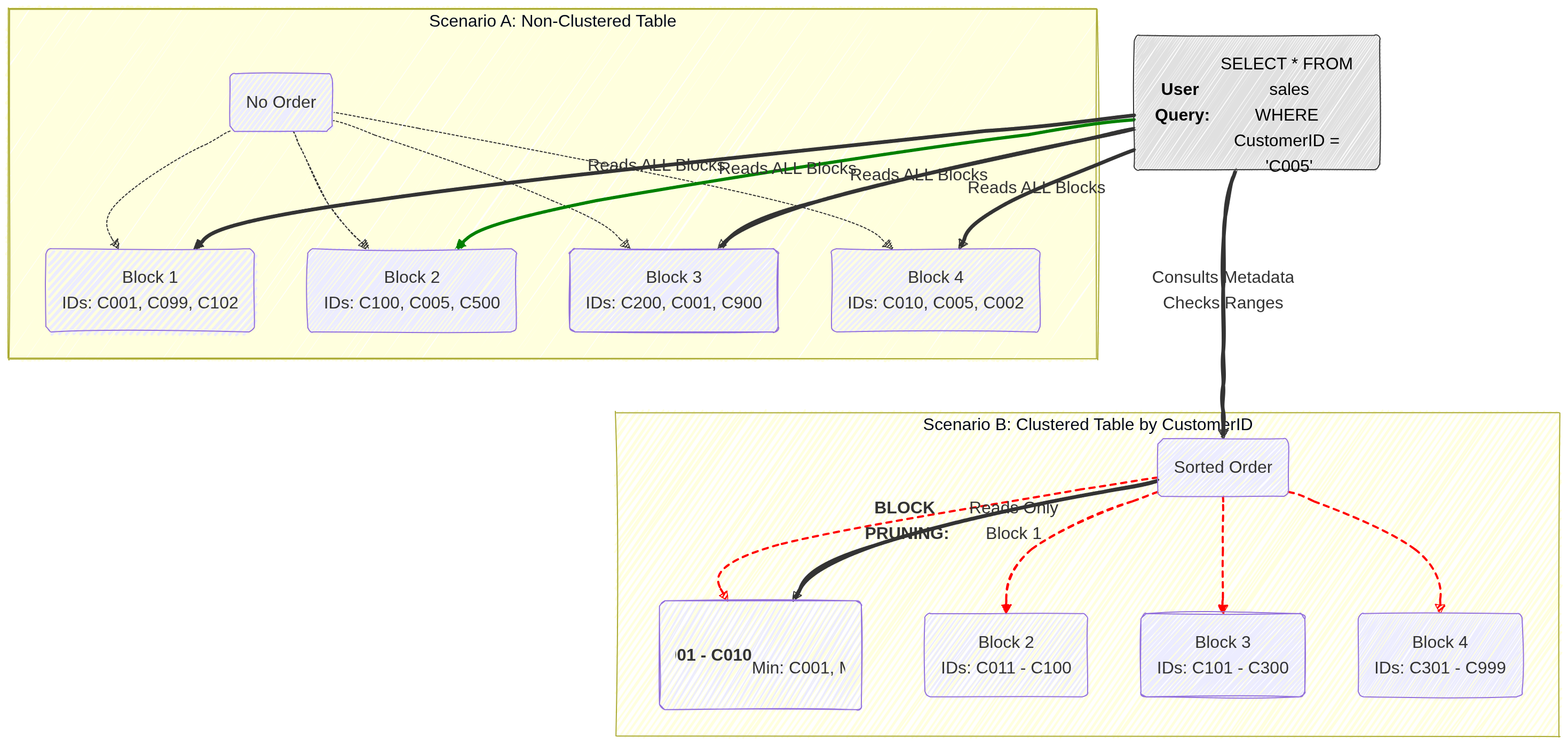
Image source: Own work (Mermaid diagram).
4. Pricing Models
- On-Demand Pricing: Pay per TB scanned ($6.25/TB as of current pricing). Best for unpredictable workloads. Includes a 1TB/month free tier.
- Capacity (Editions) Pricing: Uses Slots (virtual CPUs). Available in Standard, Enterprise, and Enterprise Plus.
- Slot Autoscaling: Automatically scales slots based on workload, ensuring you don’t pay for idle capacity.
- Storage Pricing:
- Active Storage: Data modified in the last 90 days.
- Long-term Storage: Data NOT modified for 90 days (price drops by ~50%).
4.1. Capacity (Editions) Pricing
Capacity pricing uses dedicated virtual CPUs called slots that you reserve or autoscale for your workloads. You pay for those slots over time (slot‑hours) and can buy commitments or use autoscaling reservations to control cost and performance. This model is offered through BigQuery Editions and Reservations and contrasts with on‑demand pricing, which charges per TB scanned.
Slots are the unit of compute. More slots → more concurrent and faster queries. BigQuery assigns slots to query stages automatically.
Reservations let you allocate a fixed number of slots to projects or workloads. Autoscaled reservations expand capacity when needed. You can also buy committed slots for lower unit cost.
Billing is per slot‑hour for capacity pricing. On‑demand billing is per TiB scanned. Use capacity when steady heavy usage makes slot commitments cheaper than repeated on‑demand scans.
5. IAM Roles and Permissions
Understanding the separation of access roles is a frequent exam topic.
roles/bigquery.dataViewer: Allows a user to read data and metadata from tables, but cannot run a query. (Best applied at the Dataset level to follow the principle of least privilege).roles/bigquery.jobUser: Allows a user to run jobs (like query executions) within the project, but does not grant access to view the actual data. (Must be applied at the Project level).- Crucial Exam Scenario: If a user needs to run a query against a dataset, they must be assigned both the
bigquery.dataViewerrole (to access the data) and thebigquery.jobUserrole (to execute the job). roles/bigquery.dataEditor: Allows a user to edit table data and create new tables.roles/bigquery.admin: Grants full control over all BigQuery resources.
6. Data Loading and Federated Queries
- Ingestion: You can batch load data into BigQuery from Cloud Storage (supporting formats like CSV, JSON, Avro, Parquet, and ORC) or stream data directly into the tables.
- External Tables (Federated Queries): You can run queries against data that sits directly in Cloud Storage, Cloud SQL, or Cloud Spanner without having to load or duplicate that data into BigQuery’s native storage.
7. When to Choose BigQuery
When reading an exam question, look for these specific identifiers:
- Petabyte-scale analytics and reporting.
- Enterprise Data Warehousing.
- Complex SQL queries on historical data (e.g., analyzing three years of global sales data).
- Machine learning via SQL (BigQuery ML).
8. Essential Administrative & Management Tasks
- Dataset Location: Must be chosen at creation (e.g.,
USmulti-region oreurope-west1region). Cannot be changed later. To move data, you must recreate the dataset and copy tables. - Table Expiration: Can be set at the Dataset level to automatically delete tables after a certain number of days (useful for temporary/staging data).
- Table Snapshots (2026): Preserve a table’s state at a specific point in time for a fraction of the storage cost. Ideal for “versioning” large tables before a massive update or deletion.
- Data Transfer Service: Use this to automate data movement from SaaS apps (Google Ads, YouTube) or other clouds (Amazon S3, Azure Blob) into BigQuery.
- BigQuery ML: Allows creating and executing machine learning models using standard SQL directly inside BigQuery.
- Connected Sheets: Allows users to analyze billions of rows of BigQuery data directly from Google Sheets.
9. External Links
Memorystore: ACE Exam Study Guide (2026)
Image source: Google Cloud Documentation
1. Memorystore Overview
Memorystore is Google Cloud’s fully managed in-memory data store service. It is used for low-latency caching, session storage, and real-time data access.
2. Redis/Valkey vs. Memcached
| Feature | Redis / Valkey | Memcached |
|---|---|---|
| Deployment | Regional (multi‑zone) | Zonal (no multi‑zone replication) |
| Availability | Standard Tier: automatic failover (Primary → Replica) | No HA, no failover |
| Persistence | Optional: RDB snapshots + point‑in‑time recovery | None (purely in‑memory, ephemeral) |
| Use Case | Durable cache, counters, queues, sessions, Pub/Sub patterns | Large, simple, ephemeral key/value cache |
| Scaling | Vertical (Basic/Standard) or Horizontal (Cluster mode) | Horizontal (node pool) |
| Networking | PSA (Standard) / PSC (Cluster mode) | PSA (VPC Peering) |
| Auth/TLS | Yes (AUTH, TLS) | No |
| Notes | Valkey = modern Redis‑compatible engine (2026+) | Best when data loss is acceptable |
2.1. Redis Pub/Sub
Redis Pub/Sub in Memorystore provides fast, in‑memory, real‑time messaging for apps inside a VPC. Publishers send messages to channels, and Redis instantly delivers them to connected subscribers. Messages aren’t stored, replayed, or persisted, and failovers or disconnects cause loss. It’s ideal for low‑latency notifications or cache invalidation, but not for durable or reliable event processing.
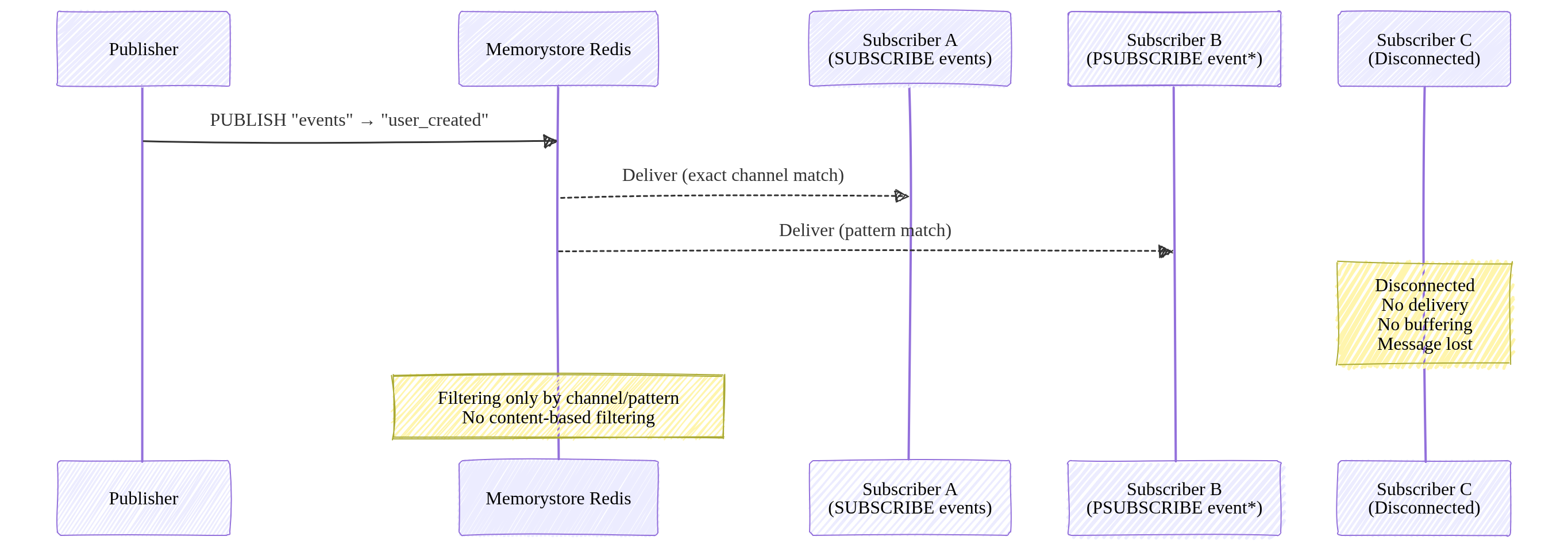
Image source: Own work (Mermaid diagram).
Redis Pub/Sub supports filtering only through channel names and pattern subscriptions (PSUBSCRIBE). It does not support content‑based or attribute‑based filtering.
3. Networking and Connectivity
Memorystore instances are VPC-only (no public IPs).
3.1. Connecting Serverless (Cloud Run / Functions)
- Direct VPC Egress (Recommended): Lowest latency and cost.
- Serverless VPC Access Connector: Legacy method.
3.2. Networking Models
- Standard/Basic Tiers: Use Private Service Access (PSA).
- Cluster/Valkey Tiers: Use Private Service Connect (PSC). Clients connect to a single IP (discovery endpoint) in their own VPC.
Private Service Access lets your VPC connect privately to Google‑managed services that run inside your project, such as Cloud SQL, Memorystore, AlloyDB, and Filestore. It works through VPC peering and a reserved IP range, giving those services private RFC 1918 addresses. PSA is regional and meant for accessing Google‑managed backends you own.
Private Service Connect creates private endpoints that let your VPC reach Google APIs, third‑party SaaS, or services in other projects using private IPs. It uses Google’s internal load balancing instead of VPC peering, making it ideal for cross‑project or cross‑organization service consumption or publishing.
| Service | Can connect? | Requirements |
|---|---|---|
| Compute Engine | Yes | Same VPC |
| GKE | Yes | Same VPC |
| Cloud Run | Yes | Direct VPC Egress |
| External clients | Yes | Only via VPN or Interconnect |
4. Scaling and TTL
- Scaling:
- Vertical: Increasing memory on Basic/Standard tiers causes brief downtime.
- Horizontal: Adding shards (Cluster/Valkey) or nodes (Memcached) has zero downtime.
- TTL (Time-to-Live): Essential for cache management.
SET key value EX 60(Set on write)EXPIRE key 60(Set after write)TTL is simply an expiration timer for a key. When you set a TTL, Redis automatically deletes the key after the specified number of seconds. It’s used to control cache freshness, prevent stale data, and free memory without manual cleanup.
4.1. Key invaldation in case of max memory usage
When Redis hits its maxmemory limit, it must validate which keys to throw away. Redis doesn’t use a perfect LRU (which is memory-heavy). Tt uses an Approximated LRU algorithm.
- Redis samples
Nkeys (default is5) and evicts the one with the oldest idle time among those samples. - Key Setting:
maxmemory-samples <number>- 5 (Default): Good balance of CPU vs. accuracy.
- 10: Closer to “True LRU” but higher CPU overhead.
These settings determine what happens when you run out of RAM.
| Policy | Description |
|---|---|
| allkeys-lru | Evicts the Least Recently Used key among all keys. |
| volatile-lru | Evicts the Least Recently Used key among keys with an expire set. |
| allkeys-lfu | Evicts the Least Frequently Used (hits per second) among all keys. |
| volatile-ttl | Evicts the key with the shortest time-to-live (TTL). |
| noeviction | Returns an error on write operations (Safest for data integrity). |
To set the Eviction Policy (maxmemory-policy):
gcloud redis instances update [INSTANCE_ID] \
    --region=[REGION] \
    --redis-config=maxmemory-policy=allkeys-lru
To enable Lazy Freeing (for performance):
gcloud redis instances update [INSTANCE_ID] \
    --region=[REGION] \
    --redis-config=lazyfree-lazy-eviction=yes,lazyfree-lazy-expire=yes
5. Authentication and Monitoring
- Security:
- IAM: Controls management plane (creating/deleting instances).
- Redis AUTH: Application-level password (not IAM-based). Must be enabled at creation.
6. Common ACE Exam Scenarios
- Scenario: Connect Cloud Run to Redis with lowest cost? → Use Direct VPC Egress.
- Scenario: Scale Redis to 10TB+ with zero downtime? → Use Redis Cluster or Valkey.
- Scenario: Need High Availability (HA)? → Use Standard Tier (Primary + Replica).
- Scenario: Ephemeral cache for simple KV pairs? → Use Memcached.
- Scenario: Avoid VPC Peering limits? → Use Private Service Connect (PSC).
7. Using Memorystore in Spring Boot (Examples)
7.1. Redis / Valkey
spring:
  data:
    redis:
      host: 10.0.0.5
      port: 6379
      password: ${sm://projects/PROJECT_ID/secrets/REDIS_AUTH_TOKEN/versions/latest}
@Service
@RequiredArgsConstructor
public class CacheService {

    private final StringRedisTemplate redis;

    public void save(String key, String value) {
        redis.opsForValue().set(key, value, Duration.ofMinutes(60));
    }
}
Note: Memorystore Redis AUTH tokens are generated by GCP and only displayed once at creation. Secure them in Secret Manager.
7.2. Memcached
@Configuration
public class MemcachedConfig {

    @Bean
    public MemcachedClient memcachedClient() throws Exception {
        return new MemcachedClient(new InetSocketAddress("10.0.0.6", 11211));
    }
}
8. External Links
- Memorystore - The Cloud Girl
- Introduction to Databases - The Cloud Girl
- Which Database should I Use - The Cloud Girl
Filestore: ACE Exam Study Guide (2026)

Image source: Google Cloud Documentation
Google Cloud Filestore is a managed NFS file storage service (POSIX‑compliant) designed for applications that require a shared filesystem. It is a regional resource that offers both zonal and multi-zonal availability tiers.
POSIX is a standard that ensures portability by unifying system calls, file and process handling, and permissions. Linux and macOS follow POSIX, so software written for one typically works on Filestore without modification.
1. Filestore Use Cases
- Shared storage for GKE and Compute Engine workloads.
- Content management systems (CMS) and media processing.
- Machine learning workloads needing shared datasets.
- Home directories for Linux users.
- Serverless: Cloud Run (Gen 2) can mount Filestore via Direct VPC Egress.
2. Filestore Tiers (Updated for 2026)
Tiers determine performance, availability, and capacity.
Note: You cannot change tiers in-place. You must migrate data to a new instance.
| Tier | Availability | Capacity | Use Case |
|---|---|---|---|
| Basic HDD | Single Zone | 1 TiB – 63.9 TiB | Low-cost, sequential workloads, dev/test. |
| Basic SSD | Single Zone | 2.5 TiB – 63.9 TiB | General purpose, legacy apps, read-heavy. |
| Zonal | Single Zone (99.9%) | 1 TiB – 100 TiB | HPC, AI/ML, High throughput (formerly High Scale). |
| Regional | Multi-Zone (99.99%) | 100 GiB – 100 TiB | Mission-critical apps, DR-ready. |
| Enterprise | Multi-Zone (99.99%) | 1 TiB – 10 TiB | GKE Multishares, high availability, NFSv4.1. |
3. Networking & Connectivity
- Deployed into a VPC network via a private IP.
- Must be in the same VPC and region as clients (or connected via VPC Peering/VPN).
- Mounting:
- GKE: Use the Filestore CSI driver for automatic provisioning.
- Cloud Run (Gen 2): Use
--add-volume=type=nfsand--vpc-egress=all-traffic.
4. Capacity & Scaling
- Increase Only: You can increase capacity, but you cannot decrease it.
- Downtime: Scaling may cause brief downtime on Basic/Zonal tiers.
- Online Scaling: The Enterprise tier supports online scaling with zero downtime, making it the preferred choice for mission-critical GKE applications.
- Independent Scaling: The Zonal tier allows scaling performance and capacity independently.
5. Data Protection: Backups & Snapshots
Understanding the difference is critical for disaster recovery (DR).
Filestore Backups
- What: A point-in-time copy of the entire share, stored separately from the instance.
- Scope: Can be stored in the same region or different regions (Multi-regional).
- Restore: You MUST restore a backup to a new Filestore instance. You cannot restore in-place.
- Use Case: Disaster recovery or moving data to a new region/tier.
Filestore Snapshots
- What: Fast, local point-in-time copies of the filesystem.
- Availability: Supported on Enterprise, Zonal, and Regional tiers.
- Restore: Allows for quick recovery of individual files or the entire share.
- Use Case: Protecting against accidental deletions or rolling back local changes.
| Feature | Backup | Snapshot |
|---|---|---|
| Location | Separate from instance | Local to instance |
| Storage Cost | Per GB (Regional/Multi-reg) | Uses instance capacity |
| Restore Path | New instance only | In-place recovery possible |
| Performance Impact | Brief degradation possible | Near-zero impact |
6. Security
- IAM: Controls instance management (create, delete, backup).
- POSIX/NFS: Controls file-level access (UID/GID, read/write permissions).
- Network: Isolated within your VPC; supports CMEK on Enterprise tiers.
Important: IAM does NOT control who can read or write individual files inside the share; that is handled by NFS permissions.
7. Using in a Spring Boot App (Example)
Filestore is mounted as a local directory. Use the java.nio.file API.
@Service
public class FileService {

    private final Path mountPoint = Paths.get("/mnt/filestore/data");

    public void save(String fileName, byte[] content) throws IOException {
        Files.write(mountPoint.resolve(fileName), content);
    }
}
8. Common ACE Exam Scenarios
- Scenario: Shared POSIX for GKE? → Filestore.
- Scenario: Many small (10GB) shares for GKE pods? → Filestore Enterprise (Multishares).
- Scenario: Mount shared storage to Cloud Run? → Filestore + Direct VPC Egress.
- Scenario: Scale performance and capacity independently? → Zonal tier.
- Scenario: In-place tier upgrade? → Not possible (must create new and migrate).
- Scenario: Regional High Availability (99.99% SLA)? → Regional or Enterprise tier.
- Scenario: Global object storage? → Cloud Storage (not Filestore).
9. Quick Summary Table
| Feature | Filestore | Cloud Storage | Persistent Disk |
|---|---|---|---|
| Protocol | NFSv3 / NFSv4.1 | HTTP(S) / API | Block (SCSI/NVMe) |
| Shared Access | ReadWriteMany (RWX) | ReadWriteMany (RWX) | ReadWriteOnce (RWO)* |
| POSIX | Full | Partial (via GCSFuse) | Full |
| Cloud Run | ✔️ (via Gen2) | ✔️ | ❌ |
| HA | Regional Tier | Regional/Multi-Reg | Regional PD |
Note: Multi-writer PD exists but is highly specialized (Block storage).
10. External Links
- Youtube - Andrew Brown - GCP ACE
- Firestore - The Cloud Girl
- Which Storage Should I Use - The Cloud Girl
- What are different storage types - The Cloud Girl
Persistent Disk: ACE Exam Study Guide

Image source: Google Cloud Documentation
1. Overview
Persistent Disk is a durable storage solution for Google Cloud VMs. Data is replicated automatically for durability and resides independently from VM lifecycle.
Key Characteristics:
- Block storage (like a physical hard drive)
- Automatically encrypted by default (AES-256)
- Can be attached to only one VM at a time (except hyperdisk multi-writer mode)
- Survives VM termination/deletion
- Regional PD replicates data across zones automatically
2. Disk Types
Standard Hard Disks
| Type | Use Case | Performance |
|---|---|---|
| Standard (pd-standard) | Bulk storage, sequential reads (logs, data warehouses) | HDD-based, lower cost |
SSD Hard Disks
| Type | Use Case | Performance |
|---|---|---|
| Balanced (pd-balanced) | General purpose workloads | SSD-based, balance of cost/performance |
| SSD (pd-ssd) | Databases, high IOPS needs | High IOPS, consistent performance |
Extreme (Extreme Persistent Disk)
| Type | Use Case | Performance |
|---|---|---|
| Extreme (pd-extreme) | Maximum sustained IOPS, provisioned IOPS | Top-tier performance, explicit IOPS provisioning |
3. Disk Performance
| Metric | pd-standard | pd-balanced | pd-ssd | pd-extreme |
|---|---|---|---|---|
| Max IOPS/volume | 1,800-6,000 | 6,000-30,000 | 15,000-100,000 | Up to 400,000 |
| Max Throughput/volume | 120-400 MB/s | 240-1,200 MB/s | 400-1,200 MB/s | Up to 6,000 MB/s |
| Cost | Lowest | Moderate | Higher | Highest |
Factors affecting performance:
- Disk size (larger disks = better baseline performance)
- Instance machine type (instance must support high IOPS)
- Number of vCPUs on the instance
4. Disk Size Limits
| Disk Type | Min Size | Max Size |
|---|---|---|
| All types | 10 GB | 257 TB (263,168 GB) |
Important: You can only increase disk size, not decrease it.
5. Local Solid-State Drive (Local SSD)
Local SSDs are physically attached to the host server, not the network.
Characteristics:
- Temporary: Data is lost when VM stops or is preempted
- Highest performance: Slower latency, higher IOPS than Persistent Disk
- Use case: Scratch space, caches, temporary data
- Cost: Charged while VM is running (not when stopped)
- Encryption: Always encrypted; keys managed by Google
- Limit: Maximum 8 Local SSD partitions (375 GB each = 3 TB total)
- up to 24 Local SSD, depending on machine type
Not for: Databases, anything requiring durability
6. Regional Persistent Disk (High Availability)
Regional PD replicates data across two zones in the same region automatically.
Use when:
- High availability is required
- Cannot tolerate zone failure
- Running production workloads
Trade-offs:
- ~2x cost of zonal PD
- Higher write latency (data written to two zones)
- Cannot be used for disk sharing between instances
7. Snapshots
Snapshots are incremental backups of Persistent Disks stored in Cloud Storage.
Characteristics:
- Incremental: Only changes since last snapshot are stored (reduces cost)
- Cross-region: Can be used to create disks in different regions
- Encryption: Encrypted by default (Google-managed keys, or CMEK if configured)
- Consistency: For consistent snapshots of multiple disks, use
snapshot-schedulewith application-consistent quiescing
Creating a snapshot:
gcloud compute disks snapshot [DISK_NAME] --region=[REGION]
Restoring from snapshot:
gcloud compute disks create [NEW_DISK] --source-snapshot=[SNAPSHOT]
8. Disk Operations
Attaching/Detaching
| Operation | Command |
|---|---|
| Attach to VM | gcloud compute instances attach-disk [INSTANCE] --disk=[DISK] |
| Detach from VM | gcloud compute instances detach-disk [INSTANCE] --disk=[DISK] |
Rules:
- Disk must be in same zone as VM
- Can attach while VM is running (hot-add)
- Must unmount filesystem before detaching
Resizing
gcloud compute disks resize [DISK] --size=[NEW_SIZE_GB]
- Always possible: Increase disk size online (no restart needed for most OS)
- Never possible: Decrease disk size (must recreate disk at smaller size)
- After resizing: Must extend filesystem within the VM (
resize2fs,diskpart, etc.)
Moving Disks Between Zones
gcloud compute disks move [DISK] --destination-zone=[ZONE] --zone=[CURRENT_ZONE]
9. Sharing Disks
Read-only Sharing
- Attach a single Persistent Disk to multiple VMs in read-only mode
- Use case: Sharing OS images, read-only data
Multi-writer Mode (Hyperdisk)
- Allows attaching a disk to multiple VMs in read-write mode
- Requires hyperdisk type (Extreme, Throughput, or Balanced)
- Use case: Clustered databases (GCS, GlusterFS, etc.)
10. Encryption Options
| Option | Key Management | Notes |
|---|---|---|
| Google-managed | Default, no configuration needed | |
| Customer-managed (CMEK) | Cloud KMS | You control the keys, disk deleted if key deleted |
| Customer-supplied (CSEK) | You provide keys | Deprecated for most uses |
11. GKE Integration
Google Kubernetes Engine uses Persistent Disk primarily through Kubernetes PersistentVolumes (PV) and PersistentVolumeClaims (PVC).
Storage Classes
GKE uses predefined Storage Classes to provision Persistent Disks:
| Storage Class | Disk Type | Use Case |
|---|---|---|
standard | pd-standard | Bulk storage, cost-effective |
balanced | pd-balanced | General purpose workloads |
ssd | pd-ssd | High-performance databases |
extreme | pd-extreme | Maximum IOPS workloads |
Volume Modes
- Filesystem (default): Mount as directory; supports
ReadWriteOnceandReadOnlyMany - Block: Raw block device; supports
ReadWriteOnceandReadWriteMany(hyperdisk only)
Access Modes
| Mode | Description |
|---|---|
ReadWriteOnce | Single node read-write (most common) |
ReadOnlyMany | Multiple nodes read-only |
ReadWriteMany | Multiple nodes read-write (requires hyperdisk only) |
StatefulSets
Use Persistent Disk with StatefulSets for workloads requiring stable identity and persistent storage:
- Each pod gets a unique PersistentVolumeClaim
- Pods are ordered for deployment/deletion
- Volume persists across pod rescheduling
Key Points for Exam
- Zonal: GKE nodes and PD must be in the same zone
- Regional clusters: Use Regional PD for HA across zones
- Node affinity: PD auto-attaches to the node where the pod is scheduled
- Disk size: Cannot decrease PVC size (same as standalone PD)
- Regional PD: Requires GKE 1.26+ or GKE Standard mode for multi-zone volume placement
Kubernetes config files
PersistentVolume (PV):
gcloud compute disks create my-gke-disk \
    --size=20Gi --zone=europe-central2-a
apiVersion: v1
kind: PersistentVolume
metadata:
  name: my-pv
spec:
  capacity:
    storage: 20Gi
  accessModes:
    - ReadWriteOnce
  persistentVolumeReclaimPolicy: Retain
  storageClassName: "my-pv"
  gcePersistentDisk:
    pdName: my-gke-disk
    fsType: ext4
PVC using default GKE StorageClass:
apiVersion: v1
kind: PersistentVolumeClaim
metadata:
  name: my-pvc
spec:
  accessModes:
    - ReadWriteOnce
  resources:
    requests:
      storage: 10Gi
  storageClassName: "my-pv"
  volumeName: my-pv
Pod mounting the Persistent Disk:
apiVersion: v1
kind: Pod
metadata:
  name: my-pod
spec:
  containers:
    - name: app
      image: nginx
      volumeMounts:
        - mountPath: "/data"
          name: my-storage
  volumes:
    - name: my-storage
      persistentVolumeClaim:
        claimName: my-pvc
12. Common Exam Gotchas
- Data loss on stop: Local SSD data is lost when VM stops (not Persistent Disk)
- Cannot decrease size: You can only increase disk size
- Zone requirement: Disk and VM must be in same zone
- Single attachment: Standard PD can only attach to one VM at a time
- Snapshot deletion: Deleting a snapshot does not delete the disk (incremental)
- Disk performance scales with size: Larger disks = better IOPS/throughput
- Instance vCPU limits: Instance must have enough vCPUs to utilize disk performance
- Boot disk deletion: By default, boot disk is deleted when VM is deleted (check “Delete boot disk” checkbox to keep)
13. Practice Questions
Q1: You need storage that survives VM deletion. What should you use?
Answer: Persistent Disk (local SSD is ephemeral)
Q2: A VM needs maximum IOPS for a database. What disk type?
Answer:
pd-extreme(orpd-ssdif not extreme needed)
Q3: A disk needs to be attached to multiple VMs simultaneously. What mode/type?
Answer: Hyperdisk with multi-writer mode
14. Quick Reference Summary
| Feature | Value |
|---|---|
| Minimum size | 10 GB |
| Maximum size | 257 TB |
| Default encryption | Google-managed (AES-256) |
| Disk attachment | One VM at a time (except hyperdisk) |
| Local SSD max | 8 partitions x 375 GB = 3 TB |
| Local SSD durability | Ephemeral (lost on stop/preempt) |
| Regional PD zones | Two zones in same region |
| Snapshot type | Incremental |
| Size change | Increase only |
15. External Links
- Persistent Disk - The Cloud Girl
- Which Storage Should I Use - The Cloud Girl
- What are different storage types - The Cloud Girl
Networking

Image source: Google Cloud Documentation
VPC Networks
Global, virtual network for GCP resources. Provides isolation, subnet segmentation, firewall rules, and private communication between resources across regions and zones.
VPC Peering
Private connection between two VPC networks in the same or different projects. No transit traffic; simpler than Shared VPC but less flexible for multi-org scenarios.
Cloud NAT
Managed NAT service for VMs without external IPs to access the internet. Handles SNAT/DNAT, allows outbound-only internet access without exposing instances to inbound traffic.
Cloud VPN
Secure IPsec VPN tunnel between your VPC and on-premises network over the public internet. Uses Cloud Router for dynamic route exchange via BGP.
Cloud Router
Managed network router that enables dynamic routing (BGP) between your VPC and external networks. Automatically exchanges routes when network topology changes.
Cloud Interconnect
Dedicated physical connection between your on-premises network and GCP without traversing the public internet. Higher bandwidth, lower latency than VPN. Includes Dedicated and Partner options.
Load Balancers
Globally distributed, software-defined load balancing for HTTP(S), TCP, UDP traffic. Distributes load across backend instances, supports health checks, SSL termination, and auto-scaling.
Cloud CDN
Content delivery network that caches content at Google’s globally distributed edge locations. Reduces latency, offloads origin traffic, and supports cache invalidation.
Cloud DNS
Scalable, reliable, managed authoritative DNS service. Provides low-latency DNS resolution with 100% SLA, supporting millions of domains with anycast routing.
Serverless VPC Access
Allows Cloud Run, Cloud Functions, and App Engine to connect to VPC resources using private IPs. Uses a managed connector or Direct VPC Egress for serverless-to-VPC communication.
GCP VPC Networks: ACE Exam Study Guide (2026)
Image source: Google Cloud Documentation
1. VPC Fundamentals
A Virtual Private Cloud (VPC) is a global resource that provides networking functionality to Compute Engine, GKE, and App Engine.
- Global Scope: A single VPC can span multiple regions across the globe without needing to traverse the public internet.
- VPC Types:
- Auto Mode: Automatically creates one subnet in each Google Cloud region. Uses a predefined IP range (
10.128.0.0/9). (Not recommended for production). - Custom Mode: You manually create and define subnets and their IP ranges. This is the best practice for production environments.
- Auto Mode: Automatically creates one subnet in each Google Cloud region. Uses a predefined IP range (
- Project Relationship: By default, a project starts with a VPC named
default(Auto mode).Note: Default VPC auto-creation is disabled by default for projects created after 2020.
- RFC 1918 Private Ranges: VPC subnets should use private IP ranges:
10.0.0.0/8172.16.0.0/12192.168.0.0/16
2. Subnets (Regional)
While a VPC is global, subnets are regional resources.
- Regional Isolation: A subnet exists only within one region (e.g.,
us-central1). - IP Ranges: Subnet ranges must not overlap within the same VPC.
- Expansion: You can expand the CIDR range of a subnet without downtime, but you cannot shrink it.
- Example: Changing a
/24(256 IPs) to a/22(1024 IPs) is an expansion (Valid). - Example: Changing a
/24(256 IPs) to a/25(128 IPs) is a shrink (Invalid/Error).The new range must not overlap with any other subnets in the same VPC.
- Example: Changing a
- Secondary Ranges: Used for GKE (alias IPs) to provide IP addresses for pods and services.
- Dual-stack Support: Modern VPCs support Dual-stack subnets, allowing instances to have both IPv4 and IPv6 addresses.
- Private Google Access: Allows VMs with only internal IP addresses to reach Google API services (GCS, BigQuery) without needing an external IP.
- Direct VPC Egress: The preferred method for connecting Cloud Run and Cloud Functions to a VPC with lower latency and higher performance than Serverless VPC Access connectors.
- Proxy-only Subnets: Required for Envoy-based load balancers (e.g., Regional External HTTP(S) LB). Requires a
/26or larger range with the--purpose=REGIONAL_MANAGED_PROXYflag.
3. Routes
Routes define the paths that network traffic takes from a VM instance to other destinations.
- System-Generated Routes:
- Default Route: Routes all traffic (
0.0.0.0/0) to the Internet Gateway. - Subnet Routes: Automatically created for each subnet to allow communication between instances within the same VPC.
- Default Route: Routes all traffic (
- Static Routes: Manually created to route traffic to specific destinations (e.g., a VPN gateway or a specific VM acting as a NAT).
- Priority: Routes are evaluated based on the Longest Prefix Match (most specific CIDR). If prefixes are identical, the route with the Lowest Priority number wins.
4. Network Security & Firewall Policies
In 2026, Network Firewall Policies (Global and Regional) are the modern standard for controlling VPC traffic.
- Implicit Rules (Cannot be deleted):
- Allow Egress: All outbound traffic is allowed by default.
- Deny Ingress: All inbound traffic is blocked by default.
- Hierarchical Firewall Policies: Evaluated at the Organization or Folder level before any VPC-level rules.
- Rule Components:
- Direction: Ingress (Inbound) or Egress (Outbound).
- Action: Allow or Deny.
- Priority: 0 (Highest) to 65535 (Lowest).
- Targets: Defines which VMs the rule applies to (using Network Tags, Service Accounts, or “All instances”).
- Stateful Nature: Firewall rules are stateful. If a connection is allowed, return traffic is automatically permitted.
- VPC Flow Logs: Records network traffic flow data for debugging and security. Enabled at the subnet level.
5. VPC Network Peering & Shared VPC
- VPC Network Peering: Connects two VPC networks to allow internal IP communication. Traffic stays on Google’s private backbone.
- Peering is not transitive: If A is peered with B, and B is peered with C, A cannot communicate with C through B.
- Shared VPC: Allows an organization to connect resources from multiple projects to a common VPC network.
- Host Project: Contains the Shared VPC network.
- Service Projects: Attach their resources (VMs, GKE) to the Host Project’s subnets.
- IAM Roles: Requires Compute Network User role for service projects to use host project subnets.
6. Connectivity Services
- Cloud VPN: Connects your on-premises network to your VPC via IPsec. HA VPN provides a 99.99% SLA using two or more tunnels.
- Cloud Interconnect: Provides a direct, physical connection (Dedicated or Partner).
- Cloud NAT: Allows VMs without external IPs to access the internet for updates without exposing them to inbound connections.
- Cloud Router: Uses BGP to dynamically exchange routes between your VPC and on-premises networks.
- Private Service Connect (PSC): Allows you to access Google APIs and services (like Cloud SQL) via private IP addresses using an internal load balancer, avoiding the need for VPC Peering or PGA.
7. Common ACE Exam Scenarios
-
Scenario: You need to connect a Cloud Run service to a Cloud SQL instance using a private IP with the lowest possible latency and no management overhead.
Use Direct VPC Egress to route traffic directly into the VPC without requiring a Serverless VPC Access connector.
-
Scenario: You are deploying a Regional External HTTP(S) Load Balancer and receiving an error that no subnets are available for the proxies.
You must create a Proxy-only subnet in that region with the
--purpose=REGIONAL_MANAGED_PROXYflag and a range of at least/26. -
Scenario: You need to ensure that only traffic from your corporate headquarters’ public IP range can SSH into your VM instances.
Create a firewall rule with Direction: Ingress, Source IP range: [HQ_IP_RANGE], and Target Tags: [SSH_TAG], then apply that tag to the VMs.
-
Scenario: You want to allow internal communication between two VPCs in different organizations without using public IPs.
Configure VPC Network Peering between the two networks. Remember that this connection is not transitive.
8. Essential gcloud Commands
- Create VPC:
gcloud compute networks create [NAME] --subnet-mode=custom - Create Subnet:
gcloud compute networks subnets create [NAME] --network=[VPC] --region=[REGION] --range=[CIDR] - Create Proxy-only Subnet:
gcloud compute networks subnets create [NAME] --purpose=REGIONAL_MANAGED_PROXY --role=ACTIVE --region=[REGION] --network=[VPC] --range=[CIDR] - Enable IPv6 on Subnet:
gcloud compute networks subnets update [NAME] --stack-type=IPV4_IPV6 --ipv6-access-type=INTERNAL --region=[REGION] - Create Firewall Rule:
gcloud compute firewall-rules create [NAME] --network=[VPC] --allow tcp:80 --target-tags=http-server - Enable Private Google Access:
gcloud compute networks subnets update [SUBNET] --region=[REGION] --enable-private-ip-google-access
9. Exam Tips
- Global vs. Regional: VPC is Global, Subnets are Regional, Firewall Rules/Policies are Global (legacy rules) or Regional/Global (policies).
- Conflict Resolution: Longest Prefix Match always wins in routing.
- IAP for SSH/RDP: Remember the range
35.235.240.0/20must be allowed for IAP TCP forwarding (TCP:22 for SSH, TCP:3389 for RDP). - Networking Costs: Egress traffic usually incurs costs; Ingress is usually free. Traffic within the same Zone is free; traffic between Zones in the same Region has a cost.
10. External Links
GCP VPC Peering and Shared VPC: ACE Exam Study Guide (2026)
Image source: Dilbert.com
1. VPC Network Peering
VPC Network Peering allows you to connect two VPC networks so that resources in each network can communicate via internal IP addresses.
1.1. Key Characteristics
- Private Connectivity: Traffic stays within the Google Cloud network and does not traverse the public internet.
- Low Latency: Peered networks have the same latency, throughput, and security as if the resources were in the same network.
- Cross-Project/Cross-Org: You can peer VPCs across different projects and even different Google Cloud Organizations.
- Non-Transitive: If VPC A is peered with VPC B, and VPC B is peered with VPC C, VPC A is not peered with VPC C. You must create a direct peering between A and C.
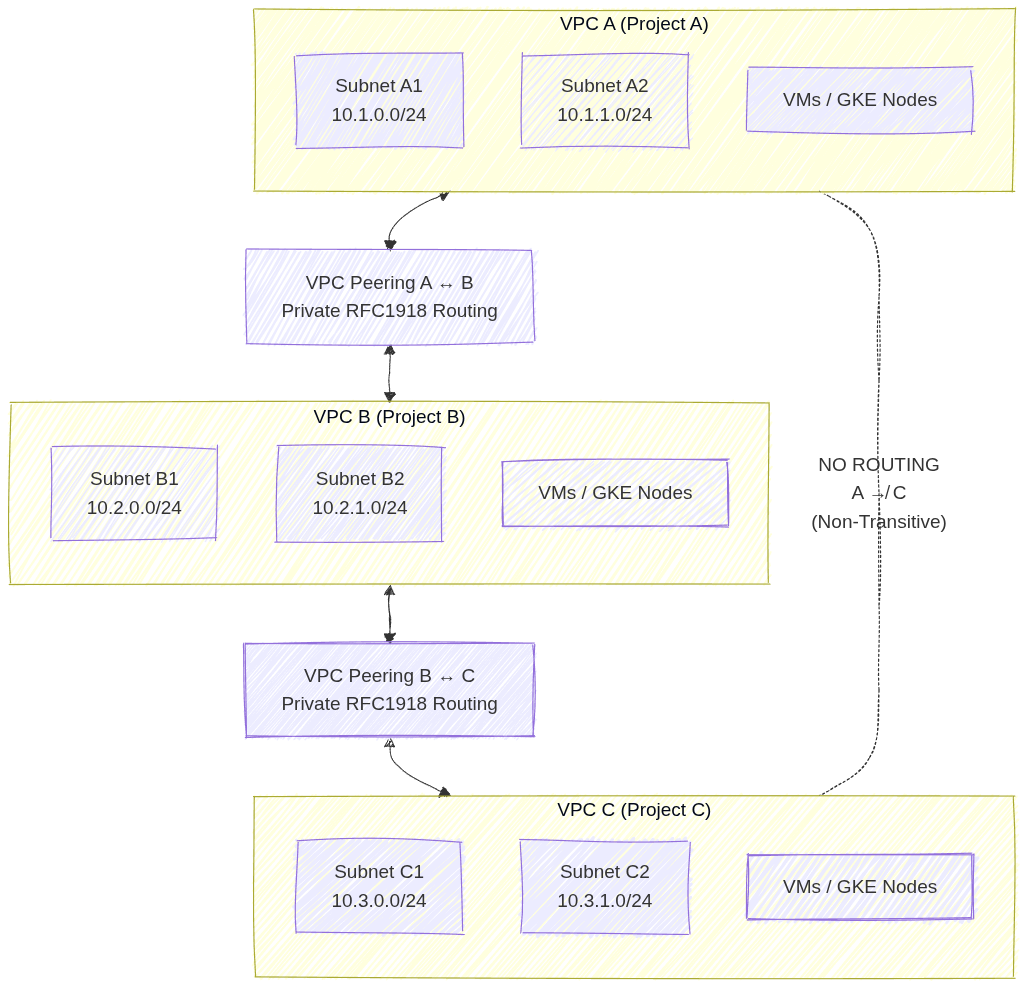
Image source: Own work (Mermaid diagram).
This setup shows three separate VPC networks where VPC A is peered with VPC B, and VPC B is peered with VPC C. Each peering connection allows private RFC 1918 traffic to flow directly between the paired VPCs without VPN, Interconnect, or NAT. However, because VPC peering in GCP is non‑transitive, VPC A cannot reach VPC C unless a direct peering connection is created. This illustrates the requirement for explicit, pairwise peering links whenever cross‑VPC communication is needed.
1.2. Requirements and Constraints
- No Overlapping IP Ranges: Peering will fail if any subnet IP ranges overlap between the two networks.
- Two-Way Configuration: Peering must be configured in both networks (A to B and B to A) for it to become active.
- Firewall Rules: Peering allows communication, but it does not bypass firewall rules. You must still create ingress firewall rules to allow traffic from the peered network’s IP ranges.
- Service Chaining: You can export/import custom routes across the peering connection.
2. Shared VPC
Shared VPC allows an organization to connect resources from multiple projects to a common VPC network, so that they can communicate with each other securely and efficiently using internal IPs from that network.
- Core Concepts:
- Host Project: The project that contains one or more Shared VPC networks.
- Service Project: A project that is attached to the Host Project. Resources in a service project (like VM instances or GKE clusters) use the subnets in the Host Project.
- Administrative Roles (Critical for Exam):
- Shared VPC Admin: Typically an Organization Admin. Responsible for enabling the Host Project and attaching Service Projects.
- Network Admin: Manages the network resources (subnets, firewall rules, etc.) in the Host Project.
- Service Project Admin: Manages the resources (VMs, GKE) within their specific service project. They can only see and use the specific subnets in the Host Project that the Shared VPC Admin has granted them access to.
- Use Cases:
- Centralized Control: One networking team manages the VPC, security, and connectivity (VPN/Interconnect) in the Host Project.
- Delegated Responsibility: Individual teams manage their applications in Service Projects without having to worry about networking complexity.
- Resource Sharing: Easily share services like internal Load Balancers or common databases across multiple projects.
3. Comparison: Peering vs. Shared VPC
| Feature | VPC Network Peering | Shared VPC |
|---|---|---|
| Administration | Decentralized (each VPC managed separately) | Centralized (one Host Project manages the network) |
| Hierarchy | Flat (Peers are equals) | Hierarchical (Host and Service projects) |
| IP Overlap | Forbidden | Managed (Host project defines all ranges) |
| Scale | Best for connecting independent VPCs | Best for multi-team/multi-project organization structure |
| Transitivity | Non-transitive | Centralized (all service projects share the same VPC) |
4. Essential gcloud Commands
- Create Peering (Network A):
gcloud compute networks peerings create [PEER_NAME] --network=[NET_A] --peer-project=[PROJECT_B] --peer-network=[NET_B] - Enable Host Project:
gcloud compute shared-vpc enable [HOST_PROJECT_ID] - Associate Service Project:
gcloud compute shared-vpc associated-projects add [SERVICE_PROJECT_ID] --host-project=[HOST_PROJECT_ID]
5. Exam Tips
- Identity-Aware Proxy (IAP) & Peering: Peering is often used to connect a “Hub” VPC (with VPN/Interconnect) to “Spoke” VPCs.
- IAM Permissions: Remember that a Service Project Admin needs the
compute.networkUserrole on the specific subnets they intend to use in the Host Project. - Quotas: Both Peering and Shared VPC have limits on the number of connections/projects.
- Troubleshooting: If two peered VMs can’t talk, check for overlapping subnets first, then firewall rules, then verify that the peering is in the
ACTIVEstate on both sides.
Cloud NAT: ACE Exam Study Guide (2026)
Image source: Google Cloud Documentation
1. Cloud NAT Overview
Cloud NAT (Network Address Translation) is a managed Google Cloud service that allows VM instances without external (public) IP addresses to access the internet.
- Primary Purpose: To provide outbound internet connectivity for private VMs while preventing those VMs from being directly accessible from the public internet (inbound).
- Managed Service: It is a software-defined, distributed service. It is NOT a single gateway instance.
- Relationship with Cloud Router: Cloud NAT is a configuration that is applied to a Cloud Router.
2. Key Characteristics
- Outbound-Only: Cloud NAT allows outbound connections and return traffic. It does not allow unsolicited inbound connections.
- Regional Scope: A Cloud NAT gateway is a regional resource.
- Static IP Support: You can assign specific static external IP addresses to the Cloud NAT gateway to whitelist traffic.
- Dynamic Port Allocation (2026 Update): A more scalable feature that allows the NAT gateway to adjust the number of ports assigned to each VM based on its actual usage, reducing the risk of port exhaustion failures.
3. Supported Resources
Cloud NAT provides NAT services for resources without external IP addresses:
- Compute Engine VMs: Standard, N4, and C4 machine types in a VPC.
- GKE Nodes and Pods: Private cluster nodes use Cloud NAT for outbound access.
- Serverless (Cloud Run/Cloud Functions/App Engine): When using a Serverless VPC Access Connector or Direct VPC Egress.
- Private Service Connect (PSC) (2026 Update): Cloud NAT can now provide NAT services for traffic destined for Private Service Connect endpoints.
4. Architecture and Configuration
To set up Cloud NAT, you need:
- VPC Network: The network containing the private resources.
- Cloud Router: A regional router in the same region.
- Cloud NAT Gateway: Configured on the Cloud Router.
- Mapping Options:
- Primary IP ranges: NAT for only the primary IP range of a subnet.
- Secondary IP ranges: NAT for secondary ranges (e.g., GKE pods).
- All ranges: NAT for all ranges in all subnets of the region.
5. Security and Logging
- Cloud NAT Logging: Enable logging to capture connection details, including source/destination IP addresses and ports.
- Port Reservation: By default, Cloud NAT reserves a fixed number of ports (64). Using Dynamic Port Allocation is recommended for better scalability.
6. Essential gcloud Commands
- Create Cloud Router:
gcloud compute routers create [ROUTER_NAME] --network=[VPC] --region=[REGION] - Create Cloud NAT Gateway:
gcloud compute routers nats create [NAT_NAME] --router=[ROUTER_NAME] --region=[REGION] --auto-allocate-nat-external-ips --nat-all-subnet-ip-ranges - List NAT Gateways:
gcloud compute routers nats list --router=[ROUTER_NAME] --region=[REGION]
7. Exam Tips
- Private Google Access vs. Cloud NAT:
- Use Private Google Access to reach Google APIs (GCS, BigQuery) without an external IP.
- Use Cloud NAT to reach the general internet (e.g., package repositories) without an external IP.
- High Availability: Cloud NAT is automatically highly available within its region.
- IAP SSH: Remember that IAP TCP Forwarding allows you to SSH into a VM without an external IP, but the VM still needs Cloud NAT for internet-based updates.
8. External Links
Cloud VPN: ACE Exam Study Guide (2026)
Image source: Google Cloud Documentation
1. Cloud VPN Overview
Cloud VPN securely connects your peer network (on-premises or another VPC) to your Google Cloud VPC network through an IPsec VPN connection.
Key Characteristics
- Encrypted Traffic: Data travels over the public internet but remains private due to IPsec encryption.
- SLA: Up to 99.99% availability for HA VPN.
2. VPN Types (The Most Important Exam Distinction)
Google Cloud offers two types of VPN gateways: HA VPN and Classic VPN.
| Feature | HA VPN | Classic VPN |
|---|---|---|
| SLA | 99.99% | 99.9% |
| Architecture | Two interfaces (0 & 1), each with its own external IP; two tunnels per interface for redundancy | Single interface, single external IP; single tunnel unless manually duplicated |
| Routing | Dynamic routing only (BGP) via Cloud Router | Static or Dynamic (BGP optional) |
| Redundancy | Built‑in high availability across two availability zones | No built‑in HA; must create multiple tunnels manually |
| Traffic Support | IPv4 and IPv6 (2026 standard) | IPv4 only |
| Throughput | Higher throughput due to dual‑tunnel architecture | Lower throughput |
| Use Case | Production‑grade, highly available VPN connections | Legacy systems or peers that do not support BGP |
| Status | Recommended default | Deprecated for most new deployments |
3. Dynamic vs. Static Routing
- Dynamic Routing (BGP):
- Uses Cloud Router to automatically exchange routes between Google Cloud and on-premises.
- Automatically updates routes if the network topology changes.
- Static Routing:
- Routes are manually defined.
- Only supported on Classic VPN.
4. Connectivity Components
To establish a VPN, you need:
- VPC Network: The Google Cloud network you are connecting.
- Cloud VPN Gateway: The Google-side gateway.
- Peer VPN Gateway: The on-premises or non-GCP side gateway.
- VPN Tunnels: Encrypted links connecting the two gateways.
- Cloud Router: Required for Dynamic Routing (BGP).
5. Bandwidth and MTU
- Bandwidth: Each tunnel supports up to 3 Gbps (egress/ingress combined). You can add multiple tunnels to increase aggregate bandwidth.
- MTU (Maximum Transmission Unit): Cloud VPN uses an MTU of 1460 bytes.
- Exam Tip: If SSH works but large file transfers hang, it is likely an MTU mismatch. Adjust the MTU on the peer gateway or guest OS.
6. Security and Firewall Rules
-
IPsec Protocols: Uses IKE (Internet Key Exchange) to establish the secure tunnel.
Internet Key Exchange is the protocol that negotiates keys and security parameters for IPsec VPN tunnels. It authenticates endpoints and establishes encrypted sessions. Used by GCP Cloud VPN (Classic + HA VPN) because both rely on IPsec.
-
Firewall Rules: You must create ingress firewall rules in your VPC to allow traffic from the on-premises IP ranges.
-
IKE Ports: Traffic on UDP 500 and UDP 4500 must be allowed by the on-premises firewall.
7. Essential gcloud Commands
- Create HA VPN Gateway:
gcloud compute vpn-gateways create [NAME] --network=[VPC] --region=[REGION] - Create Cloud Router (for BGP):
gcloud compute routers create [ROUTER_NAME] --network=[VPC] --region=[REGION] --asn=[GOOGLE_ASN] - Create VPN Tunnel:
gcloud compute vpn-tunnels create [TUNNEL_NAME] --peer-address=[PEER_IP] --ike-version=2 --router=[ROUTER_NAME] --vpn-gateway=[GW_NAME] --interface=[0_OR_1]
8. Exam Tips
- VPN vs. Interconnect:
- Use VPN for lower bandwidth, lower cost, and fast setup over the public internet.
- Use Interconnect for high bandwidth (10 or 100 Gbps), predictable latency, and high security via a direct physical link.
- High Availability: To achieve 99.99% SLA, you must have two tunnels from the HA VPN gateway and use Cloud Router with BGP (Border Gateway Protocol).
- Transitive Routing: Cloud VPN can act as a bridge for transitive routing if Cloud Router is configured correctly to advertise routes from other peered VPCs.
Cloud Router (GCP)

Image source: Google Cloud Documentation
1. Overview
Cloud Router is a fully managed BGP routing service that dynamically exchanges routes between your Google Cloud VPC and on-premises networks. It eliminates the need for static routes by automatically discovering and advertising network paths.
BGP (Border Gateway Protocol): The core routing protocol of the internet that allows different networks to exchange reachability information. It uses TCP port 179 and maintains connections between autonomous systems to share routing tables and adapt to network changes automatically.
2. Key Features
| Feature | Description |
|---|---|
| BGP Protocol | Uses BGP MD5-authenticated sessions for secure route exchange |
| Dynamic Updates | Automatically learns new VPC subnets without manual intervention |
| High Availability | Managed redundancy across zones within a region |
| Custom Advertisements | Control which routes are advertised with custom prefixes |
| Route Priority | Configurable route priorities for traffic engineering |
3. When Cloud Router Is Required
Cloud Router is mandatory for:
- HA VPN - Both classic and HA VPN implementations
- Dedicated Interconnect - For dynamic routing to on-premises
- Partner Interconnect - When using a service provider for hybrid connectivity
Exam Tip: If you see “dynamic routing” in a hybrid connectivity question, Cloud Router is the answer.
4. Architecture
┌─────────────────┐         BGP Session         ┌─────────────────┐
│   On-Premises   │◄───────────────────────────►│   Cloud Router  │
│     Router      │    (Port 179 / TCP 179)     │   (GCP VPC)     │
└─────────────────┘                             └─────────────────┘
5. Configuration
5.1. Create a Cloud Router
gcloud compute routers create ROUTER_NAME \
    --region=us-central1 \
    --network=my-vpc-network \
    --asn=65001
5.2. Add BGP Interface and Peer
gcloud compute routers add-interface ROUTER_NAME \
    --interface=interface-0 \
    --ip-address=169.254.0.1 \
    --mask-length=30 \
    --region=us-central1

gcloud compute routers add-bgp-peer ROUTER_NAME \
    --peer-name=peer-1 \
    --interface=interface-0 \
    --peer-ip-address=169.254.0.2 \
    --peer-asn=65002 \
    --region=us-central1
5.3. Advertise Custom Prefixes
gcloud compute routers export-routes ROUTER_NAME --region=us-central1

gcloud compute routers update ROUTER_NAME \
    --advertisement-mode=CUSTOM \
    --region=us-central1

gcloud compute routers add-advertisement ROUTER_NAME \
    --advertised-ranges=10.0.0.0/16 \
    --region=us-central1
6. Route Advertisement Modes
| Mode | Behavior |
|---|---|
| DEFAULT | Advertises all VPC subnets with RFC 1918 ranges |
| CUSTOM | Only advertises prefixes you explicitly configure |
6.1. Default Behavior (DEFAULT Mode)
Automatically advertises:
- All connected subnets in the VPC
- Static routes you’ve configured
- Routes from Cloud NAT
6.2. Custom Advertising
Use when you need to:
- Advertise only specific subnets
- Advertise custom IP ranges (e.g.,
172.16.0.0/12) - Filter what on-premises networks can reach
7. BGP Session Details
- BGP Port: TCP 179 (router must allow this)
- Keepalive Interval: 20 seconds (default)
- Hold Timer: 60 seconds (default)
- MD5 Authentication: Supported and recommended
- Peer IP Addresses: Use
169.254.0.0/30link-local range
8. Common Scenarios
8.1. Scenario: On-Premises to GCP Communication
On-Prem Server → On-Prem Router → Cloud Router → VPC Subnet
                                    (BGP learns routes in both directions)
8.2. Scenario: HA VPN with Cloud Router
Cloud Router
    ├── BGP Session 1 ──► VPN Tunnel 1 (Zone A)
    └── BGP Session 2 ──► VPN Tunnel 2 (Zone B)
         (Automatic failover if one tunnel fails)
9. Important Exam Points
9.1. Do
- Use Cloud Router for any dynamic routing scenario
- Specify a unique ASN (64512-65534 for private, or your own)
ASN (Autonomous System Number): A unique identifier assigned to an autonomous system (AS) for BGP routing. Private ASNs range from 64512-65534. Each network on both sides of a BGP peering must have an ASN to establish the session.
- Use the same ASN on both sides of a BGP session
- Remember Cloud Router manages routes, not traffic itself
9.2. Don’t
- Use for VPC-to-VPC routing (use VPC Peering or TGW)
TGW (Transit Gateway): A regional hub that connects VPCs and on-premises networks in a hub-and-spoke topology. Use it for simplifying multi-VPC architectures instead of managing multiple peerings.
- Use static routes when dynamic routing is required
- Forget to allow TCP 179 in firewall rules for on-prem router
10. Troubleshooting
| Issue | Solution |
|---|---|
| Routes not exchanged | Check BGP session state; verify firewall allows port 179 |
| One direction only | Check route advertisements match expected prefixes |
| Flapping connection | Verify BGP timers (hold-time should be ≥ 3x keepalive) |
10.1. Verify BGP Status
gcloud compute routers get-status ROUTER_NAME \
    --region=us-central1 \
    --format="yaml(bgpSessions)"
11. Comparison with Alternatives
| Service | Use Case | Routing Type |
|---|---|---|
| Cloud Router | Hybrid cloud connectivity | Dynamic (BGP) |
| Static Routes | Simple single-hops | Manual |
| VPC Peering | VPC-to-VPC | No BGP needed |
| Cloud NAT | Outbound internet for private VMs | No BGP |
12. Exam Prep Summary
Key Takeaway: Cloud Router = BGP + Dynamic Routing + Hybrid Connectivity. If a question mentions HA VPN, Interconnect, or dynamic route exchange with on-premises, Cloud Router is required.
Cloud Interconnect: ACE Exam Study Guide

Image source: Google Cloud Documentation
1. Overview
Cloud Interconnect provides a direct physical connection between your on-premises network and Google’s network. Unlike Cloud VPN, traffic bypasses the public internet.
Key Characteristics:
- No public internet: Traffic travels over dedicated physical links
- Predictable performance: Consistent latency, no jitter from internet congestion
- High bandwidth: 10 Gbps or 100 Gbps (Dedicated) or smaller (Partner)
- Not encrypted by default: Must use MACsec (Dedicated) or HA VPN over Interconnect
- Requires BGP: Uses Cloud Router for dynamic routing
MACsec (Media Access Control Security) is a Layer‑2 encryption standard (IEEE 802.1AE) that protects traffic on physical links. In Google Cloud, MACsec is used to encrypt traffic on Dedicated Interconnect connections between your on‑premises router and Google’s edge router.
It provides hop‑by‑hop, hardware‑level encryption directly on the fiber link — unlike IPsec, which is Layer‑3 and tunnel‑based.
2. Interconnect Types
Dedicated Interconnect
| Aspect | Details |
|---|---|
| What | Physical connection at Google’s colocation facility |
| Requirement | Must be present at an Interconnect location |
| Bandwidth | 10 Gbps or 100 Gbps circuits |
| Encryption | MACsec available (encrypts data in transit) |
| Best for | High data volume, organizations with colocation presence |
Partner Interconnect
| Aspect | Details |
|---|---|
| What | Connection via third-party service provider |
| Requirement | Connect to Partner who already has Google link |
| Bandwidth | 50 Mbps up to 10 Gbps (or 50 Gbps) |
| Encryption | Not via MACsec (use VPN if needed) |
| Best for | Lower bandwidth needs, no colocation access |
Cross-Cloud Interconnect
| Aspect | Details |
|---|---|
| What | Direct link between GCP and other clouds (AWS, Azure) |
| Requirement | No physical hardware setup |
| Best for | Multi-cloud architectures requiring low latency |
3. Deployment Components
- Physical Link: Fiber connecting your equipment to Google (Dedicated) or Partner
- Interconnect Resource: The physical circuit (visible in GCP console)
- VLAN Attachment: Logical connection (VLAN) between Interconnect and VPC
- Cloud Router: Manages BGP sessions for dynamic routing
- Border Gateway Protocol (BGP): Exchanges routes between on-prem and GCP
Image source: Own work (Mermaid diagram).
This diagram shows how an on‑premises network connects to a Google Cloud VPC using Dedicated Interconnect and BGP routing.
- The On‑Prem Router establishes a BGP session (TCP 179) with Cloud Router in Google Cloud. This BGP session exchanges routes so both environments know how to reach each other.
- The physical connectivity is provided by Dedicated Interconnect, represented by the fiber link between the on‑prem router and Google’s Edge Router. This link operates at Layer 1/2, and can optionally be protected with MACsec for encryption.
- Google’s Edge Router terminates the physical Interconnect circuit and hands traffic to Cloud Router, which handles the control plane (routing decisions).
- Cloud Router injects learned routes into the VPC, making on‑prem networks reachable to GCE VMs, GKE clusters, and other services inside the VPC.
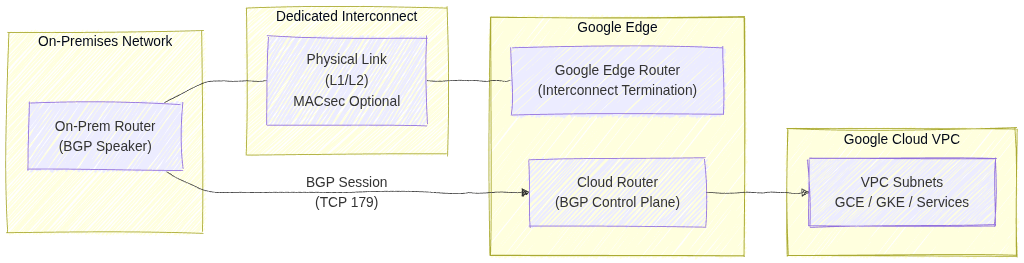
4. VLAN Attachments
- What: Logical connections that carry your VLAN traffic over the Interconnect
- MTU: Default 1440 bytes (smaller than standard 1500 due to encapsulation)
- Limits:
- Up to 50 VLAN attachments per Interconnect
- Each VLAN attachment needs a unique VLAN ID (802.1Q tag)
- Requirements:
- Must be in the same region as your Cloud Router
- BGP session configured with peer IP addresses
5. High Availability & SLA
| SLA | Requirement |
|---|---|
| 99.99% | 4+ VLAN attachments across 2+ Interconnect locations + 2+ Cloud Routers |
| 99.9% | 2+ VLAN attachments + 2 Cloud Routers (single location) |
Important: Single Interconnect = no SLA (0%)
6. Direct Peering vs Carrier Peering
These are NOT the same as Cloud Interconnect:
| Type | Purpose | Reaches |
|---|---|---|
| Direct Peering | Reach Google services directly | Google Workspace, YouTube only (NOT VPC) |
| Carrier Peering | Via partner for Google services | Google Workspace via partner |
Key point: Neither reaches VPC resources. Use Interconnect or VPN for VPC.
7. Encryption
| Method | Availability | Notes |
|---|---|---|
| MACsec | Dedicated Interconnect only | Encrypts physical link |
| HA VPN over Interconnect | Both types | Add VPN tunnel over VLAN attachment |
| Default (none) | Both types | Traffic is unencrypted |
Exam tip: If encryption is required, use HA VPN over Interconnect (most common answer).
8. Common Exam Gotchas
- No encryption by default: Interconnect does not encrypt traffic
- Single Interconnect = no SLA: Must have redundancy for SLA
- MTU 1440: VLAN attachments have lower MTU than standard (1500)
- BGP required: All Interconnect types need Cloud Router and BGP
- VLAN limits: Maximum 50 VLAN attachments per Interconnect
- Cross-Cloud is GCP-to-cloud: Not for connecting to on-premises directly
- Peering ≠ Interconnect: Direct/Carrier Peering only reaches Google services, not VPC
- Partner bandwidth flexibility: Can start small (50 Mbps), unlike Dedicated
9. Interconnect vs VPN Comparison
| Factor | Cloud Interconnect | Cloud VPN |
|---|---|---|
| Transport | Dedicated physical link | Public internet |
| Bandwidth | Up to 100 Gbps | Up to 3 Gbps per tunnel |
| Latency | Lower, consistent | Higher, variable |
| Setup time | Weeks (physical) | Minutes |
| Cost | Higher | Lower |
| Encryption | None (use MACsec/VPN) | Built-in (IPsec) |
| Use case | Migration, high-volume | Quick setup, lower volume |
Choose Interconnect when: Migrating large datasets, need consistent performance, acceptable to wait for physical setup.
Choose VPN when: Need quick connectivity, lower budget, can tolerate internet variability.
10. Essential gcloud Commands
Create Dedicated VLAN Attachment:
gcloud compute interconnects attachments dedicated create [NAME] \
  --interconnect=[INTERCONNECT] \
  --router=[ROUTER] \
  --region=[REGION] \
  --vlan=[VLAN_ID]
Create Partner VLAN Attachment:
gcloud compute interconnects attachments partner create [NAME] \
  --router=[ROUTER] \
  --region=[REGION] \
  --interconnect-region=[PARTNER_REGION]
List VLAN Attachments:
gcloud compute interconnects attachments list
11. Practice Questions
Q1: What provides 99.99% SLA for Cloud Interconnect?
Answer: 4+ VLAN attachments across 2+ Interconnect locations and 2+ Cloud Routers
Q2: You need to connect on-premises to VPC with encryption. What do you use?
Answer: HA VPN over Interconnect (or MACsec with Dedicated)
Q3: What’s the maximum VLAN attachments per Interconnect?
Answer: 50
Q4: Direct Peering can reach which GCP resources?
Answer: Google Workspace and YouTube only (NOT VPC resources)
Q5: A company needs 500 Mbps bandwidth but has no colocation presence. Which Interconnect type?
Answer: Partner Interconnect
Q6: What is the default MTU for a VLAN attachment?
Answer: 1440 bytes
12. Quick Reference Summary
| Feature | Value |
|---|---|
| Dedicated bandwidth | 10 Gbps or 100 Gbps |
| Partner bandwidth | 50 Mbps to 50 Gbps |
| VLAN attachments max | 50 per Interconnect |
| VLAN MTU | 1440 bytes |
| 99.99% SLA requires | 4+ VLANs, 2+ locations, 2+ routers |
| Encryption by default | No (use MACsec or VPN) |
| BGP required | Yes (via Cloud Router) |
| Reaches VPC | Yes |
| Reaches Google Workspace | Yes |
13. External Links
Load Balancing: ACE Exam Study Guide (2026)
Image source: Cloud Icons
1. Load Balancing Overview
Google Cloud Load Balancing is a fully managed, software-defined service. It is not instance-based, so you don’t need to manage infrastructure or scale it manually.
Key Characteristics
- External vs. Internal: Internet-facing or private within your VPC.
- Global vs. Regional: Traffic distribution across multiple regions or a single region.
- Traffic Type: Layer 7 (HTTP/S) vs. Layer 4 (TCP/UDP).
2. External Load Balancers
Global External Application Load Balancer (HTTP/S)
- Layer: Layer 7 (HTTP, HTTPS, HTTP/2).
- Scope: Global. Distributes traffic to the closest available backend.
- Features: URL maps (path-based routing), SSL termination, Cloud Armor integration, and Cloud CDN support.
- Backends: MIGs/ZIGs, NEGs for GKE/Serverless.
SSL Termination is the process where a load balancer decrypts incoming HTTPS traffic before passing it to backend services over HTTP. This offloads CPU‑heavy encryption work from the servers, simplifies certificate management, and allows the load balancer to inspect and route requests (e.g., via URL maps).
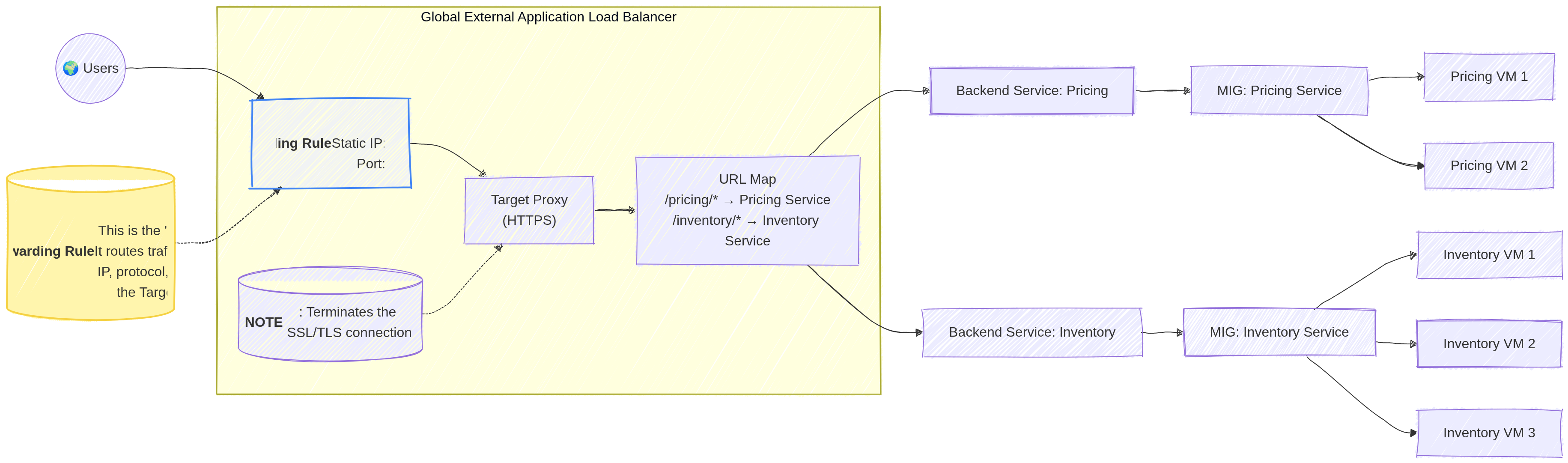
Image source: Own work (Mermaid diagram).
There is no functional difference today — TLS is simply the modern, secure successor to SSL. But people still say SSL termination even though they actually mean TLS termination.
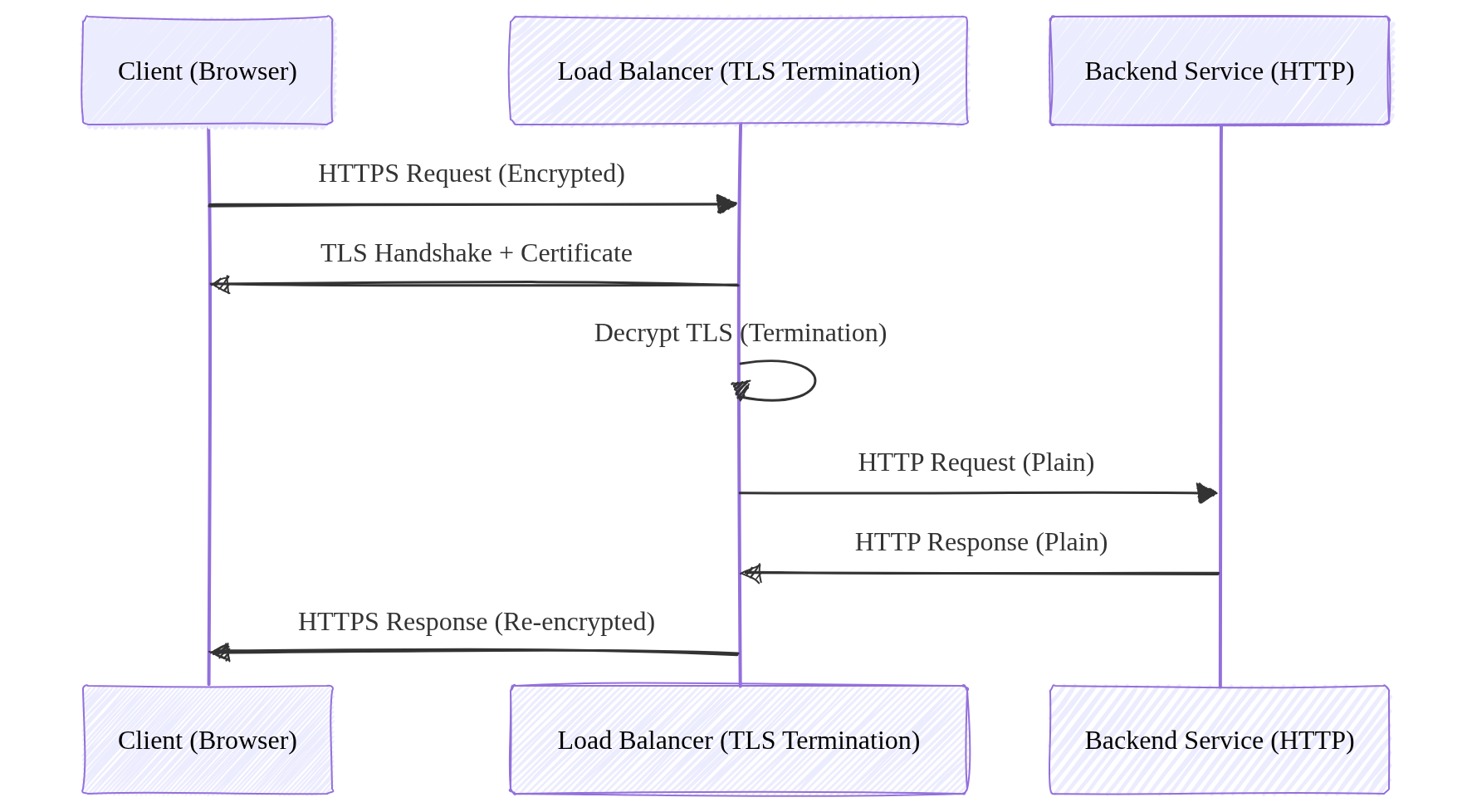
Image source: Own work (Mermaid diagram).
External Proxy Network Load Balancer (TCP/SSL)
- Layer: Layer 4 (TCP with SSL termination).
- Scope: Global (Regional version available).
- Use Case: Non-HTTP traffic that requires SSL termination or proxying.
External Passthrough Network Load Balancer (TCP/UDP)
- Layer: Layer 4 (TCP, UDP, ICMP).
- Scope: Regional.
- Nature: Passthrough. Preserves the source IP address of the client.
- Use Case: Simple TCP/UDP traffic where low latency is critical.
2.1. Load Balancing Methods
When distributing traffic across multiple backend services or instances, load balancers can use different algorithms to determine which backend receives each request.
Round Robin
The simplest method — requests are distributed sequentially to each backend in order. Each backend gets an equal number of requests in rotation. This works well when all backends have similar capacity.
Least Connections
The load balancer sends new requests to the backend with the fewest active connections. This accounts for varying request processing times — backends handling longer requests will receive fewer new requests.
Least Request
Similar to Least Connections but uses a more general approach based on outstanding request count rather than established connections. The External Application Load Balancer uses this method.
Weighted Round Robin
Each backend is assigned a weight indicating its capacity. Backends with higher weights receive proportionally more requests. For example, a backend with weight 3 receives 3 requests for every 1 sent to a weighted backend.
IP Hash
The client’s IP address is hashed to determine which backend receives the request. This ensures the same client always reaches the same backend — useful when session data is stored locally on the backend.
Session Affinity (Sticky Sessions)
Session affinity ensures requests from the same client go to the same backend. This is critical when applications store session data in memory on specific instances. The load balancer uses cookies or source IP to track and route requests to the same backend.
- L7 Load Balancers: Use LB-generated cookies (e.g.,
GOOGLBcookie). - L4 Proxy Load Balancers: Use source IP/port hashing.
- Passthrough Load Balancers: Do not support session affinity.
3. Internal Load Balancers
Internal Application Load Balancer (HTTP/S)
- Layer: Layer 7.
- Scope: Regional.
- Use Case: Microservices communication within a VPC requiring path-based routing.
Internal Proxy Network Load Balancer (TCP)
- Layer: Layer 4.
- Scope: Regional.
- Use Case: Internal TCP traffic requiring proxying services.
Internal Passthrough Network Load Balancer (TCP/UDP)
- Layer: Layer 4.
- Scope: Regional.
- Nature: Passthrough. Very low latency.
- Use Case: Database clusters, legacy applications inside the VPC.
4. Summary Table for the Exam (with SSL Termination)
| Load Balancer Type | Layer | Scope | Traffic Type | Proxy? | SSL Termination? |
|---|---|---|---|---|---|
| Global External App LB | L7 | Global | HTTP, HTTPS, HTTP/2 | Yes | Yes |
| Regional External App LB | L7 | Regional | HTTP, HTTPS | Yes | Yes |
| External Proxy Net LB | L4 | Global/Reg | TCP, SSL | Yes | Yes (SSL proxy) |
| External Passthrough Net LB | L4 | Regional | TCP, UDP | No | No |
| Internal App LB | L7 | Regional | HTTP, HTTPS | Yes | Yes |
| Internal Passthrough Net LB | L4 | Regional | TCP, UDP | No | No |
5. Components of a Load Balancer
- Forwarding Rule: Directs traffic based on IP, protocol, and port.
- Target Proxy: Terminates the connection and forwards it to the URL map.
- URL Map: Defines path-based routing rules (e.g.,
/imagesvs/api). - Backend Service: Manages health checks, session affinity, and backend pools.
- Health Check: Regularly polls backends to ensure they are healthy.
It does not restart or rotate instances. That’s task of a Managed Instance Group.
5.1. Backend Service
A backend service defines how a load balancer sends traffic to backends like MIGs or NEGs. It applies health checks, balancing policies, timeouts, and routing rules. The load balancer never talks directly to VMs - traffic always flows through a backend service, which decides which instances are healthy and ready to receive requests.
6. Essential gcloud Commands
- Create a health check:
gcloud compute health-checks create http [NAME] --port 80 - Create a backend service:
gcloud compute backend-services create [NAME] --protocol=HTTP --health-checks=[HC_NAME] --global - Add backends to service:
gcloud compute backend-services add-backend [NAME] --instance-group=[GROUP_NAME] --global - Create a URL map:
gcloud compute url-maps create [MAP_NAME] --default-service=[BACKEND_NAME]
7. Exam Tips
- Preserving Client IP: For L4 traffic, use the External Passthrough Network Load Balancer.
- Path-based Routing: Only Application Load Balancers (L7) support URL maps.
- SSL Termination: Proxy-based load balancers (App LB, Proxy Net LB) handle SSL at the load balancer level.
- Cloud Armor/CDN: These integrate only with the Global External Application Load Balancer.
- Session Affinity: Use if a client needs to stick to the same backend instance.
8. External Links
Cloud CDN: ACE Exam Study Guide (2026)

Image source: Google Cloud Documentation
1. Cloud CDN Overview
Cloud CDN (Content Delivery Network) uses Google’s global edge network to serve content closer to users, which reduces latency and lowers serving costs.
Key Characteristics
- Edge Caching: Content is stored in Google’s Edge Points of Presence (PoPs) globally.
- Integration: Works exclusively with the Global External Application Load Balancer (HTTP/S).
- Origin Servers: Backends can be Instance Groups (VMs), Cloud Storage buckets, or external origins.
- Media CDN: For large-scale streaming, use Media CDN, which is built on the same infrastructure as YouTube.
2. Core Features
- Anycast IP: Uses a single, global IP address for the load balancer.
- Cache Keys: Defines what makes a request unique for caching purposes (e.g., URL, query parameters, headers).
- Signed URLs/Cookies: Used to serve private content only to authorized users (e.g., premium video or paid downloads).
- Cache Invalidation: Allows you to manually remove content from the cache before its TTL (Time To Live) expires.
- Dynamic Compression: Automatically compresses text-based responses (Gzip/Brotli) to save bandwidth.
3. Caching Behavior
- TTL (Time To Live): Defines how long content stays in the cache.
- Default TTL: 3,600 seconds (1 hour).
- Maximum TTL: 31,536,000 seconds (1 year).
- Cache Modes:
- USE_ORIGIN_HEADERS: Respects
Cache-Controlheaders from the backend. - CACHE_ALL_STATIC: Caches all static content regardless of headers.
- FORCE_CACHE_ALL: Unconditionally caches all responses (use with caution).
- USE_ORIGIN_HEADERS: Respects
4. Administrative Operations
- Enabling CDN: You enable Cloud CDN on a per-backend-service basis within a Global External Application Load Balancer.
- Invalidation:
gcloud compute url-maps invalidate-cdn-cache [MAP_NAME] --path "/*"- Exam Tip: Cache invalidations are global but can take several minutes to propagate.
5. Security
- SSL/TLS: Handled at the Load Balancer level (SSL termination).
- Cloud Armor integration: You can use Cloud Armor security policies (WAF, Geo-blocking) in front of your CDN-enabled backends.
6. Essential gcloud Commands
- Enable CDN on existing backend:
gcloud compute backend-services update [BACKEND_NAME] --enable-cdn --global - Invalidate a specific path:
gcloud compute url-maps invalidate-cdn-cache [MAP_NAME] --path "/images/*" - Describe backend CDN settings:
gcloud compute backend-services describe [BACKEND_NAME] --global
7. Exam Tips
- Load Balancer Requirement: It requires a Global External Application Load Balancer (no other Load balancer can use Cloud CDN).
- Static vs. Dynamic: CDN is primarily for static content (images, CSS, JS). While it can cache dynamic content, it is less common.
- Cost Savings: Cloud CDN reduces “egress” costs because traffic from cache to user is cheaper than traffic from origin to user.
- Cloud Storage: When using Cloud Storage as a backend, ensure the bucket or files have public access (unless using Signed URLs).
8. External Links
Cloud DNS: ACE Exam Study Guide (2026)
Image source: Google Cloud Documentation
1. Cloud DNS Overview
Cloud DNS is a high-performance, resilient, and managed Domain Name System (DNS) service that runs on the same infrastructure as Google.
Key Characteristics
- Fully Managed: No DNS servers to manage or scale.
- Global Scope: DNS is a global service; managed zones are accessible from anywhere.
- Low Latency: Uses Google’s global network of Anycast name servers.
- 100% Availability SLA: Google guarantees 100% availability for its authoritative name servers.
Authoritative Name Server
An authoritative name server stores and serves the official DNS records for a domain (A, AAAA, CNAME, MX, TXT, SPF, DKIM, etc.). It provides final, non-recursive answers to DNS queries. In Cloud DNS, the authoritative name servers are the globally distributed Google name servers assigned to your DNS zone, each using Anycast IPs for low-latency resolution.
Anycast IP
Anycast IP means a single IP address is advertised from multiple global locations. Traffic is routed to the nearest or lowest‑latency Google edge. Cloud DNS uses Anycast for its public authoritative name servers, giving global low‑latency DNS resolution, built‑in failover, and high availability without extra configuration.
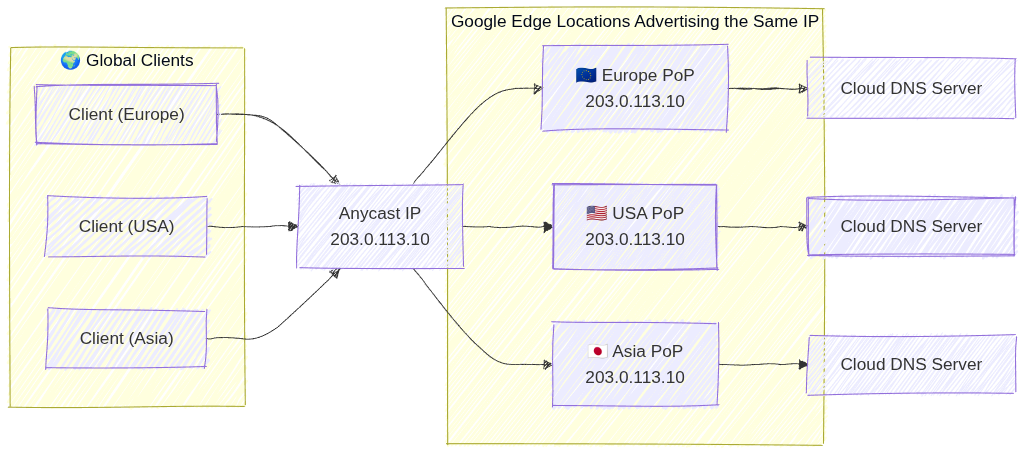
Image source: Own work (Mermaid diagram).
2. Managed Zones
A managed zone is a container for DNS records of the same DNS name suffix (e.g., example.com).
- Public Zones: Visible to the entire internet. You must register the domain with a registrar and point the registrar’s name servers to Google’s.
- Private Zones: Visible only to one or more VPC networks within your project or organization.
- Exam Tip: Use private zones for internal service discovery (e.g.,
db.internal.vpc).
- Exam Tip: Use private zones for internal service discovery (e.g.,
- Forwarding Zones: Used to forward DNS queries for a specific domain to an external DNS server (e.g., on-premises DNS).
- Peering Zones: Allows one VPC to use the DNS records defined in another VPC’s private zone.
3. Record Types
Cloud DNS supports common DNS record types:
- A: Maps a hostname to an IPv4 address.
- AAAA: Maps a hostname to an IPv6 address.
- CNAME: Maps an alias hostname to a canonical hostname.
- MX: Specifies mail servers for a domain.
- TXT: Arbitrary text data (often used for domain verification like SPF (Sender Policy Framework) or DKIM (DomainKeys Identified Mail)).
- SOA (Start of Authority): Contains administrative info about the zone.
4. DNS Forwarding and Peering
- Inbound Query Forwarding: Allows on-premises clients to resolve GCP private DNS records. Requires an Inbound Forwarding Policy on the VPC.
- Outbound Query Forwarding: Allows GCP instances to resolve on-premises DNS records. Accomplished via Forwarding Zones.
- DNS Peering: Connects the DNS namespace of two VPCs. Unlike VPC Peering, this only affects DNS resolution, not network connectivity.
4.1. DNS Inbound Forwarding Policy
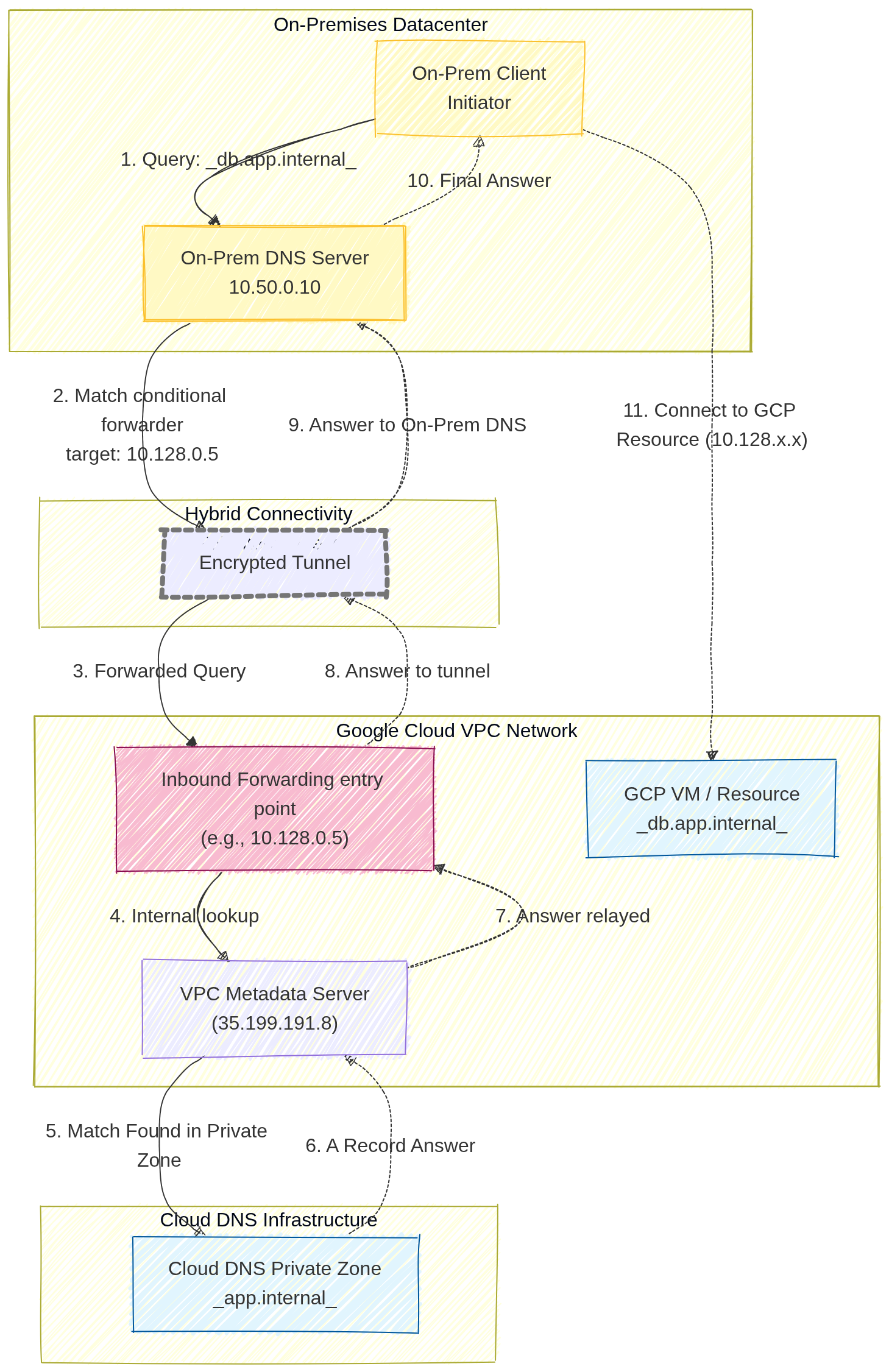
Image source: Own work (Mermaid diagram).
A user on-premises wants to access a GCP-hosted database (e.g., db.app.internal) using its friendly DNS name.
- The On-Prem Client sends a query to its local On-Prem DNS Server (e.g.,
10.50.0.10). - The On-Prem DNS server is configured with a conditional forwarder. It knows that any request ending in
.internal(or specificallyapp.internal) must be forwarded to a specific GCP entry point IP address (in this diagram,10.128.0.5). - The DNS query travels across the private hybrid connection (VPN or Interconnect) and reaches the Inbound Forwarding Policy IP.
- This entry point IP address acts as a bridge, forwarding the query to the VPC Metadata Server.
- The Metadata Server identifies the query for
db.app.internalas belonging to a configured Cloud DNS Private Zone. - Cloud DNS retrieves the correct
ARecord (e.g., the IP10.128.2.3) from the Private Zone database - and relays it back to the entry point.
- The answer is relayed back through the tunnel
- to the On-Prem DNS server,
- which finally provides the internal GCP IP address to the on-prem user.
4.2. DNS Formawring Zone
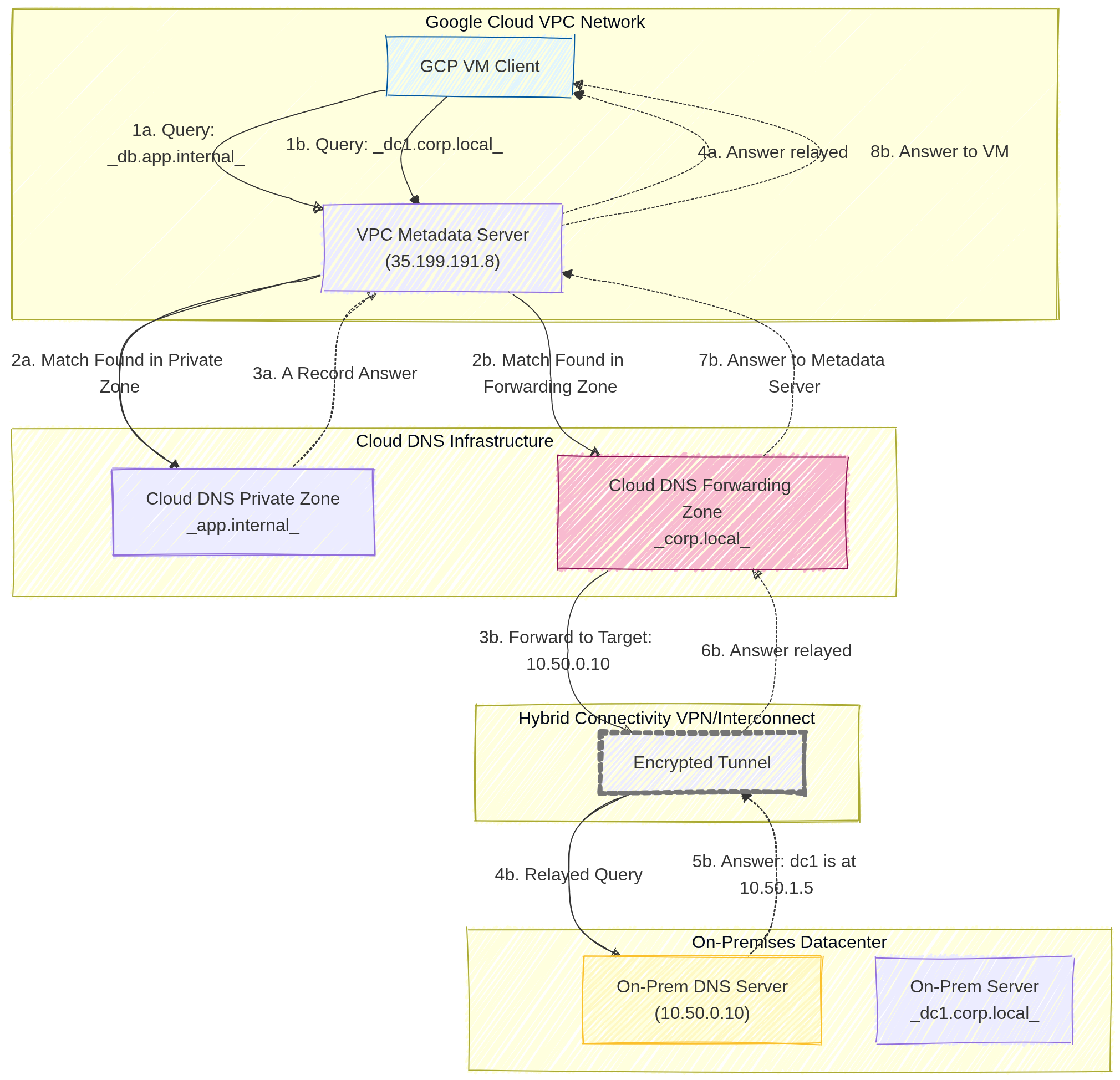
Image source: Own work (Mermaid diagram).
Scenario A: Query Resolved by Cloud DNS (GCP Internal)
This path covers how Google Cloud resolves names for resources that live entirely within your cloud environment.
- Query: A GCP VM Client sends a DNS request for
db.app.internalto the VPC Metadata Server (35.199.191.8). - Match: The Metadata Server checks its local configuration and finds a Match in a configured Cloud DNS Private Zone.
- Answer: Cloud DNS retrieves the specific
ARecord (IP address) for that resource from its internal database. - Relay: The Metadata Server relays the final answer back to the VM, allowing it to connect to the internal database.
Scenario B: Query Resolved by On-Prem DNS (Forwarded)
This path demonstrates the Forwarding Zone in action, where Cloud DNS acts as a middleman between the cloud and your physical datacenter.
- Query: The GCP VM Client sends a DNS request for
dc1.corp.local(an on-premises server) to the VPC Metadata Server. - Match: The Metadata Server finds a match in the Cloud DNS Forwarding Zone specifically created for the
.corp.localsuffix. - Forward: Cloud DNS identifies the Target Name Server (e.g.,
10.50.0.10) and forwards the DNS packet. - Hybrid Transit: The query travels through the Encrypted Tunnel (Cloud VPN or Interconnect).
- On-Prem Resolution: The On-Prem DNS Server receives the query, looks up its local record, and finds the answer (e.g.,
dc1is at10.50.1.5). - Return: The answer is sent back through the hybrid connection.
- Processing: The Forwarding Zone receive the result and passes it back to the Metadata Server.
- Final Relay: The Metadata Server provides the on-prem IP address to the original GCP VM.
5. DNS Policies
DNS policies allow you to control how the VPC handles DNS queries.
- Server Policies: Can enable inbound DNS forwarding or specify alternative DNS servers for the VPC.
- Client Policies: Can be used to apply specific DNS settings to VM instances.
- DNS over HTTPS (DoH): Support for encrypted DNS queries between clients and Cloud DNS to enhance privacy and security.
6. Security
- DNSSEC (DNS Security Extensions): Protects your domains from spoofing and cache poisoning by digitally signing DNS records.
- Exam Tip: DNSSEC is available for Public Zones only.
- IAM Roles:
roles/dns.admin: Full control over Cloud DNS resources.roles/dns.reader: View access only.
7. Essential gcloud Commands
- Create a Public Managed Zone:
gcloud dns managed-zones create [ZONE_NAME] --dns-name="example.com." --description="My public zone" - Create a Private Managed Zone:
gcloud dns managed-zones create [ZONE_NAME] --dns-name="internal.com." --description="My private zone" --visibility=private --networks=[VPC_NAME] - Add an A Record:
gcloud dns record-sets transaction start --zone=[ZONE_NAME] gcloud dns record-sets transaction add [IP_ADDRESS] \ --name="www.example.com." --ttl=300 --type=A --zone=[ZONE_NAME] gcloud dns record-sets transaction execute --zone=[ZONE_NAME] - List Records:
gcloud dns record-sets list --zone=[ZONE_NAME]
8. Exam Tips
- Visibility: Always distinguish between Public (Internet) and Private (VPC only) zones.
- Forwarding vs. Peering:
- Use Forwarding for GCP <-> On-Premises.
- Use Peering for GCP VPC <-> GCP VPC.
- Split-Horizon DNS: Cloud DNS supports split-horizon, where you have a public zone and a private zone with the same name but different records.
- Registration: Cloud DNS is not a domain registrar. You buy the domain elsewhere (or through Google Domains/Squarespace) and use Cloud DNS for management.
Split-Horizon DNS (Cloud DNS)
Split-horizon DNS lets you create a public zone and a private zone with the same domain name (e.g. example.com) but different DNS records. Public clients receive the public IPs (e.g. 203.0.113.10) from the public zone, while internal VPC clients receive private IPs (e.g. 10.0.0.5) from the private zone. Cloud DNS automatically selects the correct zone based on the source of the query.
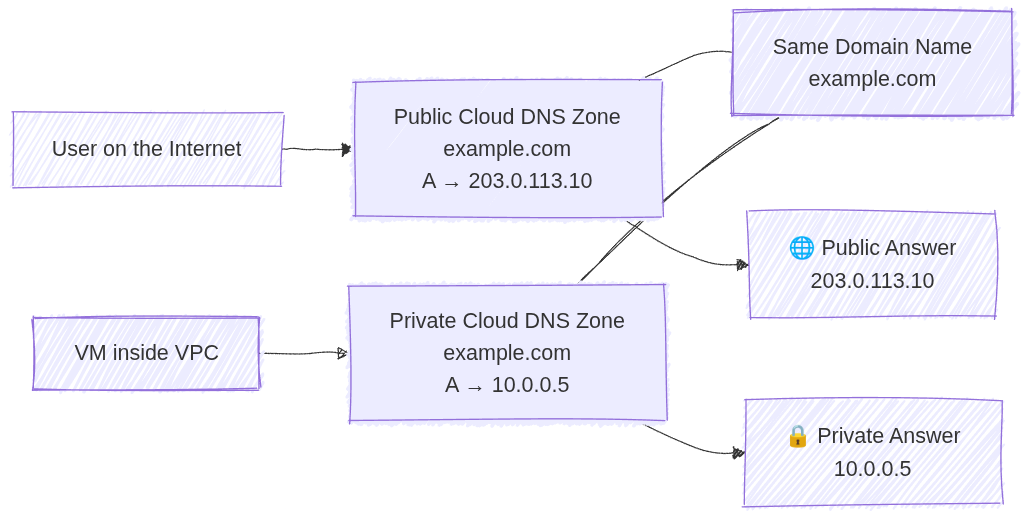
Image source: Own work (Mermaid diagram).
9. External Links
Serverless VPC Access: ACE Exam Study Guide
Image source: Dilbert.com
1. Overview
Serverless VPC Access allows your Google Cloud serverless services to communicate with resources in your VPC network using internal (private) IP addresses.
Supported Services (The “Serverless” side):
- Cloud Run (Services and Jobs)
- Cloud Functions (1st and 2nd Gen)
- App Engine (Standard Environment)
Target Resources (The “VPC” side):
- Compute Engine VMs
- Cloud SQL (with private IP)
- Memorystore (Redis/Memcached)
- Internal Load Balancers
- On-premises resources (via Cloud VPN or Cloud Interconnect)
2. Direct VPC Egress vs Serverless VPC Access Connector
| Feature | Direct VPC Egress | Serverless VPC Access Connector |
|---|---|---|
| Subnet required | No | Yes (/28 dedicated subnet) |
| Performance | Lower latency | Higher latency |
| Cost | Pay per use | Always-on minimum instances |
| All traffic egress | Native support | Requires “All traffic” mode |
| Simplicity | Simpler | More complex |
Use Direct VPC Egress when:
- Building new deployments
- Only need outbound (egress) connectivity to VPC
- Want to avoid managing connector infrastructure
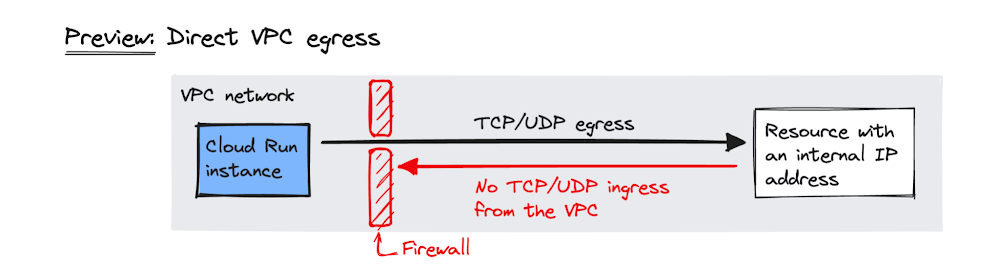
Image source: Google Cloud Blog
Use Serverless VPC Access Connector when:
- Need inbound connectivity from VPC to serverless service
- Must use Shared VPC (connector in host project)
- Exam question specifically mentions a connector
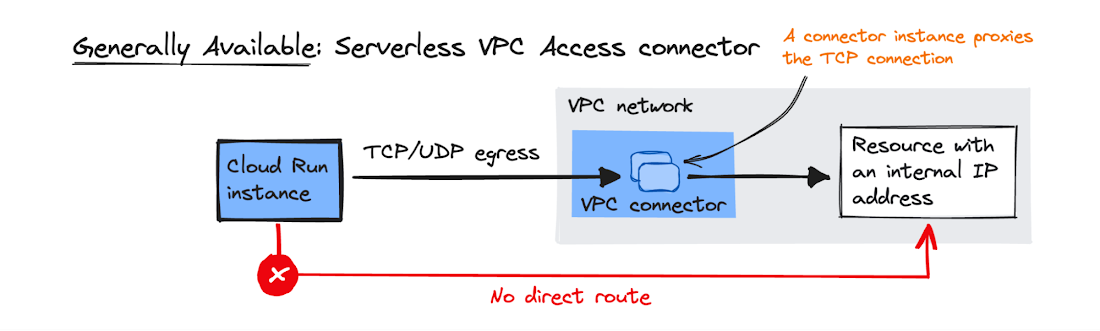
Image source: Google Cloud Blog
2.1. Key Characteristics
- Managed Connector: Acts as a bridge between serverless environment and VPC.
- Regional Resource: Created in a specific region; only works with services in that same region.
- Dedicated Subnet: Requires a
/28subnet that must not overlap with existing VPC ranges. - Always-on Cost: Minimum 2 instances run even if set to 0 (billed regardless).
- Throughput Scaling: Specify min/max instances to control throughput.
4. Configuration
4.1. Egress Settings
| Mode | Behavior |
|---|---|
| Private ranges only (default) | Only RFC 1918 traffic goes through connector. Internet traffic uses standard public gateway. |
| All traffic | All outbound traffic routes through connector. Required for static outbound IP. |
4.2. Static Outbound IP for Cloud Run
To give Cloud Run a static IP (e.g., for third-party firewall whitelisting):
- Create Serverless VPC Access Connector with “All traffic” egress
- Configure Cloud NAT on the VPC
- All outbound traffic from Cloud Run exits via Cloud NAT’s static IP
5. Shared VPC
- Connector must be created in the Host Project (where VPC lives)
- Serverless service in Service Project references the connector
- Service Project Admin needs
roles/vpcaccess.useron the connector
6. IAM Roles
| Role | Permissions |
|---|---|
roles/vpcaccess.admin | Full control over connectors |
roles/vpcaccess.user | Use a connector (required for deployment) |
roles/vpcaccess.viewer | View-only access |
7. Firewall Rules
The connector’s /28 subnet must be allowed to reach target resources:
- Example: Allow port 3306 from connector subnet to Cloud SQL instance
- Without proper firewall rules, connectivity will fail silently
8. Common Exam Gotchas
- Wrong region: Connector and serverless service must be in the same region
- Subnet overlap:
/28must not conflict with any existing VPC subnet - Minimum instances: Even setting min to 0 still runs 2 instances (cost!)
- RFC 1918 only: By default, only private IP ranges route through connector
- Inbound vs Outbound: Connector handles outbound from serverless; for inbound to serverless from VPC, consider Direct VPC Egress or Serverless VPC Access (ingress mode)
9. Essential gcloud Commands
Create a Connector:
gcloud compute vpc-access connectors create [NAME] \
  --network=[VPC] \
  --region=[REGION] \
  --range=[CIDR_28]
List Connectors:
gcloud compute vpc-access connectors list --region=[REGION]
Deploy Cloud Run with Connector:
gcloud run deploy [SERVICE_NAME] --image [IMAGE] --vpc-connector [CONNECTOR_NAME]
Deploy Cloud Run with Direct VPC Egress:
gcloud run services update [SERVICE_NAME] --vpc-egress=all
10. Practice Questions
Q1: A Cloud Run service needs to connect to a Cloud SQL instance using Private IP only. What GCP feature is required?
Answer: Serverless VPC Access Connector
Q2: You want Cloud Run to use a static outbound IP for firewall whitelisting. What configuration is needed?
Answer: Serverless VPC Access Connector with “All traffic” egress + Cloud NAT gateway
11. When NOT to Use
- Public serverless services with no VPC dependencies (unnecessary cost and complexity)
- Egress-only scenarios where Direct VPC Egress is available (simpler, no connector needed)
- When service and target are in different regions (not supported)
12. Quick Reference Summary
| Item | Value |
|---|---|
| Subnet size | /28 exactly |
| Connector region | Must match service region |
| Always-on instances | 2 (even at min=0) |
| Default egress | RFC 1918 only |
| Static IP | Requires “All traffic” + Cloud NAT |
| Shared VPC connector location | Host Project |
Identity & Security

Image source: Google Cloud Documentation
IAM
Manage access control by defining who (identity) has what access (role) for which resource. Focuses on the Principle of Least Privilege and a hierarchical inheritance model.
Cloud KMS
Managed service to create, import, and manage cryptographic keys (symmetric and asymmetric) for encryption. Supports Customer-Managed Encryption Keys (CMEK) for integrated Google Cloud services.
Secret Manager
Secure storage for sensitive information like API keys, passwords, and certificates. Features versioning, replication policies, and fine-grained IAM-based access control.
Organization Policies
Centralized programmatic control over your organization’s resources. Acts as security guardrails that can restrict allowed services or locations, regardless of a user’s IAM permissions.
VPC Service Controls
Create a security perimeter around Google-managed resources to mitigate data exfiltration risks. Controls access based on the source network rather than just user identity.
Cloud Armor
Google Cloud’s Web Application Firewall (WAF) and DDoS protection service. Protects applications from L7 attacks (SQLi, XSS) and provides IP-based filtering at the network edge.
Identity and Access Management (IAM): ACE Exam Study Guide (2026)

Image source: Google Cloud Documentation
1. IAM Overview
Identity and Access Management (IAM) allows you to manage access control by defining who (identity) has what access (role) to which resource.
- The IAM Policy: A collection of statements that define who has what type of access. A policy is attached to a resource and used to enforce access control.
- The “Who” (Principals):
- Google Account (individual user).
- Service Account (for applications and VMs).
- Google Group (best practice for managing multiple users).
- Google Workspace domain or Cloud Identity domain.
- authenticatedUser (any signed-in Google account).
- allUsers (anyone on the internet).
2. IAM Roles
A role is a collection of permissions. Permissions are typically in the format service.resource.verb (e.g., compute.instances.list).
- Basic Roles (Primitive):
- Owner: Full control, including managing roles/permissions and billing.
- Editor: Can modify resources but cannot manage roles or billing.
- Viewer: Read-only access.
- Exam Tip: Basic roles are generally too broad for production and violate the Principle of Least Privilege. They should only be used in very small projects or development environments.
- Predefined Roles:
- Google-managed roles that provide granular access to specific services (e.g.,
roles/storage.objectViewer,roles/compute.networkAdmin). - Exam Tip: These are the preferred choice for most scenarios. You must be able to identify the correct predefined role for a given job function.
- Google-managed roles that provide granular access to specific services (e.g.,
- Custom Roles:
- User-defined roles created when predefined roles do not meet specific needs.
- Constraints:
- Cannot be applied at the Folder or Organization level; they are project-specific or organization-specific.
- Require manual maintenance as new permissions are added to GCP services.
- Cannot be used if the underlying permissions are not supported for custom roles.
Primitive roles (Owner, Editor, Viewer) apply across all services in a project and are too broad for most use cases. Predefined roles are service-specific (e.g., compute.instanceAdmin) with granular permissions following the principle of least privilege.
3. Service Accounts
Service accounts are special identities used by applications and virtual machines, rather than people.
- Types of Service Accounts:
- User-managed: Created by the user (e.g.,
my-app-sa@project-id.iam.gserviceaccount.com). - Default Service Accounts: Created automatically by GCP (e.g., Compute Engine default service account). These often have the “Editor” role by default, which is not recommended for production.
- Google-managed: Used by GCP services to perform actions on your behalf.
- User-managed: Created by the user (e.g.,
- Key Concepts:
- Service Account User Role (
roles/iam.serviceAccountUser): To allow one service account to use another (e.g., attach it to a resource), grant the Service Account User role (roles/iam.serviceAccountUser) on the target service account to the acting service account or user. - Service Account Token Creator (
roles/iam.serviceAccountTokenCreator): Allows impersonating (acting as) another service account. Required for workloads that need to generate tokens on behalf of another SA. - Service Account Keys: Avoid downloading JSON keys for production. Use Identity Federation or attached service accounts instead.
- Workload Identity: The recommended way for GKE workloads to access GCP services securely.
- Service Account Impersonation: When User A impersonates Service Account B, User A gains all permissions that SA B has. Requires
roles/iam.serviceAccountTokenCreatoron SA B.
- Service Account User Role (
- Exam Tip: For a GKE pod to access Cloud Storage, use Workload Identity (recommended) instead of attaching a service account key to the node.
- Exam Tip: When a VM needs to access a Cloud Storage bucket, do not use user credentials or hardcoded keys. Attach a service account with the
roles/storage.objectViewerrole to the VM.
4. Principle of Least Privilege (PoLP)
The Principle of Least Privilege states that a principal should have only the minimum permissions necessary to perform their job.
- Implementation:
- Use Predefined Roles instead of Basic Roles.
- Apply roles at the lowest possible level in the resource hierarchy.
- Use IAM Conditions to restrict access based on attributes like time, resource name, or IP address.
- IAM Recommender: Regularly audit permissions using the AI-powered IAM Recommender to identify and remove unused roles.
- Policy Troubleshooter: Use the Policy Troubleshooter to understand why a user has or doesn’t have a specific permission.
4.1. IAM Conditions
IAM Conditions provide fine-grained access control by adding conditional logic to role bindings.
- Condition Types:
- Attribute-based: Evaluate resource attributes (e.g.,
resource.name.startsWith("projects/prod-")) - Time-based: Restrict access to specific dates/times (e.g.,
now() < timestamp("2026-12-31T00:00:00Z")) - Request attributes: Check IP addresses, traffic origin, etc.
- Attribute-based: Evaluate resource attributes (e.g.,
- Example Condition: Grant
roles/storage.objectVieweronly for buckets in production:resource.name.startsWith("projects/_/buckets/prod-") - Exam Tip: IAM Conditions are evaluated at request time. If the condition evaluates to false, access is denied.
4.2. Denied Permissions (Security Tenure)
Google Cloud supports denied permissions to explicitly block access even when a role would normally grant it.
- Purpose: Implement “deny” logic to prevent access in specific scenarios.
- Example: Deny
compute.instances.deletefor all users in the production project. - Admin Access: Requires Organization Admin or specialized roles to configure.
- Exam Tip: Denied permissions take precedence over allowed permissions in the evaluation order.
5. Resource Hierarchy and Inheritance
IAM policies are hierarchical and permissions are inherited.
- Hierarchy Level: Organization > Folder > Project > Resource.
- The maximum depth of the folder hierarchy in Google Cloud is
10levels, where:- Organization = level 0
- Folders = levels 1–9
- Projects = always at the bottom
- The maximum depth of the folder hierarchy in Google Cloud is
- Inheritance: A role granted at the Organization level is inherited by all Folders, Projects, and Resources within that Organization.
- Additive Nature: Permissions are additive. You cannot “deny” a permission at a lower level if it was granted at a higher level.
- Exam Tip: If a user is an “Editor” at the Project level, they are an “Editor” for every bucket in that project, regardless of any restrictive policies set on individual buckets.
6. IAM Best Practices for 2026
- Use Groups: Always assign roles to Google Groups rather than individual users to simplify management.
- Audit Logs: Use Cloud Audit Logs to track “Who did what, where and when.”
- Avoid Default Service Accounts: Create custom service accounts with specific roles instead of using the broad default accounts.
- IAP (Identity-Aware Proxy): Use IAP to control access to applications and VMs without relying on VPNs or external IP addresses.
- Public Access Prevention: Use the “Public Access Prevention” feature to prevent Cloud Storage buckets or BigQuery datasets from becoming publicly accessible.
- IAM Recommender: Enable to automatically recommend removing over-grantive permissions based on usage patterns.
- Domain Restricted Sharing: Restrict sharing outside your organization by enabling Domain Restricted Sharing on the Organization resource.
6.1. Policy Troubleshooter & IAM Debugging
- Policy Troubleshooter: Diagnose why a principal has or lacks specific permissions. Use:
gcloud policy troubleshooteror console. - IAM Analytic: View which roles grant a specific permission to a principal.
- Dry Run Policy: Test IAM policies before applying them using the Policy Simulator.
- Exam Tip: When debugging access issues, check: (1) Project-level permissions, (2) Resource-level permissions, (3) Service Account User role, (4) IAM Conditions.
7. Essential gcloud Commands
- View Project Policy:
gcloud projects get-iam-policy [PROJECT_ID] - Add Role Binding:
gcloud projects add-iam-policy-binding [PROJECT_ID] --member='user:[EMAIL]' --role='roles/viewer' - Remove Role Binding:
gcloud projects remove-iam-policy-binding [PROJECT_ID] --member='user:[EMAIL]' --role='roles/viewer' - Create Service Account:
gcloud iam service-accounts create [SA_NAME] --display-name="[DISPLAY_NAME]" - List Service Accounts:
gcloud iam service-accounts list - Grant SA User Role to another SA:
gcloud projects add-iam-policy-binding [PROJECT_ID] --member='serviceAccount:[SA_EMAIL]' --role='roles/iam.serviceAccountUser' - Add IAM Condition:
gcloud projects add-iam-policy-binding [PROJECT_ID] --member='user:[EMAIL]' --role='roles/viewer' --condition='expression=resource.name.startsWith("projects/_/buckets/prod-"),title=Prod-Only'
8. External Links
Cloud KMS: ACE Exam Study Guide (2026)

Image source: Google Cloud Documentation
1. Cloud KMS Overview
Cloud KMS is a managed service that allows you to create, import, and manage cryptographic keys and perform cryptographic operations in a single centralized cloud service.
- Purpose: Securely manage symmetric and asymmetric encryption keys for use with other Google Cloud services.
- KMS Hierarchy:
- Project: The top-level container for all KMS resources.
- Location: Key rings are regional or multi-regional (e.g.,
us-east1orus). - Key Ring: A logical grouping of keys for easier management and permissioning.
- CryptoKey: A named resource that contains one or more key versions.
- CryptoKeyVersion: The actual material used for cryptographic operations.
- KMS Autokey (2026 Update): A newer feature that simplifies CMEK by allowing services to request keys on-demand, with KMS automatically handling the creation and assignment of keys according to best practices.
2. Key Management Operations
The ACE exam expects you to know how to perform basic lifecycle operations on keys.
- Creating Key Rings and Keys:
- Key rings are permanent and cannot be deleted.
- Keys can be created within a key ring with specific purposes (e.g.,
symmetric-encryption).
- Key Rotation:
- Automatic Rotation: You can set a rotation schedule (e.g., every 90 days).
- Manual Rotation: You can manually create a new key version and set it as the primary version.
- Note: Older versions remain available to decrypt data encrypted with them, but the primary version is used for new encryption.
- Key State Management:
- Enabled: Key version can be used.
- Disabled: Key version cannot be used but is not deleted.
- Scheduled for Destruction: Marks a key for deletion after a 24-hour waiting period (can be cancelled within that window).
- Envelope Encryption:
- Cloud KMS uses envelope encryption: generate a datakey (DEK) to encrypt the actual data, then use the KMS key to encrypt the datakey (KEK).
- The encrypted datakey is stored alongside the encrypted data.
- Benefit: Only the small datakey needs to be encrypted by KMS, not the entire dataset.
- HSM-Backed Keys:
- Keys can be software-backed (default) or HSM-backed for higher security.
- HSM keys use hardware security modules to store key material.
- Use
--protection-level hsmwhen creating keys for HSM protection.
- Key Import:
- Import your own key material into Cloud KMS (for compliance/regulatory requirements).
- Supported formats: RSA wrap key, asymmetric key, symmetric key.
- Requires the key to be created with
--importableflag.
2.1. Asymmetric Keys
Cloud KMS supports asymmetric encryption for signing and verification.
- Key Purposes:
asymmetric-sign: For digital signatures (e.g., RSA, ECDSA).asymmetric-encryption: For asymmetric encryption (e.g., RSA).
- Supported Algorithms:
- RSA-OAEP (2048, 3072, 4096-bit)
- ECdsa (P-256, P-384 curves)
- Use Case: Digitally sign documents or verify signatures without exposing private keys.
- Exam Tip: Asymmetric keys are used for signing/verification, symmetric keys for encryption/decryption.
3. Customer-Managed Encryption Keys (CMEK)
CMEK is a major exam topic. It allows you to use your own Cloud KMS keys to encrypt data at rest within Google Cloud services.
- Default Encryption: By default, Google Cloud encrypts all data at rest using Google-managed keys.
- CMEK Integration:
- Cloud Storage: Set a default KMS key for a bucket.
- Compute Engine: Encrypt Persistent Disks (PDs) on standard, N4, and C4 machine types.
- BigQuery: Encrypt datasets and tables using a KMS key.
- Cloud SQL: Encrypt PostgreSQL and SQL Server instances.
- Dataproc: Encrypt clusters and data at rest.
- Spanner: Encrypt databases using customer-managed keys.
- GKE (GKE CSI Driver): Use CMEK for cluster secrets and PVCs.
- Secret Manager: Encrypt secrets using CMEK.
- Service Agent Permissions:
- To use CMEK, the Service Agent for the specific service must be granted the
roles/cloudkms.cryptoKeyEncrypterDecrypterrole on the KMS key. - Common Service Agent Format:
service-[PROJECT_NUM]@gcp-sa-[SERVICE].iam.gserviceaccount.com(e.g., for Cloud Storage:service-[NUM]@gcp-sa-storage.iam.gserviceaccount.com)
4. IAM Roles for Cloud KMS
The ACE exam focuses on the Principle of Least Privilege and Separation of Duties.
- Cloud KMS Admin (
roles/cloudkms.admin): Allows managing key rings and keys. It does not allow using keys for encryption/decryption. - Cloud KMS CryptoKey Encrypter/Decrypter (
roles/cloudkms.cryptoKeyEncrypterDecrypter): Allows using keys to encrypt and decrypt data. - Cloud KMS Viewer (
roles/cloudkms.viewer): Allows viewing key rings and keys without the ability to use or manage them. - Best Practice: Grant the
EncrypterDecrypterrole to the specific Service Agent that needs it.
5. KMS vs. Secret Manager vs. CSEK
You must distinguish between these three concepts for the exam.
- Cloud KMS: Used for managing encryption keys (to encrypt large files, disks, or database entries).
- Secret Manager: Used for managing sensitive strings like API keys, passwords, and database credentials.
- Customer-Supplied Encryption Keys (CSEK): You provide the raw key material. Google does not store the key.
6. Essential gcloud Commands
- Create a Key Ring:
gcloud kms keyrings create [NAME] --location [LOCATION] - Create a Key:
gcloud kms keys create [NAME] --keyring [RING] --location [LOCATION] --purpose encryption - Create HSM Key:
gcloud kms keys create [NAME] --keyring [RING] --location [LOCATION] --purpose encryption --protection-level hsm - Add IAM Policy Binding:
gcloud kms keys add-iam-policy-binding [KEY] --location [LOCATION] --keyring [RING] --member [MEMBER] --role roles/cloudkms.cryptoKeyEncrypterDecrypter - Rotate a Key:
gcloud kms keys versions rotate [KEY] --keyring [RING] --location [LOCATION] - Enable a Key Version:
gcloud kms keys versions enable [VERSION] --key [KEY] --keyring [RING] --location [LOCATION] - Disable a Key Version:
gcloud kms keys versions disable [VERSION] --key [KEY] --keyring [RING] --location [LOCATION] - Destroy a Key Version:
gcloud kms keys versions destroy [VERSION] --key [KEY] --keyring [RING] --location [LOCATION]
7. External Key Manager (EKM)
- Purpose: Use your own on-premises key management infrastructure with Google Cloud services.
- Use Case: BYOK (Bring Your Own Key) with external key vendors (Thales, AWS CloudHSM, etc.).
- How it works: Google Cloud makes encryption/decryption requests to your external key server via EKM API.
- Configuration:
- Create an EKM connection in Cloud KMS.
- Define the external key URL and credentials.
- Map Cloud KMS key names to external key IDs.
- Exam Tip: EKM provides control over key lifecycle but may have higher latency than native Cloud KMS.
Secret Manager: ACE Exam Study Guide (2026)
Image source: Google Cloud Documentation
1. Secret Manager Overview
Secret Manager is a secure and convenient storage system for API keys, passwords, certificates, and other sensitive data. It provides a central source of truth for secrets across Google Cloud.
- Secret vs. Version:
- Secret: A logical container for a sensitive object (e.g., db-password). It holds metadata and replication policies.
- Secret Version: The actual sensitive payload (e.g., P@ssword123). Secrets can have multiple versions (v1, v2, etc.).
- Replication:
- Automatic: Google chooses the regions to replicate the secret for high availability.
- User-managed: You explicitly choose which regions the secret is stored in (useful for compliance).
2. Secret Lifecycle Operations
The ACE exam tests your ability to manage secrets using the console and CLI.
- Creating a Secret: Defines the name and replication policy.
- Adding a Secret Version: Uploads the actual sensitive data. Versions are immutable; you cannot change the data in a version, you must create a new one.
- Accessing a Secret: Retrieving the payload of a specific version or the latest version.
- Disabling/Deleting:
- Disabling: Prevents a version from being accessed but keeps the data.
- Deleting: Permanently removes the version or the entire secret.
3. IAM Roles and Security
Understanding Secret Manager IAM roles is critical for the exam, especially regarding the Principle of Least Privilege.
- Secret Manager Admin (roles/secretmanager.admin): Full control over all Secret Manager resources.
- Secret Manager Secret Accessor (roles/secretmanager.secretAccessor): Allows accessing the secret payload (the sensitive data). This is the role granted to applications/service accounts.
- Secret Manager Viewer (roles/secretmanager.viewer): Allows seeing secret metadata (names, replication) but cannot see the secret payload.
- Best Practice: Grant secretAccessor only to the specific Service Account that needs it, and scope it to a specific secret rather than the entire project.
4. Service Integrations
How compute services consume secrets is a frequent exam topic.
- Cloud Run and Cloud Functions:
- Environment Variables: Map a secret version to an environment variable.
- Mounted Volumes: Mount secrets as files in the container’s file system (more secure than env vars).
- Compute Engine:
- Use a Service Account with secretAccessor role. The VM can use the gcloud CLI or client libraries to fetch the secret at runtime.
- GKE:
- Secret Store CSI Driver: Recommended way to mount Secret Manager secrets as volumes in Kubernetes Pods.
5. Secret Manager vs. Cloud KMS
The exam often tries to confuse these two services.
- Secret Manager: Use for sensitive strings (API keys, passwords, database credentials, SSL certificates). You store the actual secret data here.
- Cloud KMS: Use for cryptographic keys (keys used to encrypt/decrypt large files, disks, or database tables). You do not store your database password in KMS; you use KMS to encrypt the password or the disk it sits on.
6. Security Best Practices
- Encryption: Secrets are encrypted at rest by default. You can use CMEK (Cloud KMS) to encrypt with your own key.
- Use
--kms-key-namewhen creating a secret for CMEK.
- Use
- Audit Logging: All secret access is recorded in Cloud Audit Logs (Admin Activity, Data Access).
- Avoid “Latest”: Pin applications to specific versions (e.g.,
v5) to prevent breaking changes. - Expiration: Set TTL on secret versions to auto-expire sensitive data.
- Secret Rotation: Use Cloud Scheduler + Cloud Function to rotate secrets periodically.
6a. Automated Secret Rotation
- Pattern: Cloud Scheduler triggers a Cloud Function.
- Function: Fetches new secret from source, creates new version.
- Application: Reads new version automatically.
- Benefit: Automatic credential rotation without downtime.
6b. Binary Secrets
- Secret Manager can store binary data (certificates, keys).
- Encode binary as base64 when using CLI:
--data-file=-(read from stdin). - Decode base64 on retrieval if needed.
7. Essential gcloud Commands
- Create a Secret:
gcloud secrets create [SECRET_ID] --replication-policy="automatic" - Create with CMEK:
gcloud secrets create [SECRET_ID] --replication-policy="automatic" --kms-key-name=[KMS_KEY] - Add a Secret Version:
gcloud secrets versions add [SECRET_ID] --data-file="[FILE_PATH]" - Access Latest Version:
gcloud secrets versions access latest --secret="[SECRET_ID]" - Access Specific Version:
gcloud secrets versions access [VERSION] --secret="[SECRET_ID]" - Grant Access to SA:
gcloud secrets add-iam-policy-binding [SECRET_ID] --member="serviceAccount:[SA_EMAIL]" --role="roles/secretmanager.secretAccessor" - List Secrets:
gcloud secrets list - Disable a Version:
gcloud secrets versions disable [VERSION] --secret="[SECRET_ID]" - Enable a Version:
gcloud secrets versions enable [VERSION] --secret="[SECRET_ID]" - Destroy a Version:
gcloud secrets versions destroy [VERSION] --secret="[SECRET_ID]" - Describe Secret:
gcloud secrets describe [SECRET_ID]
8. Service Integrations
- Cloud Build: Reference secrets in Cloud Build triggers.
- Dataproc: Mount secrets as configurations for Spark jobs.
- Composer (Airflow): Pass secrets to DAGs using Secret Manager.
- GKE (CSI Driver): Mount secrets as Kubernetes volumes (best practice).
- Terraform: Use Secret Manager as a backend for provider credentials.
Organization Policies: ACE Exam Study Guide (2026)
Image source: Dilbert.com
1. Organization Policies Overview
Organization Policies provide centralized and programmatic control over your organization’s cloud resources. They act as guardrails to ensure compliance and security across the entire resource hierarchy.
- Purpose: Restrict what can be done with resources, regardless of a user’s IAM permissions.
- Scope: Can be applied at the Organization, Folder, or Project level.
- Organization Policy vs. IAM:
- IAM: Focuses on who can do what (identity-based).
- Organization Policy: Focuses on what can be done to a resource (resource-based constraints).
- Crucial Exam Tip: If an Organization Policy denies an action, it overrides all IAM permissions. Even a Project Owner cannot bypass an Organization Policy constraint.
2. Constraints and Policies
- Constraint: A blueprint that defines a specific restriction (e.g., constraints/compute.disableExternalIPs).
- Policy: The actual configuration of a constraint applied to a specific resource (Organization, Folder, or Project).
- Types of Constraints:
- List Constraints: Allow or deny a specific list of values (e.g., Allowed locations for Cloud Storage or Allowed shared VPC host projects).
- Boolean Constraints: Enforce or do not enforce a specific behavior (e.g., Disable serial port access or Skip default network creation).
3. Resource Hierarchy and Inheritance
Policies follow the Google Cloud resource hierarchy.
- Inheritance: By default, a policy applied at a higher level (e.g., Organization) is inherited by all child resources (Folders, Projects).
- Policy Evaluation: The effective policy is the result of the policy applied at the current level plus any inherited settings.
- Overriding: You can choose to Override a parent’s policy at a lower level to make it more or less restrictive (if allowed).
- Resetting: You can choose to Restore to parent to remove local modifications and inherit from the parent again.
4. Key Exam Scenarios and Constraints
You should recognize these common constraints for the exam:
- Resource Location Restriction: Restricts the physical locations where resources (VMs, buckets, etc.) can be created.
- Constraint:
constraints/gcp.resourceLocations - Use case: Data residency compliance (e.g., EU-only data).
- Constraint:
- Disable Service Account Key Creation: Prevents users from downloading JSON keys for service accounts (improves security).
- Constraint:
constraints/iam.disableServiceAccountKeyCreation
- Constraint:
- Disable External IP Addresses: Prevents VMs from having public IP addresses.
- Constraint:
constraints/compute.disableExternalIPAccess
- Constraint:
- Restrict Shared VPC Host Projects: Limits which projects can beShared VPC hosts.
- Constraint:
constraints/compute.restrictShared VPCHostProjects
- Constraint:
- Enforce Shielded VM: Requires all new VMs to use Shielded VM features.
- Constraint:
constraints/compute.requireShieldedVm
- Constraint:
- Allow Cloud NAT: Forces all VMs to use Cloud NAT (no direct egress).
- Constraint:
constraints/compute.requireNatConfig
- Constraint:
- Disable VPC Auto Mode: Prevents automatic VPC network creation.
- Constraint:
constraints/compute.skipDefaultNetworkCreation
- Constraint:
- Restrict CMEK: Requires CMEK for specific services.
- Constraint:
constraints/storage.require CMEK
- Constraint:
- Disable Serial Port Access: Blocks serial port access on VMs.
- Constraint:
constraints/compute.disableSerialPortAccess
- Constraint:
- Allowed SSH Key Sources: Restricts which users can add SSH keys to metadata.
- Constraint:
constraints/compute.trustedImageProjects
- Constraint:
- Public Access Prevention: Blocks public access to Cloud Storage buckets.
- Constraint:
storage.publicAccessPrevention
- Constraint:
Exam Tip: Organization Policy constraints are evaluated before IAM. If a policy denies, IAM cannot override it.
5. Advanced Features (2026 Focus)
- Dry-run Mode: Test a policy’s impact without enforcing. Audit logs show what would be blocked.
- Tags-based Policies: Apply policies conditionally based on resource tags (e.g., stricter policy for
environment:prodresources). - List Policy Evaluation: For list constraints, use
whitelist(allow list) orblacklist(deny list) modes. - Condition Support: Use IAM-style conditions in org policies for advanced scenarios.
5a. Common Constraint Reference
| Constraint | Description | Type |
|---|---|---|
gcp.resourceLocations | Allowed resource locations | List |
iam.disableServiceAccountKeyCreation | Block SA key downloads | Boolean |
compute.disableExternalIPAccess | No public IPs on VMs | Boolean |
compute.requireShieldedVm | Require Shielded VM | Boolean |
storage.publicAccessPrevention | Block public access | Boolean |
compute.skipDefaultNetworkCreation | Block auto VPC creation | Boolean |
6. Essential gcloud Commands
- List Available Constraints:
gcloud resource-manager org-policies list --organization=[ORG_ID] - Describe Current Policy:
gcloud resource-manager org-policies describe [CONSTRAINT_NAME] --project=[PROJECT_ID] - Set a Policy (from YAML):
gcloud resource-manager org-policies set-policy [POLICY_FILE].yaml --project=[PROJECT_ID] - Delete a Policy:
gcloud resource-manager org-policies delete [CONSTRAINT_NAME] --project=[PROJECT_ID] - Set Boolean Policy:
gcloud resource-manager org-policies set-policy [CONSTRAINT_NAME] --project=[PROJECT_ID] --policy-file=[FILE].yaml - List Effective Policy:
gcloud resource-manager org-policies describe [CONSTRAINT_NAME] --effective --project=[PROJECT_ID]
6a. Policy YAML Example
spec:
  rules:
    - allowAll: false
  updateTime: '2024-01-01T00:00:00Z'
7. Troubleshooting Tip
If a user reports they have Owner permissions but cannot create a VM with an external IP or create a bucket in a specific region, always check Organization Policies first. The error message will typically indicate that a constraint has been violated.
GCP VPC Service Controls: ACE Exam Study Guide

Image source: Vecta.io
1. VPC Service Controls Overview
VPC Service Controls (VPC SC) is a security feature that allows you to define a security perimeter around Google-managed resources (like Cloud Storage, BigQuery, and Cloud SQL) to mitigate data exfiltration risks.
- Primary Goal: Prevent data exfiltration from Google Cloud services.
- Key Functionality: It limits access to protected services to only those requests originating from within a defined Service Perimeter.
- VPC SC vs. IAM:
- IAM: Determines who can access a resource.
- VPC SC: Determines where the request can come from.
- Exam Tip: Even if a user has the “Owner” IAM role, they will be blocked if their request originates from outside the allowed perimeter.
2. Core Components
- Service Perimeter: A logical boundary that isolates Google Cloud resources. Projects within a perimeter can communicate freely, but communication across the boundary is restricted.
- Access Levels: Defined using Access Context Manager. They allow access to a perimeter based on attributes like:
- Source IP address (e.g., corporate office range).
- User identity (optional).
- Device type (e.g., encrypted, company-managed).
- Device OS version, screen lock status.
- Service Perimeter Bridge: Allows projects in different perimeters to communicate. Use when you need data sharing between perimeters.
Bridge access is non-transitive. If Perimeter A is bridged to Perimeter B, and Perimeter B is bridged to Perimeter C, resources in Perimeter A cannot access resources in Perimeter C through the bridge chain.
- Ingress Rules: Allow specific inbound traffic into the perimeter.
- Egress Rules: Allow specific outbound traffic out of the perimeter.
- Use ingress/egress rules instead of a bridge for more granular control.
- Can specify:
principals[],resourceSelectors[],methodSelectors[]
3. Key Concepts & Scenarios
- Data Exfiltration Mitigation: VPC SC prevents scenarios where a malicious insider copies data from a production BigQuery dataset to a personal dataset outside the organization.
- Private Google Access: Often used in conjunction with VPC SC. It allows VMs with only internal IP addresses to reach Google APIs.
- Dry-Run Mode: Allows you to test a perimeter configuration without enforcing it. It generates audit logs showing what would have been blocked. Always use this before moving to enforcement in production.
- VPC Service Controls Troubleshooter: A tool in the Cloud Console used to diagnose why a request was blocked (e.g., finding the missing access level or perimeter project).
4. Protected Services
Not all services are supported, but the most common exam-relevant services include:
- Cloud Storage (GCS) - Buckets and objects
- BigQuery - Datasets and tables
- Cloud SQL - MySQL, PostgreSQL, SQL Server
- Pub/Sub - Topics and subscriptions
- Cloud Spanner - Databases
- Cloud Functions - Functions (1st gen)
- Cloud Run - Services and jobs
- GKE - Private clusters (requires additional config)
- Artifact Registry - Registries and artifacts
- Dataproc - Clusters
- AI Platform - Notebooks and endpoints
- API Gateway - APIs
Exam Tip: Not all services support VPC SC. Always check the VPC SC documentation for the latest list.
4.1. GKE Integration with VPC SC
- Private GKE Clusters: Work well with VPC SC perimeters.
- Configuration:
- Create a private cluster (no public endpoints).
- Add the cluster’s project to the perimeter.
- Use Private Google Access or Private Service Connect.
- DNS: Configure Private Google DNS zones to resolve internal service names.
4.2. Cloud Armor vs VPC SC
| VPC SC | Cloud Armor | |
|---|---|---|
| Scope | Data exfiltration perimeter | DDoS + WAF protection |
| Layer | Application/API layer | Network layer |
| Protects | Cloud Storage, BigQuery, etc. | Load balancers, CDN |
| Use Case | Prevent data leaks | Block attacks |
5. Implementation Steps
- Create an Access Policy: The container for all access levels and perimeters (usually at the Organization level).
- Define Access Levels: Specify the conditions (IPs, devices) for allowed access.
- Create a Service Perimeter:
- Add projects to the perimeter.
- Select the services to protect (e.g., Storage, BigQuery).
- Attach Access Levels (optional).
- Test in Dry-Run Mode: Monitor audit logs for potential breakages.
- Enforce the Perimeter.
6. Essential gcloud Commands
- List Perimeters:
gcloud access-context-manager perimeters list --policy=[POLICY_ID] - Describe a Perimeter:
gcloud access-context-manager perimeters describe [PERIMETER_NAME] --policy=[POLICY_ID] - List Access Levels:
gcloud access-context-manager levels list --policy=[POLICY_ID] - Describe Access Level:
gcloud access-context-manager levels describe [LEVEL_NAME] --policy=[POLICY_ID] - Create Perimeter:
gcloud access-context-manager perimeters create [PERIMETER_NAME] --policy=[POLICY_ID] --title=[TITLE] - Update Perimeter:
gcloud access-context-manager perimeters update [PERIMETER_NAME] --policy=[POLICY_ID] --add-resources=projects/[PROJECT_ID]
7. Common Exam Scenarios
- Scenario 1: Allow on-prem office users to access BigQuery in perimeter.
- Solution: Create an Access Level with the corporate office IP range.
- Scenario 2: Allow a 3rd party vendor temporary access.
- Solution: Create a time-limited Ingress rule with specific principals.
- Scenario 3: GKE pod needs to access Cloud Storage in perimeter.
- Solution: Add GKE project to perimeter; ensure pod uses Workload Identity.
- Scenario 4: Prevent public access to Cloud Storage bucket.
- Solution: Use Public Access Prevention (org policy) + VPC SC perimeter.
7.1. TLS Inspection Warning
- Layer 7 Inspection: If you use Cloud Armor or a proxy with TLS inspection, it can break VPC SC.
- Why: VPC SC validates requests at the API layer, but TLS inspection terminates and re-encrypts traffic.
- Solution: Configure inspection to trust VPC SC headers, or bypass inspection for VPC SC-protected services.
7.2. Dry-Run to Enforcement Checklist
- Create Access Policy.
- Define Access Levels (IPs, devices).
- Create Perimeter in dry-run mode.
- Wait 4-6 hours for propagation.
- Check Audit Logs for blocked requests.
- Create Ingress/Egress rules for legitimate traffic.
- Switch to enforced mode.
8. Troubleshooting Tip
If you see a 403 Forbidden error with a reason like RESOURCES_NOT_IN_PERIMETER or ACCESS_DENIED_BY_VPC_SERVICE_CONTROLS, it means VPC SC is blocking the request. Check if:
- The project is included in the perimeter.
- The service is being protected by the perimeter.
- The user’s request meets the criteria of the attached Access Level (e.g., correct IP address).
Cloud Armor: ACE Exam Study Guide (2026)
Image source: Google Cloud Documentation
1. Cloud Armor Overview
Cloud Armor is Google Cloud’s network security service that provides Web Application Firewall (WAF) and Distributed Denial of Service (DDoS) protection at scale.
- Primary Purpose: Protect web applications and services from common internet-based threats, including DDoS attacks and application-layer (Layer 7) attacks.
- Integration: Cloud Armor security policies are applied to Backend Services of a Global External HTTP(S) Load Balancer (Classic or Envoy-based).
- Enforcement: Traffic is inspected and filtered at the Google Cloud edge, before it reaches your backend instances.
2. Security Policies and Rules
A security policy is a container for rules that define how to filter traffic.
- Policy Types:
- Backend Security Policy: Applied to traffic reaching backend services.
- Edge Security Policy: Applied to traffic at the Google Cloud edge (e.g., for filtering traffic to Cloud Storage buckets behind a Load Balancer).
- Rule Components:
- Priority: Rules are evaluated from lowest to highest numerical value (0 is the highest priority).
- Match Condition: Can be an IP address/range, or a complex expression (using Common Expression Language - CEL).
- Action:
allow,deny(403, 404, 502),redirect, orthrottle. - Preview Mode: Allows you to test the rule without actually blocking traffic (logs are generated, but the rule action is not enforced).
3. Web Application Firewall (WAF) Capabilities
Cloud Armor includes preconfigured WAF rules to protect against common web attacks:
- SQL Injection (SQLi)
- Cross-Site Scripting (XSS)
- Remote File Inclusion (RFI)
- Local File Inclusion (LFI)
- Remote Code Execution (RCE)
- Protocol Attack / Scanner Detection
- Exam Tip: You should know that Cloud Armor can mitigate the OWASP Top 10 risks using these preconfigured rule sets.
4. Managed Protection Tiers
- Cloud Armor Standard:
- Pay-as-you-go pricing.
- Always-on DDoS protection for Layer 3 and Layer 4 attacks.
- Access to WAF rules and IP filtering.
- Cloud Armor Enterprise (Managed Protection Plus):
- Subscription-based pricing.
- Advanced DDoS protection (including Layer 7 protection).
- Adaptive Protection: Uses machine learning to detect and mitigate anomalous traffic patterns.
- DDoS cost protection (billing credits for traffic spikes caused by DDoS).
- Bot Management integration (reCAPTCHA Enterprise).
5. Monitoring and Logging
- Cloud Logging: Every decision made by Cloud Armor (allow/deny) is logged.
- Security Policy Logs: Contain information about the rule that matched, the source IP, and the action taken.
- Cloud Monitoring: Dashboards showing request rates, blocked requests, and attack trends.
6. Key Exam Scenarios
- DDoS Mitigation: If a question asks how to protect a web app from a massive volume of traffic, Cloud Armor is the answer.
- IP Whitelisting/Blacklisting: Use Cloud Armor security policies to allow only specific corporate IP ranges to access a backend service.
- Geo-fencing: Creating a rule to deny traffic from specific countries using the
origin.region_codeattribute. - Troubleshooting: If a legitimate user is getting a 403 error, check the Cloud Armor logs to see if a WAF rule is incorrectly blocking the traffic (false positive).
7. Essential gcloud Commands
- Create a Security Policy:
gcloud compute security-policies create [NAME] --description="[DESC]" - Add an IP Rule:
gcloud compute security-policies rules create [PRIORITY] --security-policy=[POLICY] --src-ip-ranges="[IP_RANGE]" --action="deny-403" - Add a Preconfigured WAF Rule:
gcloud compute security-policies rules create [PRIORITY] --security-policy=[POLICY] --expression="evaluatePreconfiguredExpr('sqli-stable')" --action="deny-403" - Update a Rule:
gcloud compute security-policies rules update [PRIORITY] --security-policy=[POLICY] --action="allow" - Attach to Backend Service:
gcloud compute backend-services update [BACKEND_SERVICE] --security-policy=[POLICY] --global
DevOps, Monitoring, and Management

Image source: Google Cloud Documentation
Cloud Logging
Fully managed log aggregation and analysis service. Collects, stores, and searches logs from all GCP services and custom applications with 30-day retention and severity levels.
Cloud Monitoring
Unified observability platform for metrics, dashboards, and alerting. Monitors GCP, AWS, and on-premises resources with real-time visibility into performance and uptime.
Cloud Trace
Distributed tracing service that captures request latency across microservices. Visualizes end-to-end request paths with spans to identify performance bottlenecks.
Cloud Profiler
Statistical profiling tool for production environments. Continuously analyzes CPU and memory usage with flame graphs to identify resource-intensive code paths.
Error Reporting
Centralized error aggregation and notification service. Groups similar errors by stack trace, tracks resolution status, and alerts on new or escalating error patterns.
Cloud Build
Serverless CI/CD platform that executes builds in containers. Runs build steps defined in cloudbuild.yaml with triggers for automated deployments from source repositories.
Artifact Registry
Universal artifact repository for container images and language packages. Stores Docker, Maven, npm, and Python artifacts with vulnerability scanning and fine-grained IAM.
Deployment Manager
Infrastructure as Code service for automating GCP resource creation. Uses Jinja2 or Python templates to declaratively define and manage infrastructure deployments.
Cloud Scheduler
Fully managed cron job service for scheduled task execution. Triggers HTTP, Pub/Sub, or App Engine targets on configurable schedules with at-least-once delivery.
Pub/Sub
Global serverless messaging service for asynchronous event-driven communication. Decouples publishers from subscribers with at-least-once delivery and automatic scaling.
Eventarc
Managed event routing service that connects event sources to destinations. Uses CloudEvents format to route GCP, Audit Log, or custom events to Cloud Run, Functions, or Workflows.
Cloud Logging: ACE Exam Study Guide (2026)
Image source: Google Cloud Documentation
1. Cloud Logging Overview
Cloud Logging is a fully managed service that allows you to store, search, analyze, and alert on log data and events from Google Cloud.
1.1. Key Characteristics
- Unified: Collects logs from all GCP services (Compute Engine, GKE, Cloud Run, etc.) and even multi-cloud/on-premises sources.
- Integrated: Works seamlessly with Cloud Monitoring and Cloud Error Reporting.
- Retention: Logs are kept for a specific period (standard is 30 days) and then automatically deleted.
1.2. Log Entry Structure
Each log entry contains:
| Field | Description |
|---|---|
| Timestamp | When the event occurred |
| Severity | Log level (DEBUG, INFO, WARNING, ERROR, CRITICAL, etc.) |
| Resource | The GCP resource that generated the log |
| Log Name | Source of the log |
| Labels | Key-value pairs for metadata |
| TextPayload/JSONPayload | The actual log message |
1.3. Severity Levels
DEBUG < INFO < NOTICE < WARNING < ERROR < CRITICAL < ALERT < EMERGENCY
1.4. Log Router Flow
Log Sources (GKE, Cloud Run, VM, etc.)
         ↓
    Log Router
    (applies inclusion/exclusion filters)
         ↓
    ┌────┴────┐
    ↓         ↓
Storage    Sinks
(30 days)  (export)
1.5. Console Location
View logs in Cloud Console: Cloud Console → Logging → Logs Explorer
2. Log Buckets and Log Analytics
Logs are stored in Log Buckets (not Cloud Storage buckets).
- Default Buckets:
- _Default: For all standard logs (e.g., App Engine, Cloud Functions).
- _Required: For essential logs like Audit Logs (cannot be disabled or deleted).
- Log Analytics (2026 Update): A feature that allows you to perform SQL-based analysis directly on your logs in a log bucket without exporting them to BigQuery.
3. Log Sinks (Exporting Logs)
Log Sinks allow you to export specific logs to other destinations for long-term storage or analysis.
3.1 Log Router and Flow
Logs first pass through the Log Router, which:
- Routes logs to appropriate destinations
- Can apply inclusion and exclusion filters
- Determines which logs go to storage vs. exported
3.2. Sink Destinations (Critical for Exam)
| Destination | Best For | Retention |
|---|---|---|
| Cloud Storage | Long-term archival (years) | As long as you want |
| BigQuery | SQL-based analytical queries | Configurable |
| Pub/Sub | Real-time streaming to third-party tools | Depends on topic settings |
| Another Log Bucket | Cross-project log routing | Per bucket settings |
- Filters: You use the Logging Query Language (LQL) to define which logs should be exported.
3.3. LQL (Logging Query Language) Examples
# All error logs from a specific service
resource.type="cloud_run_revision" AND severity>=ERROR

# Logs from Compute Engine with specific resource
resource.type="gce_instance" AND resource.zone="us-east1-b"

# HTTP requests with latency over 1 second
resource.type="cloud_run_revision" AND
"latency" AND latency>1000

# Export filter: Only errors from production
severity>=ERROR AND resource.labels.service_name="production"
4. Log-based Metrics
Log-based Metrics allow you to create numerical metrics based on the content of your logs.
- Counter Metrics: Count the number of log entries that match a specific filter.
- Distribution Metrics: Extract numeric values from log entries (e.g., latency percentiles).
- Alerting: You can create Alerting Policies in Cloud Monitoring based on these metrics.
A percentile is a statistical measure used to indicate the relative standing of a value within a dataset. It represents the value below which a specific percentage of data points in a group fall.
Key Characteristics
- Range: Percentiles range from 1 to 99.
- Interpretation: If a value is in the k-th percentile, it is greater than or equal to k% of the other values in the set.
- Purpose: They are used to understand “typical” vs. “outlier” behavior without being as heavily skewed by extreme values as an average (mean).
Common Benchmarks
- 25th Percentile (Q1): The “Lower Quartile”—25% of the data falls below this point.
- 50th Percentile (Median): The middle of the dataset—50% of the data falls below this point.
- 75th Percentile (Q3): The “Upper Quartile”—75% of the data falls below this point.
- 90th/95th/99th Percentiles: Often used in performance monitoring (e.g., latency) to understand the experience of the “worst-case” users.
Practical Example If your exam score is in the 95th percentile, you scored better than 95% of the people who took the test. It does not mean you got 95% of the questions correct; it only describes your rank relative to others.
Image source: Own work.
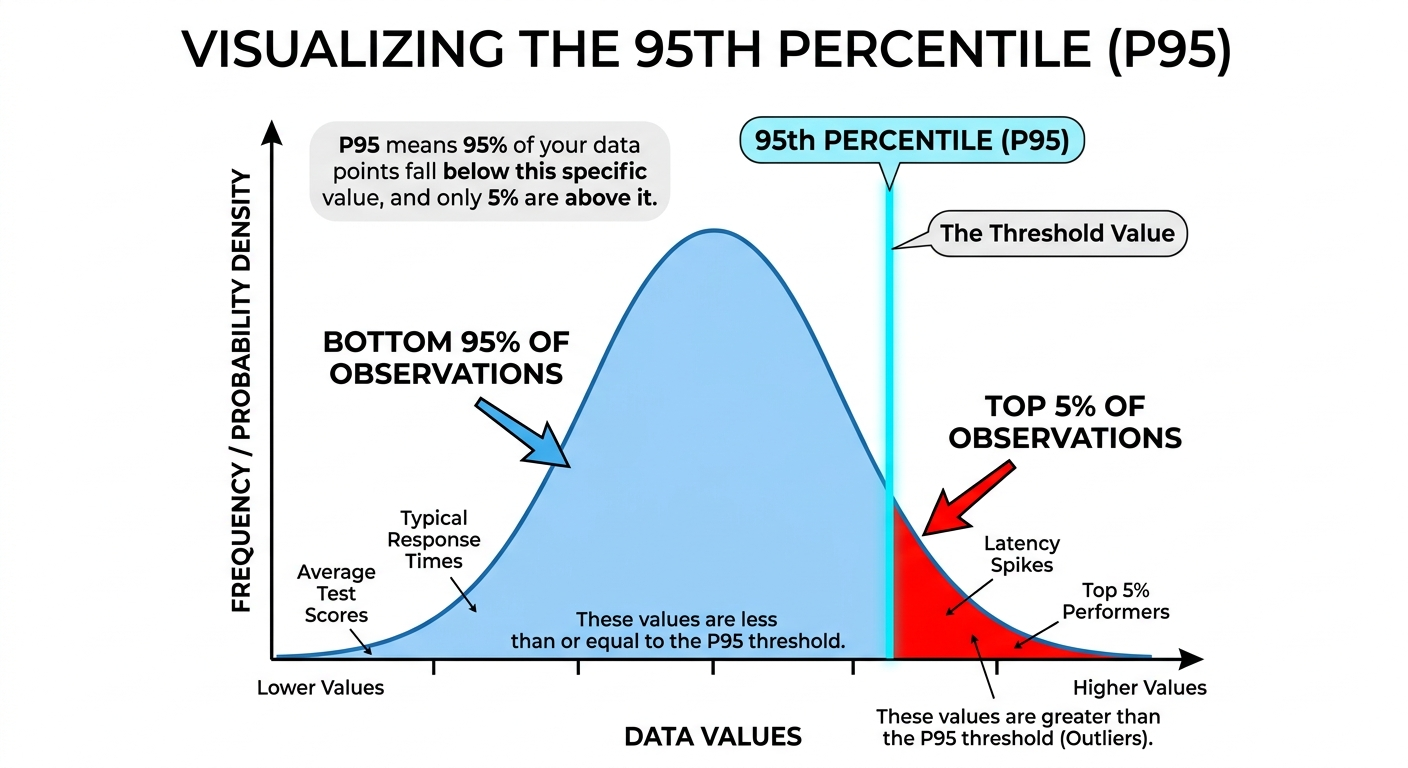
4.1. Creating Log-based Metrics
# Counter Metric: Count HTTP 500 errors
metric.type="logging.googleapis.com/user/httperror_count"
filter: httpRequest.status >= 500

# Distribution Metric: Extract request latency
metric.type="logging.googleapis.com/user/request_latency"
filter: httpRequest.latency
valueExtractor: regex_extract(httpRequest.latency, "(\d+)s", 1)
4.2. Use Cases
| Metric Type | Example |
|---|---|
| Counter | Count of 500 errors, failed logins, API failures |
| Distribution | Request latency, response size, processing time |
Log-based metrics appear in Cloud Monitoring alongside system metrics and can trigger alerts.
5. Audit Logs
These are critical for security and compliance.
| Type | Description | Enabled | Retention | Cost |
|---|---|---|---|---|
| Admin Activity | Configuration changes (create, update, delete resources) | Always ON | 400 days | Free |
| Data Access | Reading/writing user data (storage, databases) | Manual | 30 days | Paid |
| System Event | Google-managed actions (maintenance, autoscaling) | Always ON | 400 days | Free |
| Policy Denied | Security policy denials | Always ON | 400 days | Free |
5.1. Key Points
- Admin Activity: Records are stored for 400 days. This is fixed, automatic, and free — you cannot shorten or disable it.
- Data Access: Must be manually enabled per GCP service. Creates significant log volume.
- View Audit Logs: Cloud Console → IAM & Admin → Audit Logs
5.2. Viewing Audit Logs
# View admin activity logs
gcloud logging read "logName:\"admin.googleapis.com/activity\""

# View policy denied logs
gcloud logging read "logName:\"policy.googleapis.com/policy_activity\""
6. Access Control (IAM)
roles/logging.admin: Full control over all logging resources.roles/logging.configWriter: Permission to create sinks and log buckets.roles/logging.viewer: Permission to view logs in the Logs Explorer.roles/logging.privateLogViewer: Permission to view logs containing sensitive information.
7. Essential gcloud Commands
- Read Logs:
gcloud logging read "resource.type=gce_instance" - Create a Sink:
gcloud logging sinks create [SINK_NAME] storage.googleapis.com/[BUCKET_NAME] --log-filter="severity>=ERROR" - List Sinks:
gcloud logging sinks list - Delete Logs:
gcloud logging logs delete [LOG_NAME] - Write Log Entry:
gcloud logging write [LOG_NAME] "Log message" --severity=ERROR
7.1. Retention Details
| Log Type | Default Retention | Configurable |
|---|---|---|
| Standard Logs | 30 days | Yes (1-3650 days per bucket) |
| Admin Activity | 400 days | No (fixed) |
| System Event | 400 days | No (fixed) |
| Cloud Storage Archival | Unlimited | As long as you pay |
7.2. Supported Environments
| Environment | How Logs Are Collected |
|---|---|
| Compute Engine | Cloud Logging agent (Ops Agent) |
| GKE | Cloud Logging addon (Fluent Bit) |
| Cloud Run | Automatic via stdout/stderr |
| Cloud Functions | Automatic via stdout/stderr |
| App Engine | Automatic for managed runtimes |
| On-premises/AWS/Azure | Cloud Logging agent |
8. Exam Tips
- Export Choices:
- Archiving → Cloud Storage
- SQL Analysis → BigQuery or Log Analytics
- Real-time → Pub/Sub
- Retention vs. Sink: Remember that logs in the Logs Explorer have a retention period.
- Admin Activity Audit Logs: Always on, free, 400 days retention - you CANNOT disable these.
- Data Access Audit Logs: Must be enabled manually - generates significant volume.
- Log Buckets ≠ Cloud Storage Buckets: Log Buckets are for live log storage; Cloud Storage is for archival exports.
9. GCP Observability Tools Comparison
| Tool | Purpose | What it Answers |
|---|---|---|
| Cloud Logging | Log aggregation and analysis | What happened at a specific point in time? |
| Cloud Monitoring | Metrics, dashboards, alerting | Is my service healthy and performing well? |
| Cloud Profiler | Code-level performance analysis | Which function is using the most CPU/memory? |
| Cloud Trace | Distributed tracing | Where is latency in my service calls? |
| Error Reporting | Aggregated error tracking | What bugs are in my code? |
| Cloud Debugger | Live debugging | What is the state of my code at this moment? |
10. Practice Questions
Q1: You need to keep audit logs for 7 years for compliance. Where should you export them?
Answer: Cloud Storage (export via sink) - Cloud Logging only retains 30 days by default.
Q2: You want to query your logs using SQL without exporting to BigQuery. What feature do you use?
Answer: Log Analytics (2026 feature) - allows SQL queries directly on log buckets.
Q3: Which audit log type records when someone reads data from Cloud Storage?
Answer: Data Access audit log (must be manually enabled).
Cloud Monitoring: ACE Exam Study Guide (2026)

Image source: Vecta.io
1. Cloud Monitoring Overview
Cloud Monitoring provides visibility into the performance, uptime, and overall health of your applications and infrastructure.
- Key Characteristics:
- Full Stack: Monitors GCP services, AWS, and on-premises resources.
- Integrated: Collects metrics, events, and metadata from Cloud Logging, Trace, and Debugger.
- Real-time: Provides a real-time dashboarding and alerting system.
2. Metrics and Time Series
- System Metrics: Automatically collected from GCP services (e.g., CPU, Disk I/O).
- Custom Metrics: Metrics you define and send to Monitoring via the API.
- Log-based Metrics: Metrics derived from the content of your logs in Cloud Logging.
- Time Series: The fundamental data structure in Monitoring, representing data points over time.
Common Metric Types
| Metric | Description | Example |
|---|---|---|
| CPU Utilization | Percentage of CPU in use | 75% |
| Memory Usage | RAM utilization | 4.2 GB / 8 GB |
| Request Count | Number of requests received | 1,200 req/min |
| Request Latency | Time to process requests | p50: 45ms, p99: 200ms |
| Error Rate | Percentage of failed requests | 0.5% |
| Disk Usage | Storage utilization | 150 GB / 500 GB |
Metric Types by Resource
| Resource | Key Metrics |
|---|---|
| Compute Engine | CPU, Disk, Network, Instance uptime |
| Cloud Run | Request count, Latency, Container instances |
| GKE | CPU, Memory, Pod count, Network |
| Cloud SQL | CPU, Connections, Queries/sec |
| Load Balancer | Request count, Latency, Backend errors |
3. Dashboards, MQL, and Metrics Explorer
Dashboards provide a visual representation of your metrics.
- Google Cloud Dashboards: Pre-defined dashboards created automatically.
- Custom Dashboards: Dashboards you create to monitor specific aspects of your application.
- MQL (Monitoring Query Language): A powerful language used to create complex charts and data transformations.
MQL Example
fetch gce_instance
| metric 'compute.googleapis.com/instance/cpu/utilization'
| filter resource.zone == 'us-east1-b'
| align rate(1m)
| every 1m
| group_by ['instance_name'], mean(val())
Dashboard Types
| Type | Use Case |
|---|---|
| Built-in Dashboards | Auto-created per GCP service (GKE, Cloud Run, etc.) |
| Metrics Explorer View | Ad-hoc metric analysis and exploration |
| Custom Dashboards | User-defined charts for specific monitoring needs |
| Alerting Dashboards | Focused view on metrics with alerting policies |
Metrics Explorer
A tool for ad-hoc analysis of any metric:
- Select from hundreds of available metrics
- Filter by resource, zone, or labels
- Build custom charts without saving
- Export to dashboards or use in MQL queries
4. Alerting Policies
Alerting policies notify you when specific conditions are met.
Alerting Workflow
Define Condition (metric threshold)
         ↓
Set Duration (e.g., "for 5 minutes")
         ↓
Configure Notification Channel (email, SMS, Slack, PagerDuty, Webhook)
         ↓
Add Documentation (runbook links, escalation contacts)
         ↓
Alert Triggered → Incident Created
Alerting Policy Types
| Type | Description |
|---|---|
| Metric-based | Triggered when a metric exceeds a threshold |
| Log-based | Triggered when log entries match a filter |
| Availability | Triggered by uptime check failures |
| Multi-condition | Requires multiple conditions (AND/OR) to trigger |
-
Uptime Checks vs Alerting Policies:
- Uptime Checks: Test availability of a service (HTTP/HTTPS/TCP)
- Alerting Policies: React to metric conditions or uptime failures
-
Components of an Alerting Policy:
- Conditions: What triggers the alert (e.g., “CPU utilization > 80% for 5 minutes”).
- Notification Channels: How you are notified (Email, SMS, Slack, PagerDuty, Webhooks).
- Documentation: Instructions or links to playbooks included in the alert.
-
Incident Management: When an alert is triggered, an incident is created for tracking and resolution.
5. Synthetic Monitoring (2026 Update)
Synthetic monitoring replaces traditional uptime checks with more complex, programmable checks.
- Protocols: Supports HTTP, HTTPS, and TCP.
- Custom Scripts: Use Node.js or Python scripts to simulate complex user journeys (e.g., “Login -> Add to Cart -> Checkout”).
- Global Probes: Checks are performed from multiple regions around the world.
- Alerting Integration: Notify you if a synthetic check fails or exceeds latency thresholds.
In Cloud Monitoring, you create an uptime check specifying the URL, protocol (HTTP/HTTPS/TCP), frequency, and locations to check from. If the service fails to respond from multiple locations, an alert can be triggered.
6. Groups and Resources
Groups allow you to organize and monitor sets of resources together.
- Criteria: You can define groups based on names, tags, labels, or regions.
- Use Case: Monitor all web servers in the
us-east1region as a single entity.
6.1 SLOs and SLIs
Service Level Objectives (SLOs) and Service Level Indicators (SLIs) are key reliability concepts:
| Term | Definition | Example |
|---|---|---|
| SLI | Metric that measures service reliability | Request latency, error rate, availability |
| SLO | Target value for the SLI | “99.9% of requests complete in < 200ms” |
| SLA | Contractual guarantee (legal commitment) | “99.95% uptime” |
- SLO Monitoring: Cloud Monitoring can create alerting policies based on SLO burn rate to notify you before SLOs are breached.
7. Essential gcloud Commands
- List Metrics:
gcloud monitoring metric-descriptors list - Create a Dashboard:
gcloud monitoring dashboards create --config-from-file=[DASHBOARD_JSON] - List Alerting Policies:
gcloud monitoring policies list
8. Exam Tips
- Log-based Metric vs. System Metric: Use log-based metrics for counting log events. Use system metrics for performance data.
- Ops Agent: For “inside-the-OS” metrics like Memory usage and internal process stats, the Ops Agent must be installed on VMs.
- Synthetic Monitoring: If a question asks for testing a multi-step user flow from multiple regions, choose Synthetic Monitoring.
- Alerting vs. Uptime Checks: Uptime checks test availability; alerting policies react to metric conditions.
- Metrics Explorer: Use for ad-hoc analysis; dashboards are for persistent monitoring views.
9. Security and IAM
- IAM Roles:
roles/monitoring.admin: Full control over all Monitoring resourcesroles/monitoring.editor: Create and modify dashboards, alerts, uptime checksroles/monitoring.viewer: View metrics and dashboards (read-only)roles/monitoring.alertPolicyViewer: View alerting policiesroles/monitoring.alertPolicyEditor: Create and modify alerting policies
10. GCP Observability Tools Comparison
| Tool | Purpose | What it Answers |
|---|---|---|
| Cloud Monitoring | Metrics, dashboards, alerting | Is my service healthy and performing well? |
| Cloud Logging | Log aggregation and analysis | What happened at a specific point in time? |
| Cloud Profiler | Code-level performance analysis | Which function is using the most CPU/memory? |
| Cloud Trace | Distributed tracing | Where is latency in my service calls? |
| Error Reporting | Aggregated error tracking | What bugs are in my code? |
| Cloud Debugger | Live debugging | What is the state of my code at this moment? |
Cloud Trace: ACE Exam Study Guide
Image source: Google Cloud Documentation
1. Overview
Cloud Trace is a managed distributed tracing service that collects latency data from your applications and visualizes it in the Google Cloud Console.
Primary Purpose: Understand application performance and identify latency bottlenecks in microservices architectures.
How it Works: Tracks how a single request travels through various services (frontend, backend, database) and records the time taken at each step.
2. Key Concepts
| Concept | Description |
|---|---|
| Trace | Complete path (end-2-end) of a single request through your system |
| Span | Single operation within a trace (e.g., RPC call, database query) with start/end timestamps |
| Root Span | First span in a trace, representing the initial request |
| Trace ID | Unique identifier propagated between services via HTTP headers |
| Latency Profile | Waterfall chart showing where time was spent |
3. Service Integration
Auto-Instrumented (No Setup Required)
- App Engine (Standard and Flexible)
- Cloud Run (basic tracing enabled by default)
- Cloud Functions (basic tracing enabled by default)
Manual Instrumentation Required
- Compute Engine VMs
- GKE clusters
- Internal Load Balancers (configurable)
Recommended SDK: OpenTelemetry - sends data to Trace API, supports multi-cloud (AWS, Azure).
4. Trace Context Propagation
When a request crosses service boundaries, the trace context must be propagated:
- Header:
X-Cloud-Trace-Context - Format:
TRACE_ID/SPAN_ID;o=TRACE_TRUE - The receiving service continues the trace instead of starting a new one
5. Features and Analysis
- Trace Explorer: Search and visualize individual traces. Filter by URI, latency, or status code.
- Analysis Reports: Periodic reports comparing performance across versions or time periods.
- Bottleneck Detection: Identifies which operation causes the most delay.
- Waterfall Charts: Displays sequence and duration of spans.
- Screenshots: Capture trace views for documentation.
6. Retention and Limits
| Setting | Value |
|---|---|
| Data retention | 30 days (default) / 90 days (extended) |
| Free tier | 10 traces/second |
| Sampling rate | Configurable to control costs |
7. Cloud Trace vs Other Cloud Operations Tools
| Service | Question Answered | Data Type |
|---|---|---|
| Cloud Logging | “What happened?” | Text events, logs |
| Cloud Monitoring | “How is the system performing?” | Numerical metrics |
| Cloud Trace | “Where is the delay?” | Latency across services |
| Cloud Profiler | “Which code causes latency?” | CPU/memory within a service |
Key Distinction:
- Trace = Latency between services (request flow)
- Profiler = Latency within a service (code-level)
8. When to Use Cloud Trace
Use Cloud Trace when:
- Troubleshooting latency across microservices
- Identifying which service in a chain is slowing down requests
- Comparing performance between deployments
- Monitoring distributed tracing in production
Do NOT use Cloud Trace when:
- Single monolithic application (use Cloud Profiler instead)
- Real-time alerting needed (use Cloud Monitoring)
- Log analysis required (use Cloud Logging)
9. Security and IAM
| Role | Permission |
|---|---|
roles/cloudtrace.admin | Full control over Cloud Trace resources |
roles/cloudtrace.user | Send trace data to the API (for applications) |
roles/cloudtrace.viewer | View trace data and reports in console |
10. Essential gcloud Commands
-
Check API Status
gcloud services list --enabled | grep cloudtrace -
List recent traces (alpha)
gcloud alpha trace slices list --project=[PROJECT_ID]
11. Quick Reference Summary
| Feature | Value |
|---|---|
| Trace | Complete request path through services |
| Span | Single operation with timestamps |
| Propagation header | X-Cloud-Trace-Context |
| Auto-instrumented | App Engine, Cloud Run, Cloud Functions |
| Manual setup needed | Compute Engine, GKE |
| Recommended SDK | OpenTelemetry |
| Data retention | 30 days (default) |
| Answers the question | “Where is the delay?” |
12. Comparison Diagram
Cloud Trace vs Cloud Logging vs Cloud Monitoring
                          ┌──────────────────────────────────┐
                          │        Cloud Operations Suite    │
                          │   (Observability Stack in GCP)   │
                          └──────────────────────────────────┘
                                           │
       ┌───────────────────────────────────┼───────────────────────────────────┐
       │                                   │                                   │
       ▼                                   ▼                                   ▼
┌──────────────────────────┐  ┌──────────────────────────┐  ┌──────────────────────────┐
│      Cloud Logging       │  │     Cloud Monitoring     │  │        Cloud Trace       │
└──────────────────────────┘  └──────────────────────────┘  └──────────────────────────┘
│ What it captures:        │  │ What it captures:        │  │ What it captures:        │
│ • Text logs              │  │ • Metrics (CPU, RAM,     │  │ • Latency of requests    │
│ • Structured logs        │  │   QPS, errors, custom)   │  │ • Request flow across    │
│ • Application events     │  │ • SLOs, SLIs, alerts     │  │   microservices          │
│ • Error messages         │  │ • Dashboards             │  │ • Spans & trace IDs      │
└──────────────────────────┘  └──────────────────────────┘  └──────────────────────────┘
│ Answers the question:    │  │ Answers the question:    │  │ Answers the question:    │
│ “What happened?”         │  │ “How is the system       │  │ “Where is the delay?”    │
│                          │  │ performing?”             │  │                          │
└──────────────────────────┘  └──────────────────────────┘  └──────────────────────────┘
│ Typical use cases:       │  │ Typical use cases:       │  │ Typical use cases:       │
│ • Debugging errors       │  │ • Alerting on high CPU   │  │ • Troubleshooting slow   │
│ • Viewing logs per       │  │ • Monitoring uptime      │  │   requests               │
│   service or request     │  │ • SLO compliance         │  │ • Identifying bottleneck │
│ • Log-based metrics      │  │ • Trend analysis         │  │   microservices          │
└──────────────────────────┘  └──────────────────────────┘  └──────────────────────────┘
                                             │
                         ┌───────────────────┼───────────────────┐
                         │                   │                   │
                         ▼                   ▼                   ▼
                   ┌──────────────────────────────────────────────────┐
                   │   Combined View: Observability Workflow in GCP   │
                   └──────────────────────────────────────────────────┘
                   │ Logs show **what happened**                      │
                   │ Metrics show **system health**                   │
                   │ Traces show **where latency occurs**             │
                   └──────────────────────────────────────────────────┘
Cloud Profiler: ACE Exam Study Guide (2026)

Image source: Cloud Icons
1. Cloud Profiler Overview
Cloud Profiler is a statistical, low-overhead tool that continuously profiles the performance of CPU, heap, and other resources in your applications.
- Primary Purpose: To identify specific functions or lines of code that are consuming the most resources (CPU, Memory) to optimize performance and reduce costs.
- How it Works: A small agent runs inside your application and sends profiling data to the Profiler backend.
- Low Overhead: Designed to run in production with very low impact (typically less than 5%).
2. Key Concepts
-
Profile: Data representing resource usage over a short period (default: 10 seconds, configurable).
-
Flame Graph: The primary visualization tool.
- Width: Represents the percentage of the resource consumed.
- Vertical Axis: Shows function call hierarchy (parent functions at top, callees below).
-
Continuous Profiling: Cloud Profiler is always-on in production.
Enabling the Profiler Agent
The profiler agent must be included in your application code:
| Environment | How to Enable |
|---|---|
| Compute Engine / GKE | Install Cloud Profiler library and configure service account |
| App Engine | Automatically available for supported runtimes |
| Cloud Run | Install Cloud Profiler library |
| Cloud Functions | Install Cloud Profiler library |
Java Example
Add Maven dependency:
<dependency>
    <groupId>com.google.cloud.profiler</groupId>
    <artifactId>cloud-profiler-java-agent</artifactId>
    <version>2.3.1</version>
</dependency>
Add to startup flags (VM options):
-javaagent:/path/to/cloud-profiler-java-agent.jar
Or via Spring Boot application.properties:
spring.cloud.gcp.profiler.enabled=true
3. Supported Environments and Languages
- Supported Environments:
- Compute Engine (VMs)
- Google Kubernetes Engine (GKE)
- App Engine
- Cloud Run
- Cloud Functions
- Supported Languages:
- Go, Java, Python, Node.js, C++.
4. Profile Types
Data collected depends on the language:
- CPU Time: Time spent by the CPU executing a function.
- Wall Time: Total time elapsed during execution (includes waiting for I/O).
- Heap: Amount of memory currently in use (live objects only).
- Allocated Heap: Total memory allocated during profiling (includes freed objects) - useful for identifying memory leaks.
- Heap Allocation Rate: How fast memory is being allocated over time.
- Threads: Number of active threads.
5. Security and IAM
- IAM Roles:
roles/cloudprofiler.admin: Full control over Profiler resources.roles/cloudprofiler.agent: Allows the application’s service account to send profiling data.roles/cloudprofiler.user: Allows viewing and interacting with the UI.
6. Essential gcloud Commands
- Enable API:
gcloud services enable cloudprofiler.googleapis.com - List profiles:
gcloud profiler profiles list - Profile data is primarily viewed via: Cloud Console (Cloud Run → Profiler, or direct Profiler dashboard)
Troubleshooting
| Issue | Solution |
|---|---|
| No profiling data | Check service account has roles/cloudprofiler.agent |
| Agent not starting | Verify the profiler library is correctly installed and initialized |
| Missing permissions | Ensure IAM roles are properly assigned to the service account |
7. GCP Observability Tools Comparison
| Tool | Purpose | What it Answers |
|---|---|---|
| Cloud Profiler | Code-level performance analysis | Which function is using the most CPU/memory? |
| Cloud Trace | Distributed tracing | Where is latency in my service calls? |
| Cloud Debugger | Live debugging | What is the state of my code at this moment? |
8. Exam Tips
- Profiler vs. Trace:
- Cloud Trace: Identifies latency bottlenecks between services.
- Cloud Profiler: Identifies performance issues within a service (code level).
- Production Use: If a question mentions optimizing code in a production environment with minimal overhead, choose Cloud Profiler.
- Agent Requirement: Cloud Profiler always requires an agent or library to be included in your application code.
- Dashboard Location: Profiles are viewed in Cloud Console under Cloud Profiler or via Cloud Run → Profiler.
9. Practice Questions
Q1: A production service shows high CPU usage but you cannot reproduce it locally. Which GCP tool should you use?
Answer: Cloud Profiler
Q2: You need to identify which function in your Java application is causing a memory leak. The service is running on GKE. What do you check?
Answer: Cloud Profiler - look at Heap and Allocated Heap profiles
Q3: You want to understand why API response times are high across multiple microservices. What should you use?
Answer: Cloud Trace (not Profiler - this is about inter-service latency, not code-level issues)
Error Reporting: ACE Exam Study Guide (2026)

Image source: Google Cloud Documentation
1. Error Reporting Overview
Cloud Error Reporting aggregates and displays errors from your running cloud services.
- Primary Purpose: To provide a centralized view of application errors, crash reports, and exceptions to help you identify, prioritize, and resolve issues quickly.
- Automatic Aggregation: It automatically groups similar errors based on their stack traces and context.
- Real-time Alerts: You can receive notifications (Email, SMS, Mobile) when a new error is detected or an existing error occurs frequently.
2. Key Concepts
- Error Group: A collection of individual error occurrences that share a similar cause (e.g., the same stack trace).
- Resolution Status: Track error groups as Open, Acknowledged, Resolved, or Muted.
- First and Last Seen: Timestamps that help you understand when a bug was introduced and how recently it occurred.
- Impact Analysis: Shows how many users are affected by a specific error and how many occurrences have happened.
- Error Rate: Number of errors per minute/second - helps identify error spikes.
Error Tracking Workflow
Application throws exception
         ↓
Logs written to stdout/stderr (in structured format)
         ↓
Cloud Logging captures logs
         ↓
Error Reporting parses and groups similar errors
         ↓
Dashboard displays aggregated error groups
Required Error Format
Error Reporting expects errors in structured log format:
{
  "severity": "ERROR",
  "message": "java.lang.NullPointerException: Cannot invoke method",
  "logging.googleapis.com/labels": {
    "error_group": "group_id"
  }
}
| Environment | Format Method |
|---|---|
| App Engine | Automatic (managed runtimes) |
| Cloud Run/Functions | Write to stderr in text or JSON format |
| GKE/Compute Engine | Use Error Reporting API or structured logging |
3. Supported Sources
Error Reporting can collect errors from several sources:
- App Engine: Integrated automatically for supported languages.
- Cloud Run and Cloud Functions: Errors written to
stdoutorstderrin a supported format are automatically captured. - GKE and Compute Engine:
- Errors can be captured from logs in Cloud Logging if they are in a supported format.
- Alternatively, use the Error Reporting API directly from your application code.
import com.google.cloud.errorreporting.v1beta1.ReportErrorsServiceClient;
import com.google.devtools.clouderrorreporting.v1beta1.ReportedErrorEvent;
import com.google.devtools.clouderrorreporting.v1beta1.ErrorContext;
import com.google.devtools.clouderrorreporting.v1beta1.SourceLocation;

try {
    // Your code that throws an exception
} catch (Exception e) {
    try (var client = ReportErrorsServiceClient.create()) {
        var error = ReportedErrorEvent.newBuilder()
            .setMessage(e.toString())
            .setContext(ErrorContext.newBuilder()
                .setReportLocation(SourceLocation.newBuilder()
                    .setFilePath("MyClass.java")
                    .setLineNumber(42)
                    .setFunctionName("myMethod")
                    .build())
                .build())
            .build();
        client.reportProjectOwnershipError(error);
    }
}
Java example: Reporting errors via Error Reporting API
- Cloud Logging: You can configure Error Reporting to watch specific logs for exceptions.
4. Supported Languages
Error Reporting supports major languages including: Go, Java, Python, Node.js, Ruby, PHP and .NET.
5. Security and IAM
- IAM Roles:
roles/errorreporting.admin: Full control over Error Reporting resources.roles/errorreporting.writer: Permission to send error data to the API.roles/errorreporting.viewer: Permission to view error reports in the console.roles/errorreporting.user: Combined viewer and writer permissions.
6. Integration with Other Services
- Cloud Logging: Primary ingestion method - errors written to logs are automatically parsed.
- Cloud Monitoring: Create alerting policies based on error frequencies (errors per minute threshold).
- Issue Trackers: Link error groups to external trackers (Jira, GitHub Issues) directly from the console.
- Cloud Trace: Correlate errors with latency data to identify if errors cause performance issues.
7. Essential gcloud Commands
- Enable API:
gcloud services enable clouderrorreporting.googleapis.com - List Error Groups:
gcloud alpha error-reporting groups list - Check API Status:
gcloud services list --enabled | grep clouderrorreporting
Console Location
Errors are viewed in Cloud Console:
- Direct path: Cloud Console → Logging → Error Reporting
- From Cloud Run: Your service → Errors tab
- From App Engine: App Engine → Dashboard → Errors
Troubleshooting
| Issue | Solution |
|---|---|
| Errors not appearing | Check logs are written to stderr/stdout in correct format |
| Missing error groups | Verify Error Reporting API is enabled |
| Permission denied | Ensure service account has roles/errorreporting.writer |
8. GCP Observability Tools Comparison
| Tool | Purpose | What it Answers |
|---|---|---|
| Cloud Logging | Log aggregation and analysis | What happened at a specific point in time? |
| Error Reporting | Aggregated error tracking | What bugs are in my code? |
| Cloud Debugger | Live debugging | What is the state of my code at this moment? |
9. Exam Tips
- Error vs. Log:
- Cloud Logging: Individual text events over time.
- Error Reporting: Aggregated stack traces and exceptions.
- Troubleshooting: If a question asks for a centralized way to track and manage application crashes or exceptions, the answer is Error Reporting.
- Automatic Groups: Error Reporting groups errors intelligently based on stack trace - saves developers from redundant logs.
- Notification: To get notified when a new error occurs, use Error Reporting’s built-in notification feature.
- Issue Linking: Link errors to external bug trackers (Jira, GitHub Issues) directly from the console.
- Mute Behavior: Muting an error group suppresses notifications but does not delete the error data.
Cloud Build: ACE Exam Study Guide (2026)
Image source: Vecta.io
1. Cloud Build Overview
Cloud Build is a serverless, managed CI/CD (Continuous Integration / Continuous Deployment) platform that executes builds on Google Cloud’s infrastructure.
- Key Characteristics:
- Serverless: No build servers to manage or scale.
- Container-Native: Every step in a build is executed in a separate Docker container.
- Flexible: Can build code from a variety of sources and deploy to a variety of targets.
- Logging: All build logs are available in Cloud Logging for troubleshooting.
2. Core Concepts
- Build Step: A single operation in a build process (e.g.,
npm install,docker build). Each step is executed as a container. - Build Config File: Usually named
cloudbuild.yaml(orcloudbuild.json). It defines the steps, environment variables, and arguments for the build. - Build Trigger: A mechanism that automatically starts a build when code is pushed to a repository (e.g., GitHub, Bitbucket, Cloud Source Repositories).
- Build Artifacts: The result of a successful build, such as a container image (stored in Artifact Registry) or a binary (stored in Cloud Storage).
- Available Builders: Google provides pre-built images in
gcr.io/cloud-builders/(e.g.,docker,gcloud,npm,java). Community-built builders are ingcr.io/cloud-builders-local/builderfor local testing.
3. Build Configuration (cloudbuild.yaml)
A typical build configuration file includes:
- steps: A list of build steps to be executed in order.
- name: The name of the Docker image to use for that step (e.g.,
gcr.io/cloud-builders/docker). - args: The arguments to pass to the container’s entrypoint.
- env: Environment variables for the step.
- timeout: The maximum duration for a step or the entire build (default: 10m, max: 60m).
- images: Specifies which built images should be pushed to Artifact Registry after a successful build.
- options: Additional build options:
- logging:
CLOUD_LOGGING_ONLY,LOCAL_AND_CLOUD_LOGGING, orNONE. - machineType:
E2_HIGHERorN1_HIGHER_8(default:E2_HIGHER).
- logging:
3.1. Example: cloudbuild.yaml
steps:
  - name: 'gcr.io/cloud-builders/docker'
    args: ['build', '-t', 'gcr.io/$PROJECT_ID/myimage:$COMMIT_SHA', '.']
  - name: 'gcr.io/cloud-builders/docker'
    args: ['push', 'gcr.io/$PROJECT_ID/myimage:$COMMIT_SHA']
images:
  - 'gcr.io/$PROJECT_ID/myimage:$COMMIT_SHA'
options:
  logging: 'CLOUD_LOGGING_ONLY'
  machineType: 'E2_HIGHER'
timeout: '20m'
4. Build Triggers
- Source Repositories: GitHub, Bitbucket, and Cloud Source Repositories (CSR).
- Events: Pushes to a branch, tags, or pull requests.
- Substitution Variables: Allows you to pass dynamic values (like the commit ID or branch name) into your build config (e.g.,
_SERVICE_NAME).
5. Build Environments
- Default Pool: A shared, multi-tenant pool of worker machines.
- Private Pools: Dedicated, customizable worker pools that can access resources in your VPC (e.g., a private GKE cluster or an internal database) via VPC Peering.
6. Security and IAM
- Cloud Build Service Account: The identity that Cloud Build uses to execute builds.
- Default:
[PROJECT_NUMBER]@cloudbuild.gserviceaccount.com - Exam Tip: You must grant this service account the necessary IAM roles to deploy to other services (e.g.,
roles/run.adminto deploy to Cloud Run).
- Default:
- Artifact Integrity: You can use Binary Authorization in conjunction with Cloud Build to ensure that only images built and signed by Cloud Build are deployed to GKE.
- Secret Manager: For sensitive data (API keys, tokens), store in Secret Manager and access via
secretEnvfield incloudbuild.yaml.
7. Essential gcloud Commands
- Submit a Build Manually:
gcloud builds submit --config cloudbuild.yaml . - Build a Docker Image directly:
gcloud builds submit --tag gcr.io/[PROJECT_ID]/[IMAGE_NAME] . - List Builds:
gcloud builds list - Describe a Build:
gcloud builds describe [BUILD_ID]
8. Exam Tips
- Steps as Containers: Remember that every single step in a
cloudbuild.yamlis a Docker container. - The Service Account Gotcha: If a build fails with a Permission Denied error during deployment, the first thing to check is if the Cloud Build Service Account has the correct IAM role for the target service (e.g., GKE or Cloud Run).
- Artifact Registry: By default, Cloud Build is closely integrated with Artifact Registry for storing container images. GCR is deprecated - use Artifact Registry instead.
- Caching: You can speed up builds by using Docker’s
--cache-fromfeature or by using a persistent disk for caching in a Private Pool. - Parallelism: You can run build steps in parallel by using the
waitForfield in yourcloudbuild.yaml. - Timeout Issues: If builds time out, increase the
timeoutfield (max: 60m) or optimize your build steps. - Troubleshooting: Check Cloud Logging for detailed error messages when builds fail.
Artifact Registry: ACE Exam Study Guide (2026)

Image source: Google Cloud Documentation
1. Artifact Registry Overview
Artifact Registry is the evolution of Container Registry (GCR), providing a single, secure, and managed place to store and manage build artifacts (container images, language packages, and OS packages).
- Key Characteristics:
- Unified: Stores Docker images, Maven (Java), npm (Node.js), PyPI (Python), and OS packages (Debian, RPM).
- Secure: Supports vulnerability scanning, Binary Authorization, and fine-grained IAM controls.
- Regional: Repositories are regional or multi-regional, unlike the project-wide nature of GCR.
- Replacement for GCR: Google recommends using Artifact Registry for all new projects.
| Feature | Artifact Registry (AR) | Google Container Registry (GCR) |
|---|---|---|
| Status | Current, fully supported; recommended for all new workloads Legacy; | in maintenance mode |
| Supported Artifact Types | Containers, Maven, npm, Python, generic artifacts | Containers only |
| Repository Structure | Regional or multi‑regional repositories | Multi‑regional buckets (us, eu, asia) |
| IAM & Permissions | Fine‑grained, repo‑level IAM | Bucket‑level IAM (coarse) |
| VPC‑SC Support | Full support | Limited |
| Security Scanning | Built‑in scanning + deeper integration with Security Command Center | Basic container scanning |
| Performance | Faster pulls, optimized caching, regional isolation | Older architecture, slower under load |
| Tag & Version Management | More flexible; supports immutability policies | Basic tagging |
| Pricing Model | Storage + network egress (per repo) | Storage + network egress (per bucket) |
| Recommended Use | All new container and artifact storage | Only for legacy workloads; migrate to AR |
2. Core Concepts
- Repository: A container for artifacts of a specific type (e.g., a “Docker” repository).
- Package: A group of artifacts that share the same name (e.g.,
my-app). - Version: A specific instance of a package (e.g.,
v1.0.0or a Docker tag). - Registry Format: The format of the repository (e.g.,
Docker,npm,Maven).
3. Repository Types
- Standard: Stores your private artifacts.
- Remote: Acts as a proxy for external repositories (e.g., Docker Hub, npmjs.org) and caches them locally for faster, more reliable builds.
- Virtual: Combines multiple standard and remote repositories into a single endpoint.
4. Security and Compliance
- Vulnerability Scanning: Automatically scans container images for known security vulnerabilities.
- Binary Authorization: Integration with GKE ensures only trusted, scanned images are deployed.
- CMEK (Customer-Managed Encryption Keys): Allows you to encrypt your artifacts with your own keys from Cloud KMS.
- Fine-grained IAM: Permissions can be granted at the repository level, whereas GCR permissions were tied to the underlying Cloud Storage bucket.
5. Repository Structure (Naming)
For Docker images, the format is:
[LOCATION]-docker.pkg.dev/[PROJECT_ID]/[REPOSITORY_NAME]/[IMAGE_NAME]:[TAG]
- Example:
us-central1-docker.pkg.dev/my-project/my-repo/my-app:v1
6. Access Control (IAM)
roles/artifactregistry.admin: Full control over repositories and artifacts.roles/artifactregistry.repoAdmin: Manage repositories only.roles/artifactregistry.writer: Upload and delete artifacts.roles/artifactregistry.reader: View and pull artifacts.
7. Essential gcloud Commands
- Create a Docker Repository:
gcloud artifacts repositories create [NAME] --repository-format=docker --location=[LOCATION] --description="My Docker repo" - Configure Docker for Artifact Registry:
gcloud auth configure-docker [LOCATION]-docker.pkg.dev - List Repositories:
gcloud artifacts repositories list - List Artifacts in a Repository:
gcloud artifacts docker images list [LOCATION]-docker.pkg.dev/[PROJECT]/[REPO]
8. Exam Tips
- GCR vs. Artifact Registry: Remember that Artifact Registry is the modern, regional, and multi-format successor to Container Registry (GCR).
- Vulnerability Scanning: Know that this is a core feature for secure container-based workflows.
- Repository Naming: Be prepared to identify the correct format for an Artifact Registry Docker image URL.
- Multi-format: If a question mentions storing npm or Python packages in Google Cloud, the answer is always Artifact Registry.
- Cleanup Policies: You can define policies to automatically delete old versions of packages to save costs.
Deployment Manager: ACE Exam Study Guide (2026)

Image source: Vecta.io
1. Deployment Manager Overview
Deployment Manager is an Infrastructure as Code (IaC) service that allows you to automate the creation and management of Google Cloud resources.
- Key Characteristics:
- Declarative: You specify what the infrastructure should look like, and Google Cloud handles the how to create it.
- Infrastructure as Code: Allows you to version control and repeatably deploy your infrastructure.
- Native to GCP: Fully integrated with Google Cloud services and IAM.
2. Core Components
- Configuration: A single YAML file that defines all the resources you want in a deployment.
- Templates: Reusable code blocks used to simplify configurations. Written in Jinja2 or Python.
- Resources: Individual GCP services (e.g., a VM, a Bucket) defined in the configuration.
- Types: The specific kind of resource being created (e.g.,
compute.v1.instance). - Properties: The settings for a resource (e.g.,
machineType,zone). - Manifest: A file created after deployment that shows the final applied configuration - useful for auditing.
- Outputs: Exposes resource properties (e.g., IP address, URL) after creation for reference.
3. Configuration File Structure (YAML)
A basic configuration file includes a resources list:
resources:
  - name: my-vm
    type: compute.v1.instance
    properties:
      zone: us-central1-a
      machineType: zones/us-central1-a/machineTypes/n1-standard-1
      # ... other properties
4. Templates (Jinja2 and Python)
Templates allow you to abstract logic and make configurations more dynamic.
- Jinja2: Simpler, logic-based templating.
- Python: More powerful, allows for complex calculations and logic.
- Importing: Templates must be explicitly imported into the main YAML configuration file using
importsandresources. - Dependencies: Resources can reference each other; Deployment Manager infers the creation order based on references.
- basePath: Used in templates to specify how to access the template file path.
4.1. Example: Python Template
def generate_config(context):
  """Generate resource configuration."""
  return [
    {
      'name': context.properties['instanceName'],
      'type': 'compute.v1.instance',
      'properties': {
        'zone': context.properties['zone'],
        'machineType': 'zones/' + context.properties['zone'] + '/machineTypes/n1-standard-1',
        'networkInterfaces': [{
          'network': 'global/networks/default',
          'accessConfigs': [{'type': 'ONE_TO_ONE_NAT'}]
        }]
      }
    }
  ]
5. Deployment Lifecycle
- Create: Initial deployment of resources.
- Preview: Allows you to see what Deployment Manager will do without actually creating resources. (Uses the
--previewflag). - Update: Modifying an existing deployment. Deployment Manager determines the difference and applies changes.
- Delete: Removes all resources associated with a deployment.
5.1. Deleting Deployment Manager
Default Behavior (Delete Policy: DELETE)
When you delete a deployment using the Google Cloud Console or the standard CLI command, the default behavior is to delete the deployment metadata and all underlying resources (e.g., VM instances, databases, firewalls) created by that deployment.
Warning: This operation is permanent and cannot be undone.
Alternative Behavior (Delete Policy: ABANDON)
If you want to remove the deployment record from Deployment Manager but keep the actual resources running in your project, you must explicitly use the ABANDON policy via the gcloud CLI or API.
gcloud deployment-manager deployments delete [DEPLOYMENT_NAME] --delete-policy=ABANDON
Use Case: This is helpful if you want to stop managing resources via Deployment Manager (perhaps to switch to Terraform or manual management) without destroying your infrastructure.
| Action | Policy | Result for Resources | Result for Deployment Metadata |
|---|---|---|---|
| Standard Delete | DELETE (Default) | Deleted | Removed |
| Abandon | ABANDON | Kept (Remain active) | Removed |
6. Security and IAM
- Service Account: Deployment Manager uses the Cloud APIs Service Agent by default to create resources on your behalf.
- Default:
service-[PROJECT_NUMBER]@cloudservices.gserviceaccount.com - Exam Tip: If Deployment Manager fails to create a resource, ensure this service agent has the necessary IAM permissions.
- Default:
- Logging: All deployment operations are logged in Cloud Logging for auditing.
- IAM Roles:
roles/deploymentmanager.admin: Full control.roles/deploymentmanager.editor: Create and manage deployments.roles/deploymentmanager.viewer: View deployments only.
7. Essential gcloud Commands
- Create a Deployment:
gcloud deployment-manager deployments create [NAME] --config [FILE.YAML] - Update a Deployment:
gcloud deployment-manager deployments update [NAME] --config [NEW_FILE.YAML] - Preview a Deployment:
gcloud deployment-manager deployments create [NAME] --config [FILE.YAML] --preview - List Deployments:
gcloud deployment-manager deployments list - Delete a Deployment:
gcloud deployment-manager deployments delete [NAME]
8. Exam Tips
- YAML vs. Templates: Remember that the main config is always YAML, but reusable parts are Jinja2 or Python.
- Declarative Nature: If a question asks how to ensure a specific state for infrastructure repeatably, the answer is often Deployment Manager (or Terraform).
- Terraform vs. Deployment Manager: While both are IaC, Deployment Manager is the Google-native tool. If a question specifically mentions “GCP-native templates,” it’s Deployment Manager.
- Note: For new projects, Google recommends Terraform over Deployment Manager.
- Preview Mode: Always use the
--previewflag to validate changes before applying them to production. - Resource Types: Familiarize yourself with the syntax for types like
compute.v1.instanceorstorage.v1.bucket.
Cloud Scheduler: ACE Exam Study Guide (2026)

Image source: Google Cloud Documentation
1. Cloud Scheduler Overview
Cloud Scheduler is a fully managed enterprise-grade cron job service. It allows you to schedule virtually any job, including batch, big data, and cloud infrastructure operations.
- Key Characteristics:
- Fully Managed: No infrastructure to manage or scale.
- Reliability: Guaranteed at-least-once delivery to your targets.
- Unified: Provides a single interface to manage all your scheduled jobs.
- PaaS Nature: It is a serverless product; you pay per job per month.
2. Target Types (How it triggers work)
Cloud Scheduler can trigger three main types of targets:
- HTTP/S Targets:
- Triggers any publicly accessible URL or an internal URL (if configured correctly).
- Supports custom HTTP headers and methods (GET, POST, PUT, etc.).
- Standard for triggering Cloud Run or Cloud Functions.
- Pub/Sub Targets:
- Publishes a message to a specific Pub/Sub topic.
- Ideal for decoupled architectures where multiple services subscribe to the same trigger.
- App Engine HTTP Targets:
- Sends an HTTP request to a specific service and handler within an App Engine app.
- Uses App Engine’s internal task queue infrastructure.
3. Schedule Syntax (Cron Format)
Cloud Scheduler uses the standard Unix cron format: * * * * * (Minute, Hour, Day of Month, Month, Day of Week).
- Example:
0 9 * * 1runs every Monday at 9:00 AM. - Timezone: You can specify a timezone for the job (e.g.,
UTC,America/New_York). If not specified, it defaults toUTC.
For more details on cron see the Crontab Guru.
4. Reliability and Retries
- At-least-once delivery: Google guarantees that the job will be sent at least once. Your code should be idempotent to handle potential duplicate triggers.
- Retry Config: You can configure:
- Max Retries: Number of times to try again if the target returns an error.
- Min/Max Backoff: The delay between retry attempts.
- Max Doublings: How many times the backoff interval is doubled.
5. Security and Authentication
-
Auth for HTTP Targets:
- OIDC Token: Used for services that require OpenID Connect (e.g., Cloud Run, Cloud Functions).
OIDC is an identity layer built on top of OAuth 2.0 that adds user authentication and provides ID tokens containing user identity information.
- OAuth Token: Used for Google APIs.
OAuth 2.0 is an authorization framework that lets an application access a user’s resources (APIs, data) on another service without needing the user’s password.
- Service Account: You must specify a service account that has the permissions to invoke the target service (e.g.,
roles/run.invoker).
OAuth handles authorization (permissions), while OIDC adds authentication (identity) on top of OAuth.
- OIDC Token: Used for services that require OpenID Connect (e.g., Cloud Run, Cloud Functions).
-
IAM Roles:
roles/cloudscheduler.admin: Full control.roles/cloudscheduler.jobRunner: Permission to run jobs manually.roles/cloudscheduler.viewer: View-only access.
6. Essential gcloud Commands
- Create a Pub/Sub Job:
gcloud scheduler jobs create pubsub [JOB_NAME] --schedule="0 9 * * 1" --topic=[TOPIC_NAME] --message-body="Hello world" - Create an HTTP Job:
gcloud scheduler jobs create http [JOB_NAME] --schedule="0 0 * * *" --uri=[URL] --oidc-service-account-email=[SA_EMAIL] - Run a Job Manually (for testing):
gcloud scheduler jobs run [JOB_NAME] - List Jobs:
gcloud scheduler jobs list - Pause/Resume Job:
gcloud scheduler jobs pause [JOB_NAME]/gcloud scheduler jobs resume [JOB_NAME]
7. Exam Tips
- The “Cron” Keyword: If a question asks how to run a task on a schedule (e.g., “daily at 2 AM”), look for Cloud Scheduler.
- Idempotency: Because Cloud Scheduler guarantees “at-least-once” delivery, your backend logic must be able to handle receiving the same request twice without side effects.
- Triggering Serverless: For Cloud Run or Cloud Functions, use the HTTP target with an OIDC token and a service account with the Invoker role.
- App Engine Region: Cloud Scheduler requires an App Engine application to be initialized in the project (it uses the same underlying location). You cannot change this location later.
- Cron Format: Be familiar with the 5-field cron syntax for basic scheduling questions.
8. Limitations and Quotas
- Jobs per project: Limited to a certain number per project (check current quotas in Cloud Console).
- Frequency: Minimum interval is 1 minute between job executions.
- App Engine Dependency: Requires App Engine to be enabled in the project for location assignment.
- Payload size: Pub/Sub message body has size limits (typically 256KB).
9. Cloud Scheduler vs Cloud Tasks
| Feature | Cloud Scheduler | Cloud Tasks |
|---|---|---|
| Type | Fully managed cron service | Task queue service |
| Use case | Time-based triggers | Work queue processing |
| Target control | Simple HTTP/Pub/Sub | More control over task execution |
| Retry behavior | Configurable backoff | Queue-based with automatic retry |
| Best for | Scheduled jobs, periodic tasks | Decoupled async workloads |
When to use Cloud Tasks: If you need to process large volumes of tasks, want finer control over queue behavior, or need to throttle task execution rate.
10. Troubleshooting
- Job not triggering: Check job status (
gcloud scheduler jobs describe), verify the schedule syntax, ensure the target service is accessible. - Authentication failures: Verify the service account has the correct IAM roles (e.g.,
roles/run.invokerfor Cloud Run). - Location errors: Confirm App Engine is initialized in the project with the correct region.
- Use Logs: Cloud Scheduler logs executions in Cloud Logging - check for error messages under the specific job.
11. Job States and Lifecycle
- Enabled: Job is active and will execute on schedule.
- Disabled: Job exists but won’t execute (can be re-enabled).
- Paused: Job is temporarily paused (can be resumed).
- Job History: Use Cloud Logging to view past executions, success/failure status, and error details.
While both
disabledandpausedstates stop a job from running, the difference lies in intent and behavior regarding missed schedules.
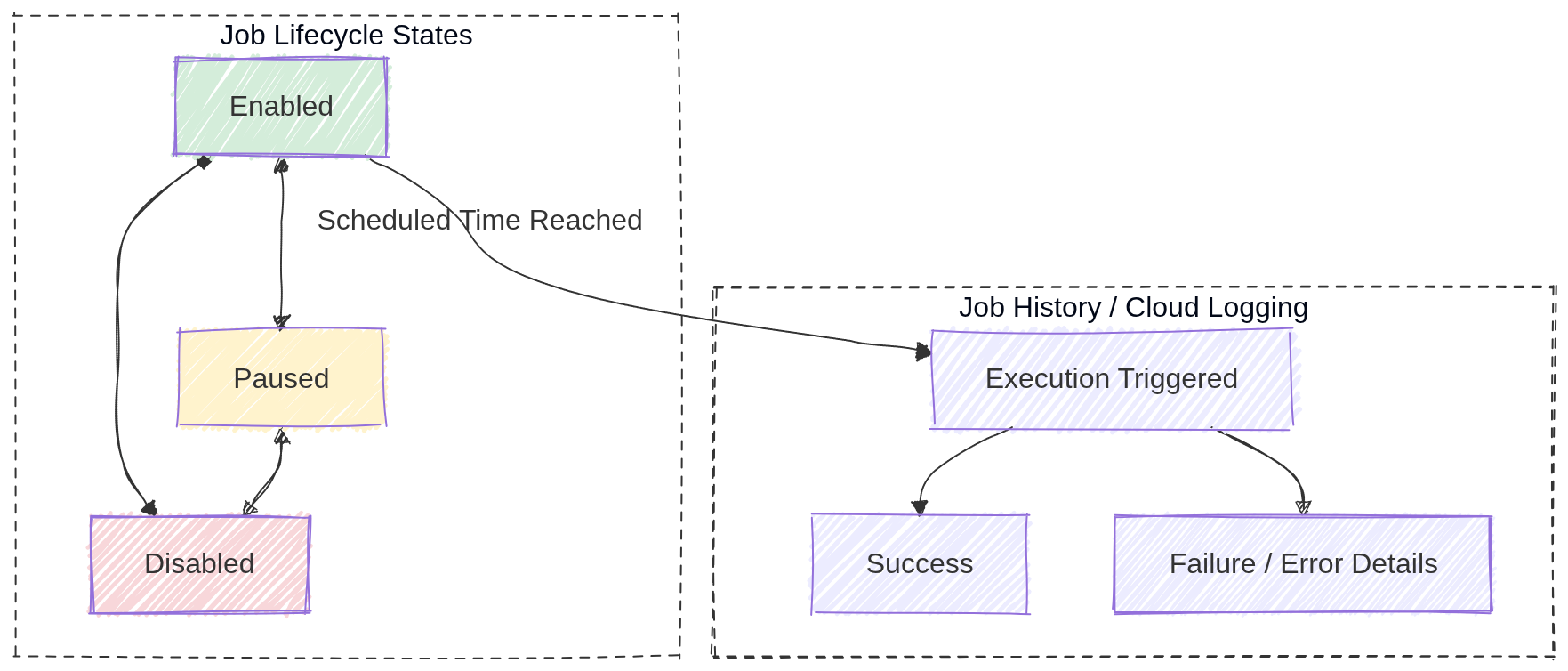
Image source: Own work (Mermaid diagram).
12. Real-World Use Cases
- Data pipeline automation: Trigger a Cloud Function or Dataflow job nightly to process daily data.
- Database maintenance: Run a scheduled script to clean up old records or optimize tables.
- Report generation: Send a daily email report by triggering a Cloud Run service that generates and emails reports.
- Resource cleanup: Automatically delete old temporary files from Cloud Storage every week.
- Instance scheduling: Start/stop Compute Engine instances during business hours to save costs.
13. Additional IAM Roles
roles/iam.serviceAccountUser: Required to impersonate or use a service account for job authentication.roles/pubsub.publisher: Needed when creating Pub/Sub target jobs to publish messages to topics.
Cloud Pub/Sub (GCP)
Image source: Google Cloud Documentation
1. Overview
Cloud Pub/Sub is a fully managed, global, serverless messaging service that enables asynchronous, event-driven communication between services. It decouples publishers (services that send messages) from subscribers (services that receive and process messages).
Key Concept: Pub/Sub provides at-least-once delivery. Applications must be idempotent to handle potential duplicate messages.
2. Core Concepts
| Concept | Description |
|---|---|
| Topic | A named channel where publishers send messages |
| Subscription | A named resource representing the stream of messages from a topic |
| Message | The data payload (+ optional attributes) sent by publishers |
| Publisher | An application that creates and sends messages to a topic |
| Subscriber | An application that receives messages from a subscription |
3. Subscription Types
3.1. Pull Subscription
- The subscriber initiates requests to fetch messages from Pub/Sub
- Best for: High-throughput batch jobs, worker fleets, or when subscriber is behind a firewall
- Subscriber controls the rate of message consumption
3.2. Push Subscription
- Pub/Sub sends HTTP POST requests to a predefined endpoint (webhook)
- Best for: Serverless environments (Cloud Run, Cloud Functions)
- Endpoint must be publicly accessible or use
roles/run.invokerwith authenticated requests
3.3. BigQuery Subscription
- Messages are written directly to a BigQuery table
- No subscriber code required
- Ideal for analytics pipelines
3.4. Cloud Storage Subscription
- Messages are written directly to Cloud Storage as objects
- Useful for archiving message streams
4. Message Lifecycle
4.1. Delivery Guarantees
| Feature | Behavior |
|---|---|
| At-least-once | Messages may be delivered more than once (duplicates possible) |
| Exactly-once | Available when enabled (requires publisher + subscription settings) |
Exam Tip: If a question mentions duplicate message handling, the answer is to make your application idempotent.
4.2. Acknowledgement
| Action | Description |
|---|---|
| ACK | Subscriber signals successful processing; message is removed |
| NACK | Subscriber signals failure; message is redelivered immediately |
| Ack Deadline | Time to process before redelivery (default: 10 seconds) |
- Message Retention: Unacknowledged messages stored for up to 7 days
- Retry Policy: Configurable number of delivery attempts before sending to Dead Letter Topic
5. Advanced Features
5.1. Dead Letter Topics
- Messages that fail delivery after maximum retry attempts are sent here
- Allows for investigation and manual reprocessing
- Requires a separate topic and subscription
5.2. Message Ordering
- Enable Ordering Key on subscription to deliver messages in publish order
- All messages with the same ordering key are delivered in FIFO order
- Requires single-region topic
5.3. Message Filtering
- Subscriptions can filter messages by attributes
- Reduces cost by avoiding unnecessary message delivery
- Filter is applied at Pub/Sub level before delivery
gcloud pubsub subscriptions create high-value-orders \
    --topic=orders \
    --message-filter='attributes.type="order" AND attributes.amount > 100'
5.4. Replay (Seek)
- Rewind subscription to a specific timestamp or snapshot
- Useful for disaster recovery or reprocessing historical events
5.5. Fan-out
Fan‑out in Pub/Sub means a single published message is delivered to multiple independent subscribers. Each subscription receives its own copy of the message, allowing multiple services to react to the same event without coupling. Adding more subscribers does not affect the publisher.
- One topic can have multiple subscriptions
- Each subscription receives a copy of every message
- Enables parallel processing by different consumers
In Pub/Sub, each subscription can define its own filter. A message is delivered to a subscription only if it matches that filter. This allows selective fan‑out without creating multiple topics.
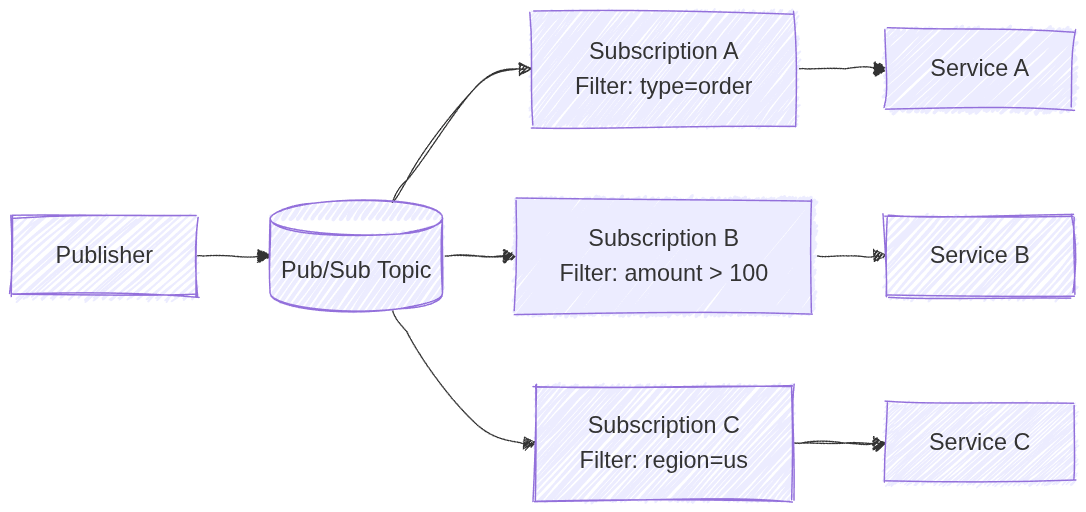
Image source: Own work (Mermaid diagram).
5.6. Schema Registry
- Define message structure using Avro or Protocol Buffers
- Ensures data quality and validation
6. IAM Roles
| Role | Permission |
|---|---|
roles/pubsub.publisher | Send messages to a topic |
roles/pubsub.subscriber | Pull messages and ACK |
roles/pubsub.viewer | View topics and subscriptions |
roles/pubsub.admin | Full control over all resources |
Exam Tip: Use the principle of least privilege - grant only publisher or subscriber roles, not admin.
7. Configuration Commands
7.1. Create Topic
gcloud pubsub topics create TOPIC_NAME
7.2. Create Pull Subscription
gcloud pubsub subscriptions create SUB_NAME \
    --topic=TOPIC_NAME
7.3. Create Push Subscription
gcloud pubsub subscriptions create SUB_NAME \
    --topic=TOPIC_NAME \
    --push-endpoint=https://example.com/webhook
7.4. Publish Message
gcloud pubsub topics publish TOPIC_NAME --message="Hello World"
7.5. Pull Messages
gcloud pubsub subscriptions pull SUB_NAME --auto-ack
7.6. Configure Dead Letter Topic
gcloud pubsub subscriptions update SUB_NAME \
    --dead-letter-topic=DEAD_LETTER_TOPIC \
    --max-delivery-attempts=5
7.7. Enable Message Ordering
gcloud pubsub topics update TOPIC_NAME --enable-message-ordering
8. Java Code Example
Add a dpendency into the pom.xml:
<dependency>
    <groupId>com.google.cloud</groupId>
    <artifactId>spring-cloud-gcp-starter-pubsub</artifactId>
</dependency>
Using Pub/Sub Template in Java:
@Service
@RequiredArgsConstructor
public class MessagingService {

    private final PubSubTemplate pubSubTemplate;

    public void sendWithHeaders(String topic, String payload) {
        var headers = Map.of(
            "origin", "spring-boot-app",
            "priority", "high",
            "correlation-id", "uuid-1234");

        pubSubTemplate.publish(topic, payload, headers)
            .addCallback(
                result -> System.out.println("Message sent successfully! ID: " + result),
                ex -> System.err.println("Failed to send: " + ex.getMessage()));
    }
}
9. Comparison with Alternatives
| Feature | Pub/Sub | Kafka (Confluent) | RabbitMQ |
|---|---|---|---|
| Management | Fully managed | Self-managed or Confluent Cloud | Self-managed |
| Global | Yes | No | No |
| Scalability | Auto | Manual | Manual |
| Use Case | Event-driven, serverless | High-throughput streaming | Traditional messaging |
10. Exam Prep Summary
10.1. Key Points to Remember
- Global Service: Topics and subscriptions are global resources (not regional)
- At-least-once Delivery: Applications must be idempotent
- Serverless: Automatically scales, no capacity planning needed
- Fan-out: Multiple subscriptions = multiple copies of each message
- Ordering: Use ordering keys for FIFO delivery
- Ack Deadline: Default is 10 seconds, configurable up to 600 seconds
- Retention: Messages stored for up to 7 days
- Dead Letter Topics: For failed messages after max retries
10.2. When to Choose Pub/Sub
- Decoupling microservices for independent scaling
- Buffering traffic spikes (IoT, analytics)
- Event-driven architectures
- Asynchronous communication between services
10.3. Common Exam Traps
| Trap | Explanation |
|---|---|
| Exactly-once guaranteed | Only available when explicitly enabled |
| Regional topic | Topics are global, not regional |
| Message deleted after ACK | Message is removed immediately after acknowledgement |
| Same subscription | Each subscriber needs its own subscription for fan-out |
11. External Links
Eventarc: ACE Exam Study Guide (2026)
Image source: Google Cloud Documentation
1. Eventarc Overview
Eventarc is a fully managed eventing service that routes events from various sources to specific destinations using the CloudEvents specification.
- Fully Managed: No infrastructure to manage; scales automatically.
- Decoupling: Enables asynchronous communication between producers and consumers.
- Standardization: Uses CloudEvents 1.0 for consistent event format.
- Regional: Triggers must be in the same region as the destination service.
2. Core Components
- Event: A record of something that happened (e.g., a file uploaded to Cloud Storage).
- Trigger: A filter that defines which events to route to which destination.
- Destination: The service that receives and processes the event (Cloud Run, Cloud Functions, GKE, Workflows).
- Event Channel: A pathway to receive events from non-Google sources (SaaS, custom apps).
3. Event Sources
- Direct Sources: Cloud Storage, Pub/Sub, Firestore, BigQuery (have built-in event types).
- Cloud Audit Logs: Any GCP service that writes to Audit Logs can trigger events. Use when a service lacks direct Eventarc support.
- Pub/Sub: Route existing Pub/Sub messages through Eventarc.
- Third-party (SaaS): Datadog, PagerDuty, etc. via Event Channels.
- Custom Applications: Your own apps can publish events via Event Channels.
- Discovery:
gcloud eventarc events list --location=[REGION]shows available event types.
4. Event Destinations
- Cloud Run (Services)
- Cloud Functions (2nd Gen - Eventarc is the underlying engine)
- GKE (via k8s triggers)
- Workflows (orchestrate multi-step processes)
- Internal Load Balancers
5. Event Filters
Triggers use AND logic - all specified filters must match:
- Single:
--event-filters="type=google.cloud.storage.object.v1.finalized" - Multiple:
--event-filters="type=google.cloud.storage.object.v1.finalized" --event-filters="bucket=my-bucket" - Common filters:
type,bucket,serviceName,methodName
6. CloudEvents Format
{
  "id": "test-event-id",
  "source": "//storage.googleapis.com/buckets/my-bucket",
  "type": "google.cloud.storage.object.v1.finalized",
  "datacontenttype": "application/json",
  "data": { "bucket": "my-bucket", "name": "my-file.txt" }
}
7. Security and IAM
- Service Account: Needs
roles/eventarc.eventReceiverto receive events androles/run.invokerto invoke destinations. - Roles:
roles/eventarc.admin: Full controlroles/eventarc.viewer: Read-only
8. Essential gcloud Commands
- Create Trigger:
gcloud eventarc triggers create [NAME] --destination-run-service=[SVC] --destination-run-region=[REGION] --event-filters="type=google.cloud.storage.object.v1.finalized" --event-filters="bucket=[BUCKET]" --service-account=[SA_EMAIL] - List Triggers:
gcloud eventarc triggers list --location=[REGION] - Create Channel:
gcloud eventarc channels create [NAME] --location=[REGION]
9. Failure Handling
- At-least-once delivery: Retries with exponential backoff on failure.
- No dead letter queue: Handle failures in the destination service.
- Idempotency required: Destinations must handle duplicate deliveries.
10. Eventarc vs Pub/Sub
| Eventarc | Pub/Sub | |
|---|---|---|
| Format | CloudEvents | Any |
| Use case | React to state changes | Service-to-service messaging |
| Filtering | Trigger-level (simple) | Subscription-level (complex) |
| Throughput | Moderate | High |
Use Pub/Sub: High-throughput, complex filtering, any message format. Use Eventarc: GCP-managed routing, CloudEvents format, serverless triggers.
11. Exam Tips
- 2nd Gen Cloud Functions use Eventarc internally.
- Cloud Audit Logs enables triggering on ANY GCP operation.
- Triggers are regional; match destination region.
- Event Channels bridge non-Google sources into Eventarc.
Migration & Hybrid

Image source: Google Cloud Documentation
Migrate to Virtual Machines
Lift-and-shift solution for migrating physical or virtual machines to Compute Engine. Supports VMware vSphere, AWS EC2, and Azure VMs. Uses continuous replication to minimize downtime while the source VM remains running.
Database Migration Service
Fully managed service for migrating databases to Cloud SQL (MySQL, PostgreSQL, SQL Server) or AlloyDB. Supports homogeneous and heterogeneous migrations with continuous replication using Change Data Capture (CDC).
Storage Transfer Service
Managed service for transferring data into Cloud Storage from AWS S3, Azure Blob, HTTP/HTTPS, on-premises, or between GCS buckets. Handles scheduling and error handling without managing VMs.
Transfer Appliance
High-capacity offline data migration appliance (40TB, 300TB+). Best for large datasets (>20TB) where internet bandwidth is limited. Bypasses slow connections by physically shipping data to Google.
Migrate to Virtual Machines (M2VM): ACE Exam Study Guide (2026)
Image source: Google Cloud Documentation
1. Overview and Use Cases
Migrate to Virtual Machines is a lift-and-shift (Rehost) solution used to migrate physical or virtual machines into Compute Engine.
- Supported Sources: VMware vSphere (on-premises), AWS (EC2), and Azure (VMs).
- Key Benefit: Minimal downtime migration. Data is replicated in the background while the source VM remains running.
- Target: All migrated workloads land as Compute Engine (GCE) instances.
2. Core Architecture Components
- Migration Center: The unified platform for discovery, assessment, and planning.
- Migrate Connector: An appliance (OVA for VMware) installed on the source environment to facilitate discovery and data replication to GCP.
- Host Project: The project where you enable the Migration API and manage the migration process.
- Target Project: The project where the final Compute Engine instances will be created and run.
- Replication: The process of continuously syncing data from the source to a Cloud Storage bucket or Persistent Disk in GCP.
3. The Migration Lifecycle
The order of operations is a common exam topic:
- Assess: Use Migration Center to discover inventory, estimate costs, and check OS compatibility.
- Plan: Group VMs into Migration Groups to manage them together (e.g., all VMs for a specific application).
- Deploy (Replicate): Start the replication of data from source to GCP.
- Test Clone: Create a sandbox instance in GCP to verify the VM boots and the application works without affecting the source VM.
- Cutover:
- Shuts down the source VM.
- Performs a final data sync.
- Starts the production VM in Compute Engine.
- Finalize/Detach: Once the migration is verified, the connection to the source is severed, and the migration is marked as complete.
4. Networking and Security
- Connectivity: Requires a stable connection between the source and GCP. Cloud Interconnect is preferred for large migrations; Cloud VPN is used for smaller ones.
- Firewalls: Port 443 (HTTPS) must be open for the Migrate Connector to communicate with GCP APIs.
- IAM Roles:
- vmmigration.admin: Full control over the migration process.
- vmmigration.viewer: Read-only access to migration status.
- The Service Account used by the connector needs storage.admin and compute.admin permissions.
5. Key Exam Tips and Gotchas
- Test Clone vs. Cutover: A Test Clone does NOT stop the source VM. A Cutover DOES stop the source VM.
- Downtime: The only downtime occurs during the Cutover phase (usually minutes), as the VM must be rebooted in the new environment.
- OS Support: Ensure the OS is supported by GCP (e.g., specific versions of RHEL, CentOS, Debian, Ubuntu, or Windows Server).
- IP Addresses: By default, VMs get new internal IP addresses in GCP unless you manually configure the VPC/Subnet to match the source.
- Machine Types: In 2026, consider using N4 or C4 machine types for migrated workloads to optimize for performance and cost.
6. Comparison with Other Tools
- Database Migration Service (DMS): Use for Cloud SQL migrations, NOT for full VMs.
- Storage Transfer Service: Use for moving large amounts of data (e.g., S3 to GCS), NOT for OS/boot disks.
- Anthos Migrate: Used specifically for migrating VMs directly into Containers (GKE).
Database Migration Service (DMS): ACE Exam Study Guide (2026)

Image source: Google Cloud Documentation
1. Overview and Use Cases
Database Migration Service (DMS) is a managed, serverless service used to migrate databases to Google Cloud with minimal downtime.
- Target Destinations: Cloud SQL (MySQL, PostgreSQL, SQL Server) and AlloyDB for PostgreSQL.
- Migration Types:
- Homogeneous: Source and destination are the same engine (e.g., MySQL to Cloud SQL for MySQL).
- Heterogeneous: Source and destination are different (e.g., Oracle to Cloud SQL for PostgreSQL or AlloyDB).
- Key Benefit: Support for continuous (online) migrations using Change Data Capture (CDC).
2. Core Architecture Components
- Connection Profiles: Reusable configurations containing the connectivity information for the source and destination databases (IP, port, credentials).
- Migration Jobs: The specific task that defines the source connection profile, destination instance, and migration type.
- Private Connectivity: Ensuring secure data transfer via VPC Peering, Cloud VPN, Dedicated Interconnect, or Reverse SSH Tunnels.
3. The Migration Lifecycle
- Assess: Evaluate the source database for compatibility. For heterogeneous migrations, use the integrated Conversion Workspace (powered by Gemini AI) to convert schema and code.
- Create Connection Profiles: Define how DMS will talk to your source and destination.
- Define Migration Job: Select the migration type (One-time or Continuous).
- Run Validation: DMS performs pre-flight checks on connectivity, permissions, and configuration (e.g., binlog settings for MySQL).
- Start Migration: DMS performs an initial full dump and then switches to continuous replication (if selected).
- Promote: The final cutover step. It stops replication, disconnects the destination from the source, and makes the destination a standalone production database.
4. Source Prerequisites (Common Exam Topics)
- MySQL: Requires binary logging (binlog) enabled and server_id configured.
- PostgreSQL: Requires the
pglogicalextension (for versions < 14) or native logical replication (for versions 14+), and all tables must have primary keys. - Oracle (Heterogeneous): Requires supplemental logging and specific user permissions for CDC.
5. Security and Monitoring
- Encryption: Supports SSL/TLS for data in transit and Customer-Managed Encryption Keys (CMEK) for data at rest.
- IAM Roles:
- roles/datamigration.admin: Full control over DMS resources.
- roles/datamigration.viewer: Read-only access to migration status.
- Monitoring: Integration with Cloud Monitoring to track Migration Lag (time difference between source and destination data).
6. Key Exam Tips and Gotchas
- DMS vs. M2VM: Use DMS for Databases (Cloud SQL/AlloyDB). Use Migrate to Virtual Machines (M2VM) for full lift-and-shift of VM disks.
- Promotion is Permanent: Once you Promote a migration job, it cannot be resumed. The destination is now the primary.
- Primary Keys: For PostgreSQL migrations, tables without primary keys will not be replicated during the continuous phase.
- Connectivity: If the source is on-premises, a VPN or Interconnect is highly recommended over the public internet. Use Reverse SSH Tunneling if you cannot modify firewall rules easily.
7. 2026 Updates
- AlloyDB: Now a major target for DMS, especially for high-performance enterprise workloads.
Storage Transfer Service: ACE Exam Study Guide (2026)

Image source: Google Cloud Documentation
1. Overview and Use Cases
Storage Transfer Service (STS) is a fully managed service for moving large volumes of data into Cloud Storage (GCS) from other cloud providers, on-premises locations, or within GCS itself.
- Source Support: AWS S3, Azure Blob Storage, HTTP/HTTPS locations, On-premises (using agents), and Google Cloud Storage (GCS).
- Destination Support: Always Google Cloud Storage (GCS) buckets.
- Key Benefit: Managed scaling, scheduling, and error handling without requiring you to manage VMs or scripts.
2. Core Architecture Components
- Transfer Job: A configuration that defines the source, destination, filters, and schedule.
- Transfer Agents (On-premises only): Lightweight software installed on your local hardware to facilitate data transfer to GCP.
- STS Service Account: A Google-managed service account that performs the transfer. It requires permissions (like
storage.admin) on both source and destination buckets. - Manifest Files: A CSV file that lists specific objects to be transferred, allowing for granular control.
3. The Migration Lifecycle
- Source Setup: Grant the STS Service Account permission to read from the source (e.g., AWS S3 bucket) and write to the destination (GCS bucket).
- Create Transfer Job: Define the source (AWS, Azure, GCS, etc.) and the destination bucket.
- Configure Options:
- Scheduling: One-time vs. Recurring (daily/weekly).
- Filtering: Include or exclude objects based on prefix or suffix.
- Overwrite/Delete: Choose whether to overwrite existing files or delete source files after transfer (use with caution).
- Monitoring: Use the Cloud Console or Cloud Monitoring to track the progress and status of the transfer job.
4. STS in Action
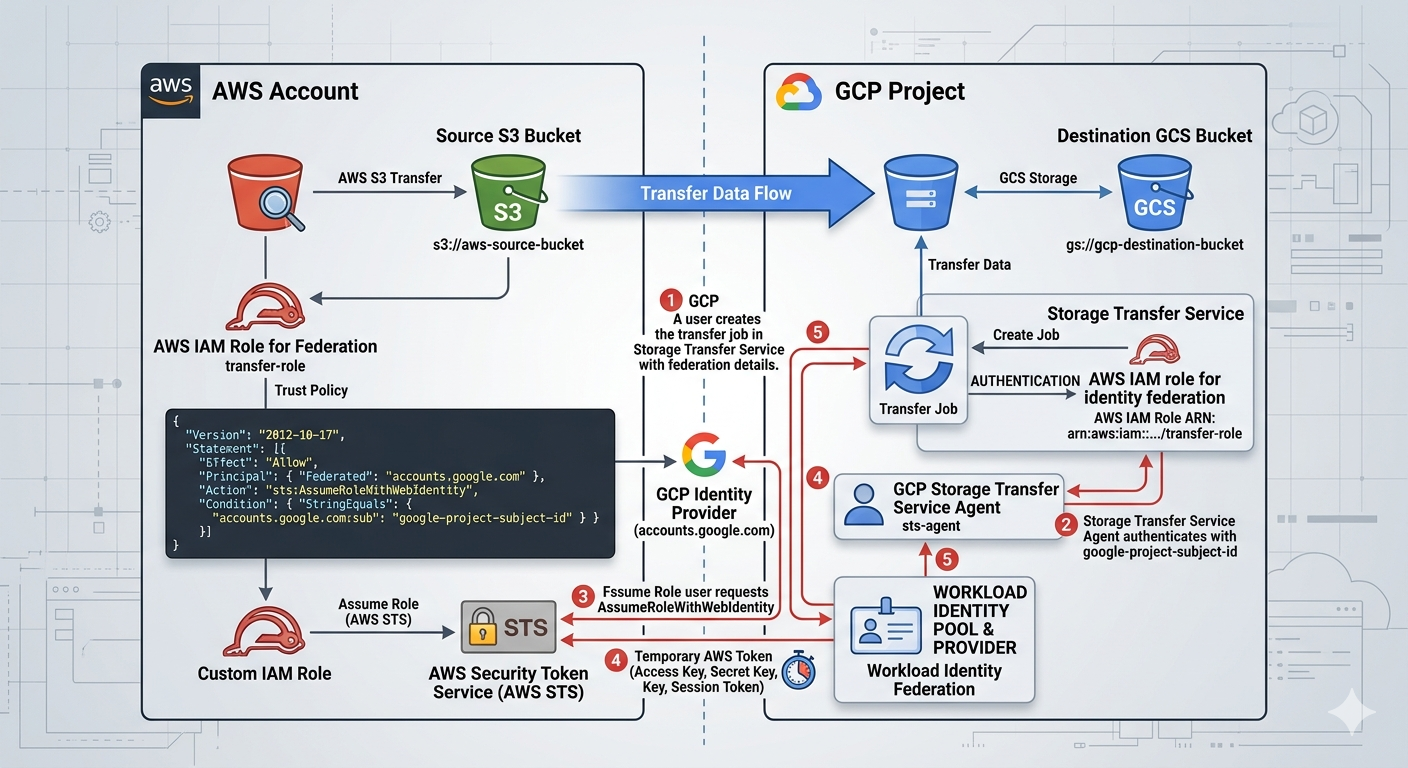
Image source: Own work (Gemini Prompting).
The image illustrates the secure, federated handshake between Google Cloud Storage Transfer Service and Amazon S3. Instead of using vulnerable, long-term passwords (Access Keys), it uses a digital trust relationship to exchange temporary “guest passes.”
Here are the specific steps happening in that workflow:
- Setup & Identity (The Foundation)
- GCP Side: You create a Transfer Job and provide it with your GCP Project Subject ID. This ID is the unique “social security number” for your transfer service.
- AWS Side: You create an IAM Role with a Trust Policy. This policy explicitly states: “I trust anyone coming from accounts.google.com, but only if their ID matches this specific Subject ID.”
- The Authentication Handshake
- Step 1: Requesting Access: The GCP Storage Transfer Service agent contacts the Google Identity Provider to prove who it is.
- Step 2: Federated Request: GCP then sends a request to AWS STS (Security Token Service). It says, “I am the verified GCP agent you trust; please let me assume the ‘transfer-role’.”
- Step 3: Verification: AWS STS checks the incoming Google token against the Trust Policy you wrote.
- The Token Exchange
- Step 4: Issuing the “Guest Pass”: Once AWS STS is satisfied, it generates a Temporary Security Token (consisting of a temporary Access Key, Secret Key, and Session Token).
- Step 5: Delivery: This temporary token is sent back to the GCP Storage Transfer Service. These credentials usually expire in as little as one hour, making them useless to hackers if intercepted later.
- The Data Transfer
- Step 6: S3 Access: Equipped with the temporary AWS token, the GCP Transfer Job connects to the Source S3 Bucket. AWS sees the token and allows GCP to “GetObject” (read the files).
- Step 7: GCS Delivery: The files are streamed directly across the high-speed Google/AWS backbone and written into your Destination GCS Bucket.
By using this specific workflow shown in the image, you eliminate Secret Management. There are no AWS Access Keys saved in GCP variables or code. If someone were to compromise your GCP environment, they wouldn’t find any permanent keys to your AWS kingdom—only a trust relationship that can be severed instantly by updating the AWS IAM Role.
5. STS vs. Other Transfer Tools (High Frequency Exam Topic)
- Storage Transfer Service (STS): Best for cloud-to-cloud (S3 to GCS), scheduled/recurring transfers, or massive on-premises data (1TB+ with good bandwidth).
- Transfer Appliance: Best for massive on-premises data (60TB+) where bandwidth is too slow for online transfer (offline “truck-based” transfer).
gcloud storage(formerlygsutil): Best for small, ad-hoc transfers (< 1TB) or developer-driven scripts.- Database Migration Service (DMS): Use for databases, NOT for unstructured file data.
6. Security and Compliance
- Identity Federation: In 2026, the exam emphasizes using OIDC (OpenID Connect) for AWS/Azure transfers instead of long-term Access/Secret keys.
- Data Integrity: STS automatically performs checksum validation (CRC32C) to ensure data is not corrupted during transit.
- Encryption: Data is encrypted in transit using HTTPS/TLS and at rest in GCS using default or Customer-Managed Encryption Keys (CMEK).
7. Key Exam Tips and Gotchas
- Incremental Transfers: STS only copies new or changed objects (based on checksums and file size) to save time and cost.
- Event-Driven Transfers: STS can be triggered by events (e.g., a new file appearing in an S3 bucket), reducing latency for real-time workflows.
- Permissions: If a transfer fails, the first check is ALWAYS the STS Service Account’s permissions on the source and destination.
- Deletion Policy: You can configure STS to delete the source files after a successful transfer (useful for moving logs to long-term storage).
- Bandwidth Throttling: For on-premises transfers, you can set limits to avoid saturating your local internet connection.
8. 2026 Updates
- Event-Driven Transfers: Now a standard feature for real-time synchronization between cloud providers.
- OIDC Adoption: Moving away from static credentials for cross-cloud transfers.
Transfer Appliance: ACE Exam Study Guide (2026)
Image source: Google Cloud Documentation
1. Overview and Use Cases
Transfer Appliance is a high-capacity, ruggedized storage server used to migrate massive amounts of data to Google Cloud Platform offline.
- Key Benefit: It bypasses slow or expensive internet connections by physically shipping data to a Google upload center.
- Capacity: Available in different sizes, typically 40TB, 300TB, or more.
- Use Case: Best for one-time migrations of large datasets (typically >20TB) where bandwidth is a major bottleneck.
2. The Transfer Lifecycle (Common Exam Topic)
You must know the steps in order:
- Order: You request an appliance from the Google Cloud Console.
- Receive: Google ships the ruggedized appliance to your data center.
- Prepare and Capture: You connect the appliance to your local network and copy your data onto it.
- Ship: You ship the appliance back to a Google data center using the provided shipping label.
- Upload: Google uploads the data from the appliance into your specified Cloud Storage (GCS) bucket.
- Verify and Wipe: You verify the data in GCS. Google then securely wipes the appliance according to NIST 800-88 standards.
3. Comparison with Other Tools
The ACE exam frequently tests your ability to choose the right tool based on data size and bandwidth:
| Feature | Transfer Appliance | Storage Transfer Service (STS) | gcloud storage (gsutil) |
|---|---|---|---|
| Method | Offline (Physical Shipping) | Online (Cloud-to-Cloud/Agent) | Online (Manual/CLI) |
| Best For | >20TB, low bandwidth | >1TB, cloud-to-cloud | <1TB, ad-hoc |
| Time | Days/Weeks (Shipping time) | Depends on bandwidth | Depends on bandwidth |
| Complexity | High (Physical handling) | Low (Fully managed) | Moderate (CLI/Scripts) |
4. Security and Data Protection
- Encryption at Rest: Data is encrypted using AES-256 before it is written to the appliance disks.
- Customer-Managed Encryption Keys (CMEK): You provide a key that Google uses to encrypt the data. Google never has access to your unencrypted data during transit.
- Secure Handling: Appliances are ruggedized and shipped in tamper-evident containers.
- Secure Wipe: After the upload is complete, Google performs a multi-pass wipe of all disks to ensure no data remains.
5. Key Exam Tips and Gotchas
- The Bandwidth Calculation: If a question mentions a specific bandwidth (e.g., 100Mbps) and a data size (e.g., 500TB), calculate the time. If it takes months to upload online, the answer is Transfer Appliance.
- Destination: Data always lands in Cloud Storage (GCS) buckets. It cannot be uploaded directly to BigQuery or Filestore.
- Preparation: You must prepare your local network (e.g., provide a 10GbE or 40GbE connection) to load the data onto the appliance quickly.
- Online vs. Offline: Transfer Appliance is Offline. Storage Transfer Service is Online.
- Data Verification: You are responsible for verifying the checksums of the data once it arrives in GCS before authorizing the wipe of the appliance.
6. 2026 Focus Areas
- Sustainability: Google emphasizes the reduced carbon footprint of shipping an appliance versus saturating a low-efficiency network connection for months.
- Integration: Transfer Appliance is often used in conjunction with the Migration Center for end-to-end planning.
AI & ML
Image source: Google Cloud Documentation
Vertex AI
Unified platform for building, deploying, and scaling ML models. Supports AutoML (no-code ML) for images, text, video, and tabular data, as well as custom training with TensorFlow, PyTorch, or Scikit-learn. Includes Model Garden for pre-built models and Vertex AI Agent Builder for search/chat applications.
Vertex AI and AI Services: ACE Exam Study Guide (2026)
Image source: Google Cloud Documentation
1. Vertex AI (High-Level Overview)
Vertex AI is Google Cloud’s unified platform for machine learning (ML). It brings together all the services for building, deploying, and scaling ML models.
Key Concepts for the ACE Exam:
- Unified Platform: Integrates AutoML and Custom Training into a single workflow.
- AutoML: A no-code/low-code approach for creating high-quality models for images, video, text, and tabular data.
- Custom Training: For data scientists who want to use their own ML frameworks (TensorFlow, PyTorch, Scikit-learn).
- Model Garden: A curated collection of first-party, open-source, and third-party models (including Gemini) that can be deployed quickly.
- Endpoints: Used for online (real-time) predictions. Models must be deployed to an endpoint to receive traffic.
- Batch Prediction: Used for large datasets where real-time response is not required (e.g., overnight processing).
2026 Exam Focus: Generative AI
- Gemini Models: Integrated directly into Vertex AI (1.5 Pro, 1.5 Flash). Gemini can be accessed via Vertex AI Studio for prototyping and then deployed as part of an application.
- Vertex AI Agent Builder: A managed service for building AI-powered search and chat interfaces (formerly Search and Conversation) with minimal coding.
- Gemini for Google Cloud: The AI-powered assistant available across the Google Cloud Console for troubleshooting, coding, and management.
IAM Roles for Vertex AI:
- roles/aiplatform.admin: Full access to all Vertex AI resources.
- roles/aiplatform.user: Permission to use Vertex AI features (create jobs, deploy models).
- roles/aiplatform.viewer: Read-only access to Vertex AI resources.
2. Vision API
The Cloud Vision API allows developers to integrate vision detection features within applications, including image labeling, face and landmark detection, optical character recognition (OCR), and tagging of explicit content.
Key Features:
- Label Detection: Identifies objects, locations, and activities in an image.
- OCR (Optical Character Recognition): Detects and extracts text from images.
- Object Localization: Identifies where objects are located within an image and provides a bounding box.
- Safe Search Detection: Detects explicit content (adult, medical, violence).
Usage Scenario:
If you need to identify objects or text in images without building a custom model, use the Vision API. If the pre-trained API is not accurate enough for your specific industry (e.g., identifying specific defective parts in a factory), use Vertex AI AutoML Vision.
3. Speech-to-Text (STT)
Cloud Speech-to-Text enables developers to convert audio to text by applying powerful neural network models.
Recognition Types:
- Synchronous Recognition: Used for short audio files (less than 1 minute). The user waits for the response.
- Asynchronous Recognition: Used for long audio files (up to 480 minutes). The results are retrieved later.
- Streaming Recognition: Used for real-time audio (e.g., live captions or voice assistants).
Configuration and Integration:
- Storage: Large audio files for asynchronous processing must be stored in a Cloud Storage (GCS) bucket.
- Language Support: Supports over 125 languages and variants.
- Accuracy Features: Can be improved using Speech Adaptation (providing hints for specific words or phrases).
4. Translation API
Cloud Translation API makes it easy to translate text into thousands of language pairs.
Basic vs. Advanced:
- Cloud Translation - Basic (v2): Simple, fast, and suitable for basic text translation.
- Cloud Translation - Advanced (v3): Supports more complex features like Glossaries (ensuring specific industry terms are translated correctly) and Batch Translation.
2026 Exam Gotchas:
- Adaptive Translation: A newer feature using LLMs (like Gemini) to provide context-aware translations that match the tone and style of the source text.
- Detection: The API can automatically detect the source language if it is not provided.
5. Summary Cheat Sheet for AI Selection
- Need to extract text from a photo? Vision API (OCR).
- Need to transcribe a 2-hour meeting recording? Speech-to-Text (Asynchronous).
- Need to translate technical manuals with specific terminology? Translation API Advanced (Glossaries).
- Need to build a custom model for your specific company data? Vertex AI (AutoML or Custom Training).
- Need to build a GenAI chatbot with your own documents? Vertex AI Agent Builder.
6. External Links
Usecases - Opentofu code
Cloud Run secured with IAP
Protects Cloud Run with Identity-Aware Proxy using an external HTTP(S) load balancer, requiring Google authentication before reaching the service.
Cloud Run using Direct VPC Egress
Connects Cloud Run directly to a VPC network without a Serverless VPC Access Connector for lower latency and cost.
Cloud Run & IAP
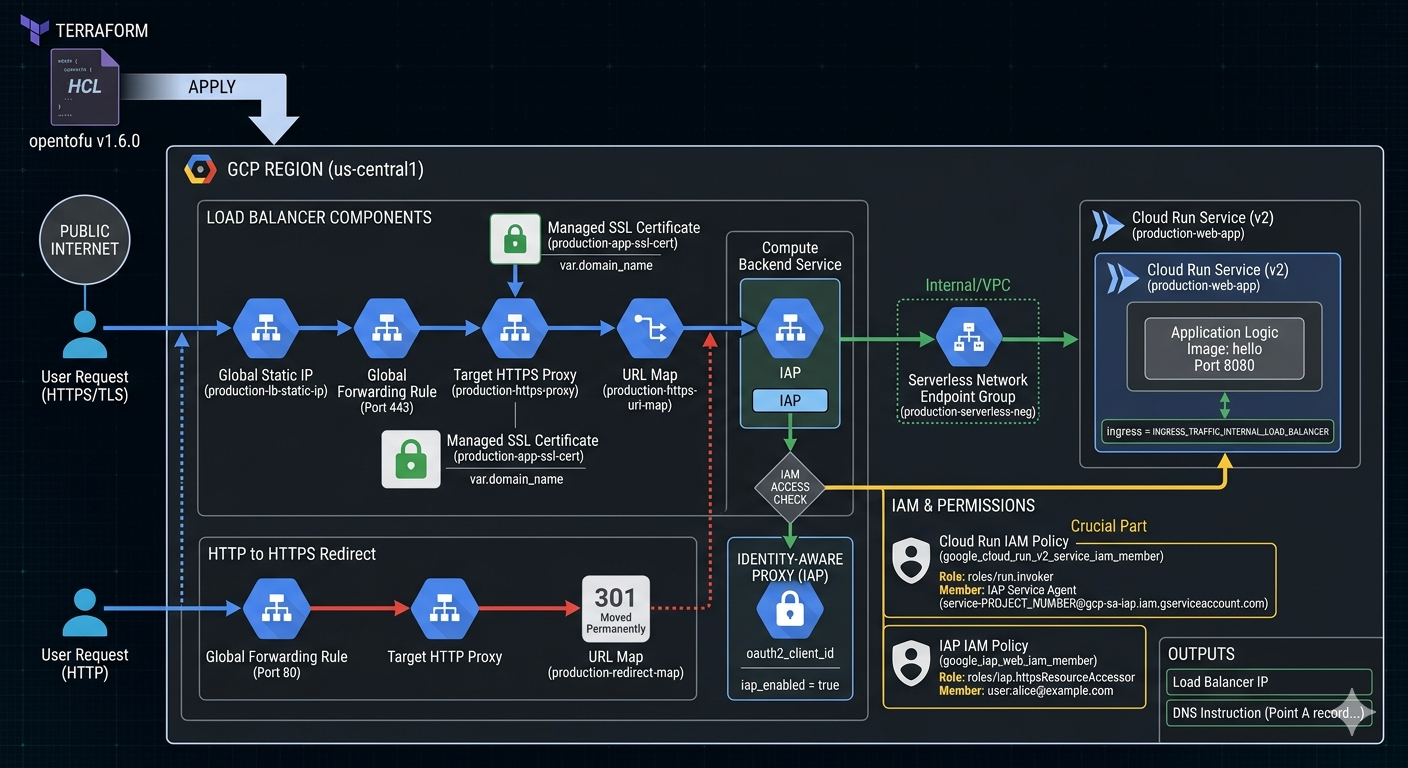
Image source: Own work (Gemini Prompting).
Opentofu Code
Go to APIs & Services > Credentials in the Google Cloud Console. Create an OAuth 2.0 Client ID (Web application type).
Create a terraform.tfvars file:
project_id        = "your-project-id"
domain_name       = "app.yourdomain.com"
iap_client_id     = "xxxx-yyyy.apps.googleusercontent.com"
iap_client_secret = "your-secret-key"
Put all following code snippets in a mail.tf file.
-
Terraform Provider Configuration - Defines the required provider and version for GCP.
terraform { required_version = ">= 1.6.0" required_providers { google = { source = "hashicorp/google" version = "~> 5.0" } } } provider "google" { project = var.project_id region = var.region } -
Variables - Declares input variables for project ID, region, IAP OAuth credentials, and domain name.
# ------------------------- # Variables # ------------------------- variable "project_id" { type = string } variable "region" { type = string default = "us-central1" } variable "iap_client_id" { type = string description = "OAuth client ID for IAP." } variable "iap_client_secret" { type = string description = "OAuth client secret for IAP." sensitive = true } variable "domain_name" { type = string description = "Domain that will point to the LB IP (e.g. app.example.com)" } -
Data & APIs - Enables required GCP APIs (Cloud Run, Compute, IAP, IAM).
# ------------------------- # Data & APIs # ------------------------- data "google_project" "project" {} resource "google_project_service" "enabled_apis" { for_each = toset([ "run.googleapis.com", "compute.googleapis.com", "iap.googleapis.com", "iam.googleapis.com" ]) service = each.key disable_on_destroy = false } -
Network & SSL - Allocates a static IP and creates a managed SSL certificate for the domain.
# ------------------------- # 1. Network & SSL # ------------------------- resource "google_compute_global_address" "app_static_ip" { name = "production-lb-static-ip" depends_on = [google_project_service.enabled_apis] } resource "google_compute_managed_ssl_certificate" "app_cert" { name = "production-app-ssl-cert" managed { domains = [var.domain_name] } } -
Cloud Run Service - Creates a Cloud Run v2 service with internal-only ingress (traffic from load balancer only).
# ------------------------- # 2. Cloud Run Service (v2) # ------------------------- resource "google_cloud_run_v2_service" "main_app" { name = "production-web-app" location = var.region ingress = "INGRESS_TRAFFIC_INTERNAL_LOAD_BALANCER" template { containers { image = "us-docker.pkg.dev/cloudrun/container/hello" ports { container_port = 8080 } } } } -
IAM - Grants the IAP Service Agent permission to invoke Cloud Run, and allows specific users to access via IAP.
# ------------------------- # 3. IAM (The Crucial Part) # ------------------------- # Permission for the IAP Service Agent to call Cloud Run resource "google_cloud_run_v2_service_iam_member" "iap_agent_invoker" { location = google_cloud_run_v2_service.main_app.location name = google_cloud_run_v2_service.main_app.name role = "roles/run.invoker" member = "serviceAccount:service-${data.google_project.project.number}@gcp-sa-iap.iam.gserviceaccount.com" } # Permission for users to pass through IAP resource "google_iap_web_iam_member" "iap_user_access" { project = var.project_id role = "roles/iap.httpsResourceAccessor" member = "user:alice@example.com" # Change this to your email } -
Load Balancer Components - Creates a Serverless NEG, backend service with IAP enabled, URL map, HTTPS proxy, and forwarding rule.
# ------------------------- # 4. Load Balancer Components # ------------------------- resource "google_compute_region_network_endpoint_group" "app_neg" { name = "production-serverless-neg" network_endpoint_type = "SERVERLESS" region = var.region cloud_run { service = google_cloud_run_v2_service.main_app.name } } resource "google_compute_backend_service" "app_backend" { name = "production-backend-service" protocol = "HTTP" load_balancing_scheme = "EXTERNAL_MANAGED" backend { group = google_compute_region_network_endpoint_group.app_neg.id } iap { enabled = true oauth2_client_id = var.iap_client_id oauth2_client_secret = var.iap_client_secret } } resource "google_compute_url_map" "https_map" { name = "production-https-url-map" default_service = google_compute_backend_service.app_backend.id } resource "google_compute_target_https_proxy" "https_proxy" { name = "production-https-proxy" url_map = google_compute_url_map.https_map.id ssl_certificates = [google_compute_managed_ssl_certificate.app_cert.id] } resource "google_compute_global_forwarding_rule" "https_rule" { name = "production-https-forwarding-rule" target = google_compute_target_https_proxy.https_proxy.id port_range = "443" load_balancing_scheme = "EXTERNAL_MANAGED" ip_address = google_compute_global_address.app_static_ip.address } -
HTTP to HTTPS Redirect - Automatically redirects HTTP traffic to HTTPS.
# ------------------------- # 5. HTTP to HTTPS Redirect # ------------------------- resource "google_compute_url_map" "redirect_map" { name = "production-redirect-map" default_url_redirect { https_redirect = true strip_query = false redirect_response_code = "MOVED_PERMANENTLY_DEFAULT" } } resource "google_compute_target_http_proxy" "http_proxy" { name = "production-http-proxy" url_map = google_compute_url_map.redirect_map.id } resource "google_compute_global_forwarding_rule" "http_rule" { name = "production-http-forwarding-rule" target = google_compute_target_http_proxy.http_proxy.id port_range = "80" load_balancing_scheme = "EXTERNAL_MANAGED" ip_address = google_compute_global_address.app_static_ip.address } -
Outputs - Exposes the load balancer IP and DNS instructions.
# -------------------------
# 6. Outputs
# -------------------------
output "load_balancer_ip" {
  value = google_compute_global_address.app_static_ip.address
}

output "dns_instruction" {
  value = "Point A record for ${var.domain_name} to ${google_compute_global_address.app_static_ip.address}"
}
Run tofu init and then tofu apply.
After applying, point your DNS to the outputted IP. It usually takes 15–60 minutes for the Google Managed Certificate to turn green (ACTIVE).
Cloud Run & Direct VPC Egress for Memorystore
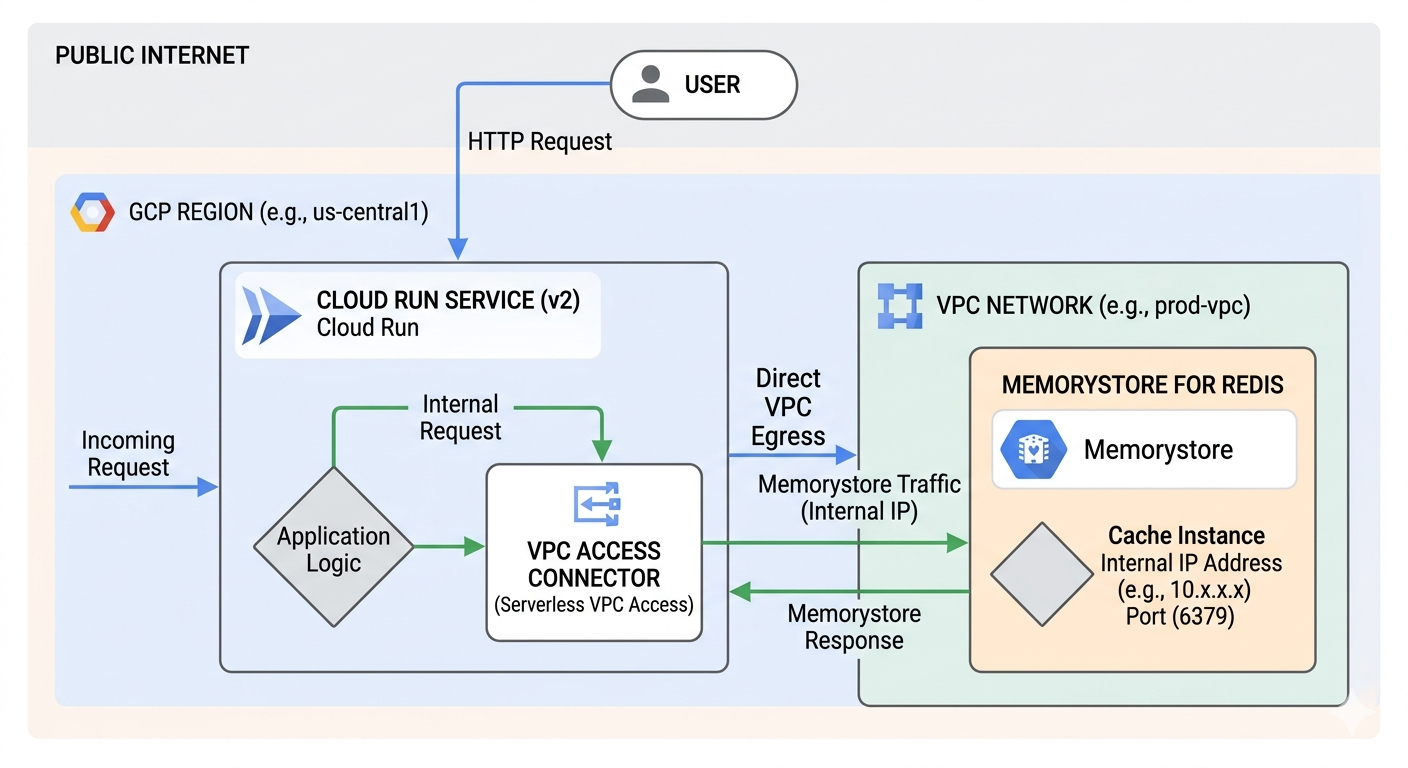
Image source: Own work (Gemini Prompting).
The Request Flow
The diagram depicts a three-step journey for your data:
- Public to Private Entry - a User sends an HTTP request from the public internet. This hits your Cloud Run Service, which houses your Application Logic.
- The “Direct” Tunnel - Instead of going back out to the internet to find the database, Cloud Run uses Direct VPC Egress. This assigns the Cloud Run instance a private IP address from your VPC Network (e.g., 10.x.x.x), allowing it to act like it is physically inside your private network.
- Private Communication: The request travels over Google’s internal network to the Memorystore for Redis instance. Because Memorystore has no public endpoint, it only accepts connections from within the VPC on its internal IP and port (usually 6379).
Why this matters (VPC Connector vs. Direct Egress)
The image highlights a shift in Google Cloud architecture:
- The “Old” Way (VPC Access Connector): Used to require a separate set of managed VMs (connectors) to bridge the gap. These cost extra and added a “hop” of latency.
- The “New” Way (Direct VPC Egress): As shown in the image, this removes the need for those connector VMs. It is faster, cheaper (scales to zero cost), and simpler to set up.
Key Components in the Image
| Component | Function |
|---|---|
| Cloud Run (v2) | The serverless compute platform running your code. |
| Direct VPC Egress | The networking path that enables private outbound requests. |
| VPC Network | Your private, isolated section of Google Cloud. |
| Memorystore | A fully managed Redis service for low-latency caching. |
This setup is ideal for applications that need high-performance caching while maintaining strict security by never exposing database data to the public internet.
Opentofu Code
Put all following code snippets in a mail.tf file.
1. VPC Network and Subnet
resource "google_compute_network" "private_network" {
  name                    = "production-vpc"
  auto_create_subnetworks = false
}

resource "google_compute_subnetwork" "app_subnet" {
  name          = "cloud-run-subnet"
  ip_cidr_range = "10.0.1.0/24" # Must be /26 or larger for Direct VPC Egress
  region        = var.region
  network       = google_compute_network.private_network.id
}
2. Memorystore (Redis) Instance
resource "google_redis_instance" "cache" {
  name           = "app-cache"
  tier           = "BASIC"
  memory_size_gb = 1
  region         = var.region

  authorized_network = google_compute_network.private_network.id
  connect_mode       = "DIRECT_PEERING"

  depends_on = [google_compute_network.private_network]
}
3. Cloud Run Service with Direct VPC Egress
resource "google_cloud_run_v2_service" "main_app" {
  name     = "cache-enabled-app"
  location = var.region

  template {
    containers {
      image = "us-docker.pkg.dev/cloudrun/container/hello" # Replace with your image

      env {
        name  = "REDISHOST"
        value = google_redis_instance.cache.host
      }
      env {
        name  = "REDISPORT"
        value = tostring(google_redis_instance.cache.port)
      }
    }

    # Direct VPC Egress configuration
    vpc_access {
      network_interfaces {
        network    = google_compute_network.private_network.id
        subnetwork = google_compute_subnetwork.app_subnet.id
      }
      egress = "PRIVATE_RANGES_ONLY" # Only route internal traffic to VPC
    }
  }
}
Run tofu init and then tofu apply.
After applying, point your DNS to the outputted IP. It usually takes 15–60 minutes for the Google Managed Certificate to turn green (ACTIVE).
Appendix
OWASP Top 10
Lists the most critical web app security risks: broken access control, cryptographic failures, injection, insecure design, security misconfig, vulnerable components, auth failures, integrity issues, logging/monitoring gaps, and SSRF.
OIDC, OAuth2 & JWT
OIDC adds identity on top of OAuth2’s authorization flows, providing user info via ID Tokens. OAuth2 issues access tokens for delegated API access. JWT is the compact, signed token format used to carry claims.
OIDC, OAuth2 & JWT
Image source: Word Line Blog
OAuth 2.0 (Authorization)
- Delegation framework allowing a client to access resources on behalf of a user
- Issues access tokens for APIs (token format not defined by spec)
- Defines flows like Auth Code, PKCE, Client Credentials
- Does not provide identity or user profile information
OpenID Connect (Authentication)
- Identity layer built on top of OAuth2
- Issues ID Tokens (always JWT) containing user identity claims
- Provides standardized user info via the UserInfo endpoint
- Used for login, SSO, and user identity verification
JWT (Token Format)
- Compact, signed token format: header.payload.signature
- Used for ID tokens, access tokens, and stateless session tokens
- Contains claims (issuer, subject, expiration, custom data)
- Enables validation without server‑side session storage
External Links
OWASP Top 10

Image source: OWASP.org
The OWASP Top 10 is a widely recognized standard that highlights the most critical security risks affecting modern web applications. It serves as an awareness document for developers, architects, and security teams, helping them understand common vulnerabilities, their impact, and how to mitigate them. Updated periodically based on real‑world data and industry trends, the OWASP Top 10 provides a practical foundation for building more secure software by focusing attention on the threats most likely to be exploited in the wild.
1. Broken Access Control
Failures in enforcing permissions allow users to access data or actions they shouldn’t.
Spring Boot example
A controller exposes user details without checking ownership:
@GetMapping("/users/{id}")
public User getUser(@PathVariable Long id) {
    // No check: user can fetch ANY user
    return userService.findById(id);
}
Fix
Use Spring Security method-level authorization:
@PreAuthorize("#id == authentication.principal.id")
Check the
idagainst thesubclaim from JWT.
2. Cryptographic Failures
Sensitive data is exposed due to missing or weak encryption.
Spring Boot example
Storing passwords in plain text or using MD5:
String hash = DigestUtils.md5DigestAsHex(password.getBytes());
Fix
Use BCrypt:
PasswordEncoder encoder = new BCryptPasswordEncoder();
3. Injection
Untrusted input is interpreted as code or commands.
Spring Boot example
Using string concatenation in JPA queries:
@Query("SELECT u FROM User u WHERE u.name = '" + name + "'")
Fix
Use parameter binding:
@Query("SELECT u FROM User u WHERE u.name = :name")
XSS (Cross-Site Scripting) is also an injection attack. It happens when an untrusted input is rendered into a webpage without proper escaping, allowing attackers to execute malicious JavaScript in the victim’s browser. This can lead to session theft, account takeover, redirects, or UI manipulation.
4. Insecure Design
Security issues caused by missing or flawed architecture and design decisions.
Spring Boot example
No rate limiting → brute force login possible.
Fix
- Spring Cloud Gateway rate limiting
- Cloud Armor rate limiting
- Captcha for login endpoints
5. Security Misconfiguration
Incorrect or missing security settings across applications, servers, or cloud resources.
Spring Boot example
Actuator endpoints exposed publicly
management:
  endpoints:
    web:
      exposure:
        include: "*"
Fix
Restrict exposure.
include: health,info
And secure with Spring Security.
6. Vulnerable and Outdated Components
Using libraries or frameworks with known vulnerabilities.
Spring Boot example
Using vulnerable Log4j version.
Fix
Upgrade to patched versions and use dependency scanning (OWASP DC, Snyk, Trivy).
7. Identification and Authentication Failures
Weak authentication or session handling allows attackers to impersonate users.
Spring Boot example
Session ID not regenerated after login → session fixation.
Fix Spring Security handles this automatically, but only if enabled:
http.sessionManagement().sessionFixation().migrateSession();
Not checking JWT cryptographic signature falls into this categoty.
8. Software and Data Integrity Failures
Trusting unvalidated or untrusted code, data, or CI/CD pipelines.
Spring Boot example
CI pipeline pulling dependencies without checksum verification.
Fix
- Maven checksum validation
- Signed artifacts
- Secure CI/CD runners
9. Security Logging and Monitoring Failures
Insufficient logging or alerting prevents detection of attacks.
Spring Boot example
Login failures not logged.
Fix
Implement logging:
logger.warn("Failed login for user {}", username);
Send logs to SIEM (Cloud Logging, ELK, etc.).
A SIEM (Security Information and Event Management) is a centralized system that collects, aggregates, correlates, and analyzes logs from across your infrastructure to detect security threats in real time.
10. Server-Side Request Forgery (SSRF)
Server makes unintended internal or external requests controlled by the attacker.
Spring Boot example
Fetching user-supplied URLs:
RestTemplate rest = new RestTemplate();
String result = rest.getForObject(userInputUrl, String.class);
Fix
- Validate URLs
- Allowlist domains
- Block metadata endpoints (
169.254.169.254) - Use Cloud Armor SSRF rules