Memorystore: ACE Exam Study Guide (2026)

Image source: Google Cloud Documentation
1. Memorystore Overview
Memorystore is Google Cloud’s fully managed in-memory data store service. It is used for low-latency caching, session storage, and real-time data access.
2. Redis/Valkey vs. Memcached
| Feature | Redis / Valkey | Memcached |
|---|---|---|
| Deployment | Regional (multi‑zone) | Zonal (no multi‑zone replication) |
| Availability | Standard Tier: automatic failover (Primary → Replica) | No HA, no failover |
| Persistence | Optional: RDB snapshots + point‑in‑time recovery | None (purely in‑memory, ephemeral) |
| Use Case | Durable cache, counters, queues, sessions, Pub/Sub patterns | Large, simple, ephemeral key/value cache |
| Scaling | Vertical (Basic/Standard) or Horizontal (Cluster mode) | Horizontal (node pool) |
| Networking | PSA (Standard) / PSC (Cluster mode) | PSA (VPC Peering) |
| Auth/TLS | Yes (AUTH, TLS) | No |
| Notes | Valkey = modern Redis‑compatible engine (2026+) | Best when data loss is acceptable |
2.1. Redis Pub/Sub
Redis Pub/Sub in Memorystore provides fast, in‑memory, real‑time messaging for apps inside a VPC. Publishers send messages to channels, and Redis instantly delivers them to connected subscribers. Messages aren’t stored, replayed, or persisted, and failovers or disconnects cause loss. It’s ideal for low‑latency notifications or cache invalidation, but not for durable or reliable event processing.
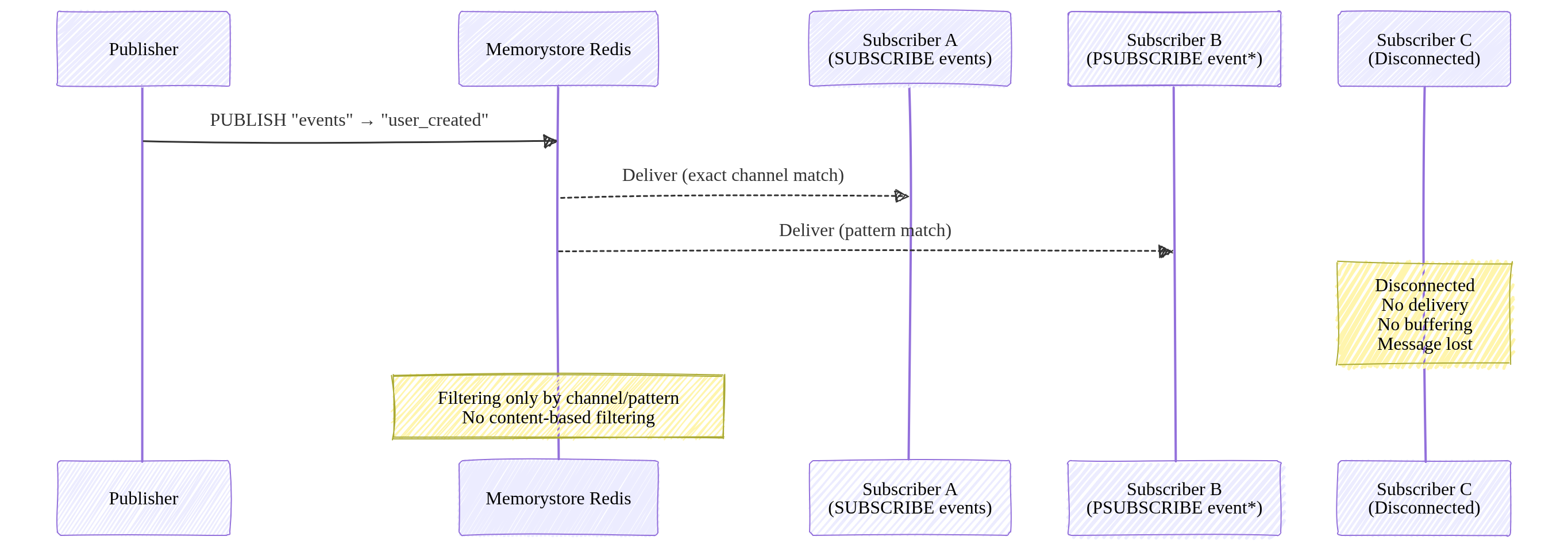
Image source: Own work (Mermaid diagram).
Redis Pub/Sub supports filtering only through channel names and pattern subscriptions (PSUBSCRIBE). It does not support content‑based or attribute‑based filtering.
3. Networking and Connectivity
Memorystore instances are VPC-only (no public IPs).
3.1. Connecting Serverless (Cloud Run / Functions)
- Direct VPC Egress (Recommended): Lowest latency and cost.
- Serverless VPC Access Connector: Legacy method.
3.2. Networking Models
- Standard/Basic Tiers: Use Private Service Access (PSA).
- Cluster/Valkey Tiers: Use Private Service Connect (PSC). Clients connect to a single IP (discovery endpoint) in their own VPC.
Private Service Access lets your VPC connect privately to Google‑managed services that run inside your project, such as Cloud SQL, Memorystore, AlloyDB, and Filestore. It works through VPC peering and a reserved IP range, giving those services private RFC 1918 addresses. PSA is regional and meant for accessing Google‑managed backends you own.
Private Service Connect creates private endpoints that let your VPC reach Google APIs, third‑party SaaS, or services in other projects using private IPs. It uses Google’s internal load balancing instead of VPC peering, making it ideal for cross‑project or cross‑organization service consumption or publishing.
| Service | Can connect? | Requirements |
|---|---|---|
| Compute Engine | Yes | Same VPC |
| GKE | Yes | Same VPC |
| Cloud Run | Yes | Direct VPC Egress |
| External clients | Yes | Only via VPN or Interconnect |
4. Scaling and TTL
- Scaling:
- Vertical: Increasing memory on Basic/Standard tiers causes brief downtime.
- Horizontal: Adding shards (Cluster/Valkey) or nodes (Memcached) has zero downtime.
- TTL (Time-to-Live): Essential for cache management.
SET key value EX 60(Set on write)EXPIRE key 60(Set after write)TTL is simply an expiration timer for a key. When you set a TTL, Redis automatically deletes the key after the specified number of seconds. It’s used to control cache freshness, prevent stale data, and free memory without manual cleanup.
4.1. Key invaldation in case of max memory usage
When Redis hits its maxmemory limit, it must validate which keys to throw away. Redis doesn’t use a perfect LRU (which is memory-heavy). Tt uses an Approximated LRU algorithm.
- Redis samples
Nkeys (default is5) and evicts the one with the oldest idle time among those samples. - Key Setting:
maxmemory-samples <number>- 5 (Default): Good balance of CPU vs. accuracy.
- 10: Closer to “True LRU” but higher CPU overhead.
These settings determine what happens when you run out of RAM.
| Policy | Description |
|---|---|
| allkeys-lru | Evicts the Least Recently Used key among all keys. |
| volatile-lru | Evicts the Least Recently Used key among keys with an expire set. |
| allkeys-lfu | Evicts the Least Frequently Used (hits per second) among all keys. |
| volatile-ttl | Evicts the key with the shortest time-to-live (TTL). |
| noeviction | Returns an error on write operations (Safest for data integrity). |
To set the Eviction Policy (maxmemory-policy):
gcloud redis instances update [INSTANCE_ID] \
    --region=[REGION] \
    --redis-config=maxmemory-policy=allkeys-lru
To enable Lazy Freeing (for performance):
gcloud redis instances update [INSTANCE_ID] \
    --region=[REGION] \
    --redis-config=lazyfree-lazy-eviction=yes,lazyfree-lazy-expire=yes
5. Authentication and Monitoring
- Security:
- IAM: Controls management plane (creating/deleting instances).
- Redis AUTH: Application-level password (not IAM-based). Must be enabled at creation.
6. Common ACE Exam Scenarios
- Scenario: Connect Cloud Run to Redis with lowest cost? → Use Direct VPC Egress.
- Scenario: Scale Redis to 10TB+ with zero downtime? → Use Redis Cluster or Valkey.
- Scenario: Need High Availability (HA)? → Use Standard Tier (Primary + Replica).
- Scenario: Ephemeral cache for simple KV pairs? → Use Memcached.
- Scenario: Avoid VPC Peering limits? → Use Private Service Connect (PSC).
7. Using Memorystore in Spring Boot (Examples)
7.1. Redis / Valkey
spring:
  data:
    redis:
      host: 10.0.0.5
      port: 6379
      password: ${sm://projects/PROJECT_ID/secrets/REDIS_AUTH_TOKEN/versions/latest}
@Service
@RequiredArgsConstructor
public class CacheService {

    private final StringRedisTemplate redis;

    public void save(String key, String value) {
        redis.opsForValue().set(key, value, Duration.ofMinutes(60));
    }
}
Note: Memorystore Redis AUTH tokens are generated by GCP and only displayed once at creation. Secure them in Secret Manager.
7.2. Memcached
@Configuration
public class MemcachedConfig {

    @Bean
    public MemcachedClient memcachedClient() throws Exception {
        return new MemcachedClient(new InetSocketAddress("10.0.0.6", 11211));
    }
}