Cloud Run: ACE Exam Study Guide (2026)

Image source: Google Cloud Documentation
1. Cloud Run Overview
Cloud Run is a fully managed, serverless compute platform that enables you to run containerized applications that are stateless, request-driven. It is built on Knative, an open-source standard for serverless.
- Key Characteristics
- Serverless: No infrastructure to manage. It scales automatically based on incoming requests.
- Scale to Zero: If there is no traffic, Cloud Run scales down to zero instances.
- Stateless: Containers must be stateless. Persistent data should be stored in Cloud Storage, Filestore, or a database.
- Concurrency: Cloud Run can handle multiple concurrent requests per container instance (default is 80, up to 1000).
Knative Framework
Knative is an open‑source framework that brings serverless capabilities to Kubernetes by providing standardized components for building, deploying, and running containerized applications.
It abstracts complex Kubernetes operations and adds features such as automatic scaling (including scale‑to‑zero), traffic management, revisioning, and event‑driven execution through CloudEvents.
Knative consists of two main parts: Serving, which handles request‑driven workloads, and Eventing, which manages event routing and triggers. Cloud Run is built directly on Knative Serving, offering a fully managed version of its core serverless functionality.
2. Deployment & Sidecars (2026)
- Methods:
- Deploy from Container Image: Provide a URL to an image in Artifact Registry.
- Deploy from Source: Cloud Run uses Cloud Build to automatically create an image and deploy it.
- Sidecar Containers: Support for multiple containers in a single pod.
- Use Case: Running a Cloud SQL Auth Proxy alongside your app to handle database connections securely.
- Use Case: Running a logging or monitoring agent (e.g., OpenTelemetry) without modifying the main app code.
- Jobs vs. Services:
- Cloud Run Services: For code that handles requests (HTTP/gRPC).
- e.g. a Spring Boot application handling REST calls.
- Cloud Run Jobs: For code that performs work (data processing, backups) and exits when finished.
- e.g. a Spring Boot application with a
CommandLineRunner(see interface JavaDoc).
- e.g. a Spring Boot application with a
- Cloud Run Services: For code that handles requests (HTTP/gRPC).
3. Revisions and Traffic Management
- Revisions: Every time you deploy a change, Cloud Run creates a new immutable revision.
- Traffic Splitting: Simultaneously route percentages of traffic to different versions (e.g., 50/50 for A/B testing or 1% for Canary testing).
- Tagging: Assign a specific URL to a revision for testing before routing main traffic.
- Rollbacks: Instantly roll back to a previous revision by shifting 100% of traffic.
Deployment Strategies
Blue‑Green Deployment
Two identical environments exist: Blue (current) and Green (new).
- Deploy the new version to the Green environment.
- Test Green without affecting users.
- Switch 100% of traffic from Blue → Green in one action.
- Rollback is instant by switching traffic back to Blue.
Use cases: zero‑downtime releases, fast rollback, predictable behavior.
A/B Testing
Two versions run simultaneously, each receiving a portion of traffic.
- Version A = baseline.
- Version B = experimental variant.
- Users are split (e.g., 50/50 or 90/10).
- Compare metrics: conversions, latency, errors, user behavior.
Purpose: Experimentation and data‑driven decision‑making.
Traffic behavior: Parallel traffic to both versions for comparison.
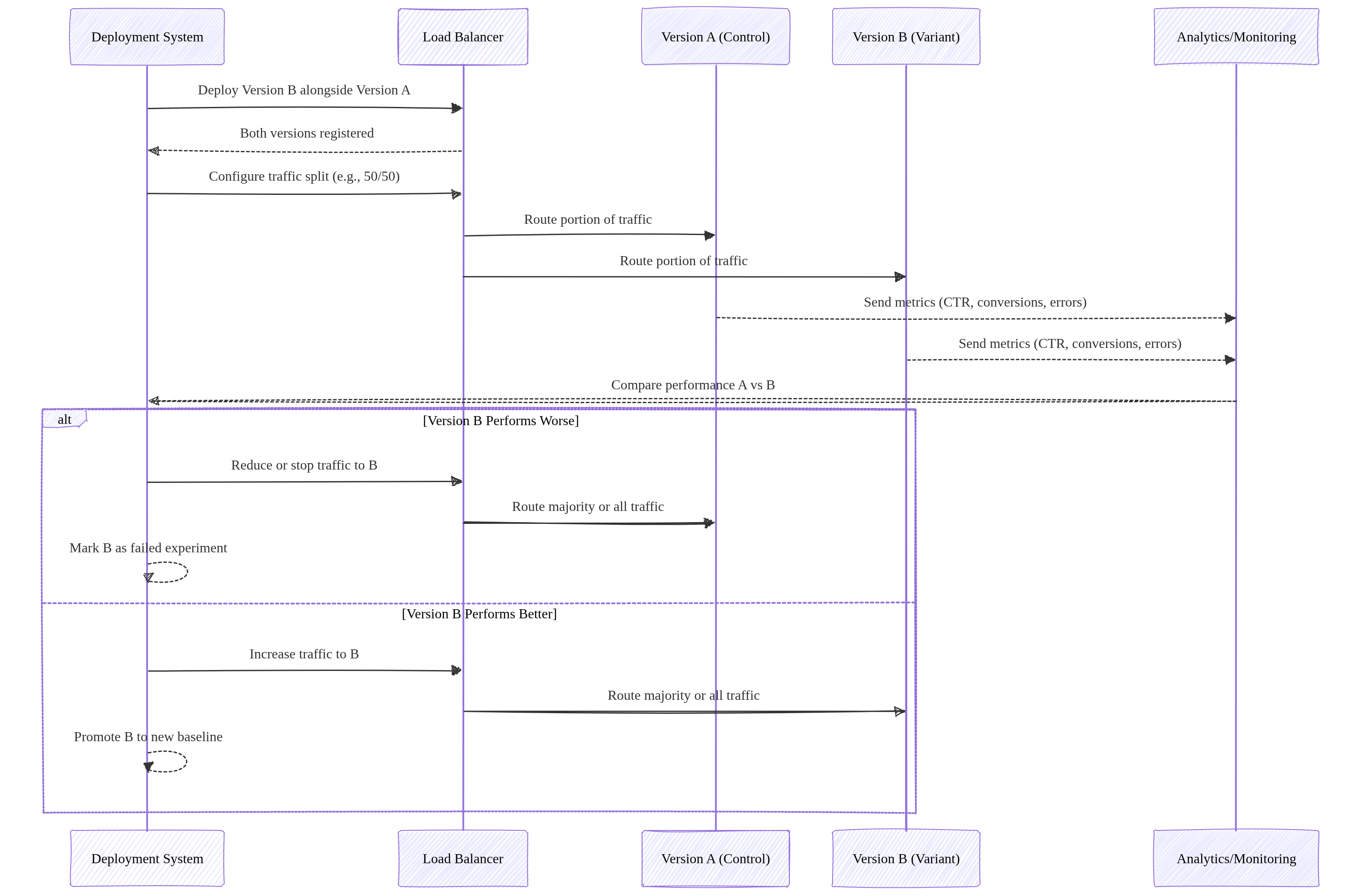
Image source: Own work (Mermaid diagram).
Canary Deployment
Gradually roll out a new version to a small subset of users.
- Start with a small percentage (e.g., 1%).
- Monitor errors, latency, logs.
- Increase traffic gradually (e.g., 1% → 10% → 50% → 100%).
- Rollback by shifting traffic back to the stable version.
Use cases: risk‑reduction, real‑world testing, incremental rollout.
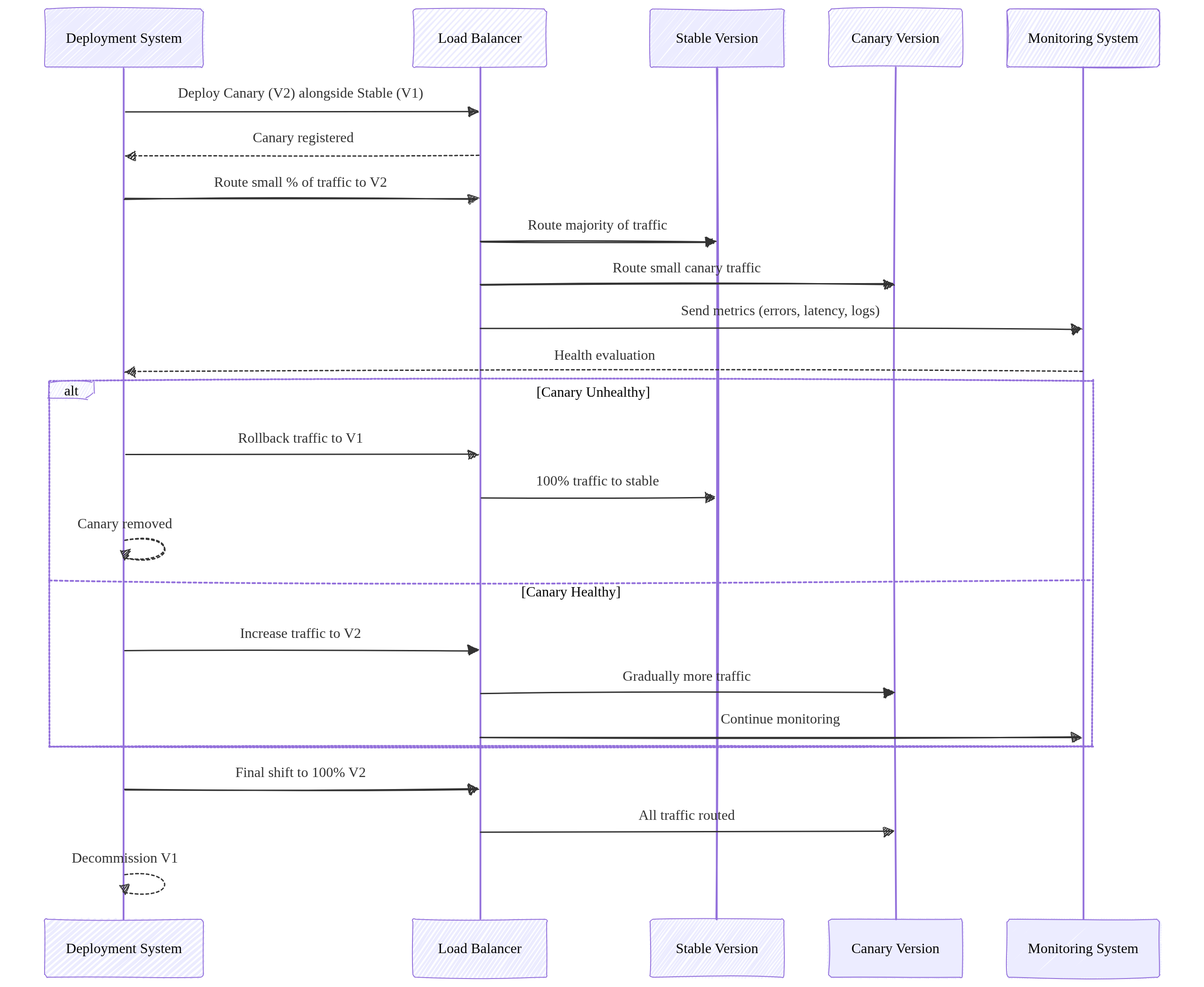
Image source: Own work (Mermaid diagram).
Rolling Update Deployment
A rolling update replaces application instances gradually, updating a few replicas at a time until the entire fleet runs the new version.
- New version is deployed in small batches (e.g., 1 pod at a time).
- Each new instance must pass readiness checks before receiving traffic.
- Old instances are terminated only after new ones become healthy.
- Traffic is continuously served throughout the process — zero downtime.
- Rollback is performed by reversing the rollout (deploying the previous version again), but it is slower than Blue‑Green.
Purpose: Safe, incremental rollout without requiring two full environments.
Traffic behavior: Traffic is always routed to a mix of old and new instances during the transition.
Rolling updates require strict backward compatibility because old and new versions run simultaneously. Breaking API changes cause runtime failures. Use versioning, tolerant readers, and the expand‑migrate‑contract pattern to safely evolve APIs.
Summary
- Blue‑Green Two full environments. Switch traffic all at once. Best for fast rollback.
- A/B Testing: Runs two versions in parallel to compare user behavior and performance metrics for data‑driven decisions.
- Canary: Gradual traffic shifting. Best for testing new versions with minimal risk.
- Rolling Update: Gradual replacement of old instances with new ones. Zero downtime, no duplicate environments, slower rollback than Blue‑Green but simpler and resource‑efficient.
4. Scaling, Resources & Probes
- Maximum Instances: Limits how far the service can scale up (prevents runaway costs).
- Minimum Instances: Keeps instances “warm” to eliminate cold start latency.
- CPU Allocation & Throttling
- Throttled (Default): CPU is only allocated during request processing. Once the response is sent, CPU is heavily “throttled” (reduced), which can cause background threads or asynchronous tasks to hang or fail.
- Always Allocated: CPU is available even when no requests are being processed. This is required for background tasks, WebSocket-like connections, or monitoring agents that need to run continuously.
- Probes (Health Checks)
- Startup Probe: Checks if the app is ready to serve traffic (prevents 503 errors during scale-up).
- Liveness Probe: Restarts the container if it becomes unhealthy or hangs.
- In Spring Boot this is achieved with an Actuator.
- GPU Support: Cloud Run now supports GPU acceleration for AI/ML inference workloads.
5. Networking and Ingress
- Ingress Settings:
All(Public),Internal(VPC only), orInternal and Cloud Load Balancing. - Direct VPC Egress: A faster, more direct way to connect to a VPC without requiring a Serverless VPC Access Connector.
- Static Outbound IP: Route traffic through a VPC and use Cloud NAT to give your service a fixed external IP.
6. Security and Authentication
- IAM Roles:
roles/run.invoker: Required to call/trigger a service.roles/run.admin: Full control over services and revisions.
- Service Account: Always assign a Custom Service Account with minimal permissions for production.
- Private Authentication (Critical):
- To call a private Cloud Run service, the requester must provide a Google-signed ID Token (not an Access Token).
curl --header "Authorization: Bearer $(gcloud auth print-identity-token)" [SERVICE_URL]
- To call a private Cloud Run service, the requester must provide a Google-signed ID Token (not an Access Token).
- Secrets: Use Secret Manager to mount sensitive data as environment variables or volumes.
6.1. Identity-Aware Proxy (IAP)
- IAP (Identity-Aware Proxy) adds an authentication layer in front of Cloud Run services, requiring users or apps to authenticate via Google Identity before accessing the service.
- How it works:
- IAP sits between the user and the Cloud Run service.
- All traffic passes through IAP, which validates the user’s identity (Google Account, OAuth 2.0).
- Only authenticated and authorized users can reach the backend service.
- The (Load Balancer’s) Backend Service receives requests with an
x-goog-authenticated-user-emailheader containing the user’s email.
- Key Benefits:
- Enforces authentication at the edge — no code changes needed.
- Integrates with IAM for fine-grained access control (grant/deny per user or group).
- Works with Cloud Load Balancing (HTTP/HTTPS).
- Use Cases:
- Internal tools requiring Google-only access.
- Adding an extra auth layer beyond IAM.
- Protecting services that don’t have built-in authentication.
For a usecase see Cloud Run & IAP.
7. Storage Options
- In-memory: Ephemeral filesystem limited by allocated RAM.
- Cloud Storage FUSE: Mount a Cloud Storage bucket as a local volume (best for large media files).
- NFS (Filestore): Use VPC egress to mount a Filestore instance for high-performance shared POSIX storage.
8. Common ACE Exam Scenarios
- Scenario: Call a private service from a local script? → Use
gcloud auth print-identity-tokento get a bearer token. - Scenario: Prevent Cold Start for a critical API? → Set
min-instancesto at least 1. - Scenario: Connect to Cloud SQL securely without hardcoded IPs? → Use a Sidecar with the Cloud SQL Auth Proxy.
- Scenario: Your application starts a background thread to process an image after sending the HTTP response, but the process never completes or runs extremely slowly. → Change CPU Allocation to “always allocated” to prevent CPU throttling after the request is returned to the user.
- Scenario: Deploy a background task that runs for 2 hours? → Use Cloud Run Jobs (not Services).
By default, each task runs for a maximum of 10 minutes: you can change this to a shorter time or a longer time up to 168 hours (7 days). For tasks using GPUs, the maximum available timeout is 1 hour.
- Scenario: Split traffic 10/90 for a new feature? → Use Traffic Splitting across revisions.
- Scenario: Mount a 1TB shared drive for multiple instances? → Use Filestore via Direct VPC Egress.
9. Essential gcloud Commands
- Deploy from Image:
gcloud run deploy [SERVICE] --image [IMAGE_URL] - Update Traffic:
gcloud run services update-traffic [SERVICE] --to-revisions [REV1=10,REV2=90] - Set CPU Allocation (Throttling):
gcloud run services update [SERVICE] --no-cpu-throttling(always on) or--cpu-throttling(default) - List Revisions:
gcloud run revisions list --service [SERVICE] - Describe Service:
gcloud run services describe [SERVICE]
Final ACE Tip: Cloud Run is the preferred choice for modern, containerized microservices that need to scale to zero. Use Sidecars for infrastructure logic and ID Tokens for private service-to-service communication.
10. External Links
- Cloud Run - Google Cloud Documentation
- Youtube - Andrew Brown - Cloud Run
- Cloud Run - The Cloud Girl
- Where should I run my staff - The Cloud Girl
- Google Cloud Documentation - Canary Deployment
- Blue-Green, Canary and Other K8s Deployment Strategies - Traefik Labs
- Most Common Kubernates Deployments Strategies (Example & Code) - Anton Putra - Youtube