Cloud Run & IAP
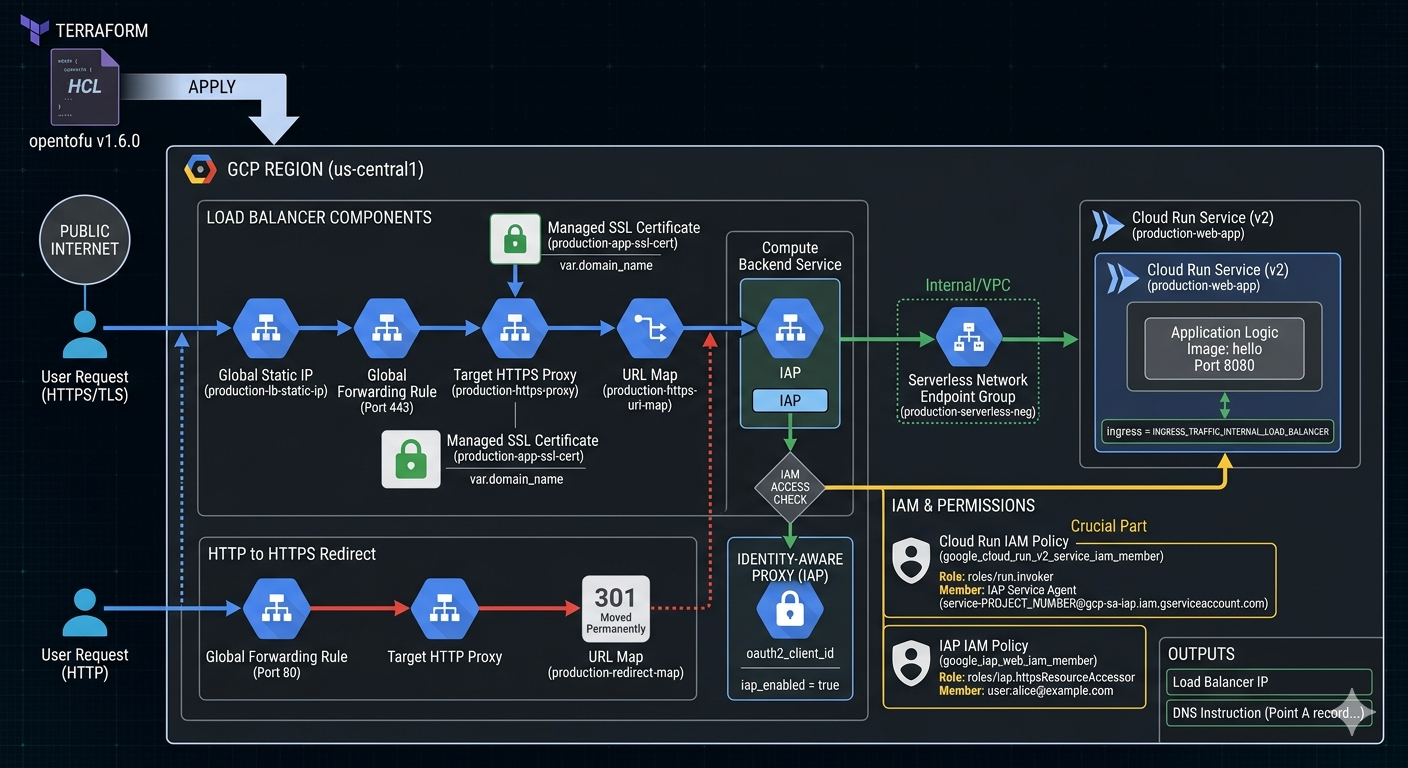
Image source: Own work (Gemini Prompting).
Opentofu Code
Go to APIs & Services > Credentials in the Google Cloud Console. Create an OAuth 2.0 Client ID (Web application type).
Create a terraform.tfvars file:
project_id        = "your-project-id"
domain_name       = "app.yourdomain.com"
iap_client_id     = "xxxx-yyyy.apps.googleusercontent.com"
iap_client_secret = "your-secret-key"
Put all following code snippets in a mail.tf file.
-
Terraform Provider Configuration - Defines the required provider and version for GCP.
terraform { required_version = ">= 1.6.0" required_providers { google = { source = "hashicorp/google" version = "~> 5.0" } } } provider "google" { project = var.project_id region = var.region } -
Variables - Declares input variables for project ID, region, IAP OAuth credentials, and domain name.
# ------------------------- # Variables # ------------------------- variable "project_id" { type = string } variable "region" { type = string default = "us-central1" } variable "iap_client_id" { type = string description = "OAuth client ID for IAP." } variable "iap_client_secret" { type = string description = "OAuth client secret for IAP." sensitive = true } variable "domain_name" { type = string description = "Domain that will point to the LB IP (e.g. app.example.com)" } -
Data & APIs - Enables required GCP APIs (Cloud Run, Compute, IAP, IAM).
# ------------------------- # Data & APIs # ------------------------- data "google_project" "project" {} resource "google_project_service" "enabled_apis" { for_each = toset([ "run.googleapis.com", "compute.googleapis.com", "iap.googleapis.com", "iam.googleapis.com" ]) service = each.key disable_on_destroy = false } -
Network & SSL - Allocates a static IP and creates a managed SSL certificate for the domain.
# ------------------------- # 1. Network & SSL # ------------------------- resource "google_compute_global_address" "app_static_ip" { name = "production-lb-static-ip" depends_on = [google_project_service.enabled_apis] } resource "google_compute_managed_ssl_certificate" "app_cert" { name = "production-app-ssl-cert" managed { domains = [var.domain_name] } } -
Cloud Run Service - Creates a Cloud Run v2 service with internal-only ingress (traffic from load balancer only).
# ------------------------- # 2. Cloud Run Service (v2) # ------------------------- resource "google_cloud_run_v2_service" "main_app" { name = "production-web-app" location = var.region ingress = "INGRESS_TRAFFIC_INTERNAL_LOAD_BALANCER" template { containers { image = "us-docker.pkg.dev/cloudrun/container/hello" ports { container_port = 8080 } } } } -
IAM - Grants the IAP Service Agent permission to invoke Cloud Run, and allows specific users to access via IAP.
# ------------------------- # 3. IAM (The Crucial Part) # ------------------------- # Permission for the IAP Service Agent to call Cloud Run resource "google_cloud_run_v2_service_iam_member" "iap_agent_invoker" { location = google_cloud_run_v2_service.main_app.location name = google_cloud_run_v2_service.main_app.name role = "roles/run.invoker" member = "serviceAccount:service-${data.google_project.project.number}@gcp-sa-iap.iam.gserviceaccount.com" } # Permission for users to pass through IAP resource "google_iap_web_iam_member" "iap_user_access" { project = var.project_id role = "roles/iap.httpsResourceAccessor" member = "user:alice@example.com" # Change this to your email } -
Load Balancer Components - Creates a Serverless NEG, backend service with IAP enabled, URL map, HTTPS proxy, and forwarding rule.
# ------------------------- # 4. Load Balancer Components # ------------------------- resource "google_compute_region_network_endpoint_group" "app_neg" { name = "production-serverless-neg" network_endpoint_type = "SERVERLESS" region = var.region cloud_run { service = google_cloud_run_v2_service.main_app.name } } resource "google_compute_backend_service" "app_backend" { name = "production-backend-service" protocol = "HTTP" load_balancing_scheme = "EXTERNAL_MANAGED" backend { group = google_compute_region_network_endpoint_group.app_neg.id } iap { enabled = true oauth2_client_id = var.iap_client_id oauth2_client_secret = var.iap_client_secret } } resource "google_compute_url_map" "https_map" { name = "production-https-url-map" default_service = google_compute_backend_service.app_backend.id } resource "google_compute_target_https_proxy" "https_proxy" { name = "production-https-proxy" url_map = google_compute_url_map.https_map.id ssl_certificates = [google_compute_managed_ssl_certificate.app_cert.id] } resource "google_compute_global_forwarding_rule" "https_rule" { name = "production-https-forwarding-rule" target = google_compute_target_https_proxy.https_proxy.id port_range = "443" load_balancing_scheme = "EXTERNAL_MANAGED" ip_address = google_compute_global_address.app_static_ip.address } -
HTTP to HTTPS Redirect - Automatically redirects HTTP traffic to HTTPS.
# ------------------------- # 5. HTTP to HTTPS Redirect # ------------------------- resource "google_compute_url_map" "redirect_map" { name = "production-redirect-map" default_url_redirect { https_redirect = true strip_query = false redirect_response_code = "MOVED_PERMANENTLY_DEFAULT" } } resource "google_compute_target_http_proxy" "http_proxy" { name = "production-http-proxy" url_map = google_compute_url_map.redirect_map.id } resource "google_compute_global_forwarding_rule" "http_rule" { name = "production-http-forwarding-rule" target = google_compute_target_http_proxy.http_proxy.id port_range = "80" load_balancing_scheme = "EXTERNAL_MANAGED" ip_address = google_compute_global_address.app_static_ip.address } -
Outputs - Exposes the load balancer IP and DNS instructions.
# -------------------------
# 6. Outputs
# -------------------------
output "load_balancer_ip" {
  value = google_compute_global_address.app_static_ip.address
}

output "dns_instruction" {
  value = "Point A record for ${var.domain_name} to ${google_compute_global_address.app_static_ip.address}"
}
Run tofu init and then tofu apply.
After applying, point your DNS to the outputted IP. It usually takes 15–60 minutes for the Google Managed Certificate to turn green (ACTIVE).