GCP VPC Peering and Shared VPC: ACE Exam Study Guide (2026)

Image source: Dilbert.com
1. VPC Network Peering
VPC Network Peering allows you to connect two VPC networks so that resources in each network can communicate via internal IP addresses.
1.1. Key Characteristics
- Private Connectivity: Traffic stays within the Google Cloud network and does not traverse the public internet.
- Low Latency: Peered networks have the same latency, throughput, and security as if the resources were in the same network.
- Cross-Project/Cross-Org: You can peer VPCs across different projects and even different Google Cloud Organizations.
- Non-Transitive: If VPC A is peered with VPC B, and VPC B is peered with VPC C, VPC A is not peered with VPC C. You must create a direct peering between A and C.
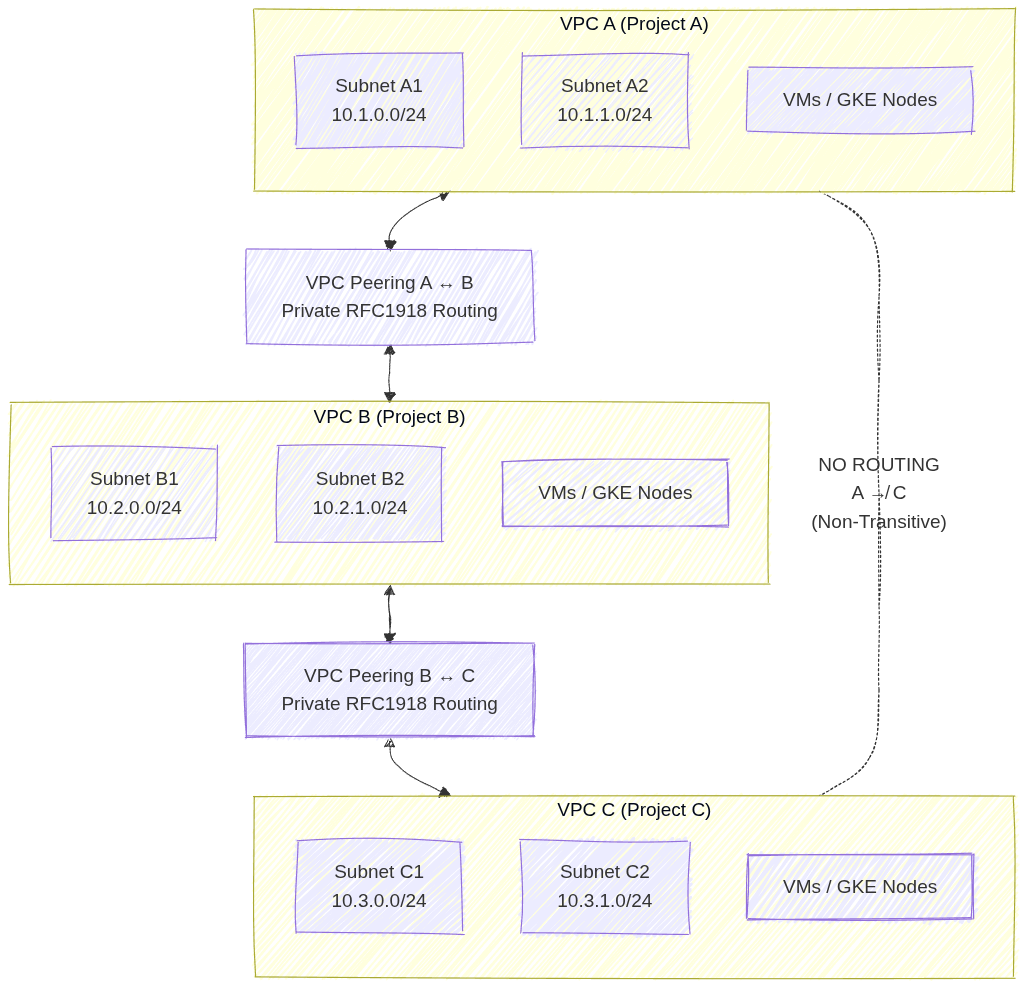
Image source: Own work (Mermaid diagram).
This setup shows three separate VPC networks where VPC A is peered with VPC B, and VPC B is peered with VPC C. Each peering connection allows private RFC 1918 traffic to flow directly between the paired VPCs without VPN, Interconnect, or NAT. However, because VPC peering in GCP is non‑transitive, VPC A cannot reach VPC C unless a direct peering connection is created. This illustrates the requirement for explicit, pairwise peering links whenever cross‑VPC communication is needed.
1.2. Requirements and Constraints
- No Overlapping IP Ranges: Peering will fail if any subnet IP ranges overlap between the two networks.
- Two-Way Configuration: Peering must be configured in both networks (A to B and B to A) for it to become active.
- Firewall Rules: Peering allows communication, but it does not bypass firewall rules. You must still create ingress firewall rules to allow traffic from the peered network’s IP ranges.
- Service Chaining: You can export/import custom routes across the peering connection.
2. Shared VPC
Shared VPC allows an organization to connect resources from multiple projects to a common VPC network, so that they can communicate with each other securely and efficiently using internal IPs from that network.
- Core Concepts:
- Host Project: The project that contains one or more Shared VPC networks.
- Service Project: A project that is attached to the Host Project. Resources in a service project (like VM instances or GKE clusters) use the subnets in the Host Project.
- Administrative Roles (Critical for Exam):
- Shared VPC Admin: Typically an Organization Admin. Responsible for enabling the Host Project and attaching Service Projects.
- Network Admin: Manages the network resources (subnets, firewall rules, etc.) in the Host Project.
- Service Project Admin: Manages the resources (VMs, GKE) within their specific service project. They can only see and use the specific subnets in the Host Project that the Shared VPC Admin has granted them access to.
- Use Cases:
- Centralized Control: One networking team manages the VPC, security, and connectivity (VPN/Interconnect) in the Host Project.
- Delegated Responsibility: Individual teams manage their applications in Service Projects without having to worry about networking complexity.
- Resource Sharing: Easily share services like internal Load Balancers or common databases across multiple projects.
3. Comparison: Peering vs. Shared VPC
| Feature | VPC Network Peering | Shared VPC |
|---|---|---|
| Administration | Decentralized (each VPC managed separately) | Centralized (one Host Project manages the network) |
| Hierarchy | Flat (Peers are equals) | Hierarchical (Host and Service projects) |
| IP Overlap | Forbidden | Managed (Host project defines all ranges) |
| Scale | Best for connecting independent VPCs | Best for multi-team/multi-project organization structure |
| Transitivity | Non-transitive | Centralized (all service projects share the same VPC) |
4. Essential gcloud Commands
- Create Peering (Network A):
gcloud compute networks peerings create [PEER_NAME] --network=[NET_A] --peer-project=[PROJECT_B] --peer-network=[NET_B] - Enable Host Project:
gcloud compute shared-vpc enable [HOST_PROJECT_ID] - Associate Service Project:
gcloud compute shared-vpc associated-projects add [SERVICE_PROJECT_ID] --host-project=[HOST_PROJECT_ID]
5. Exam Tips
- Identity-Aware Proxy (IAP) & Peering: Peering is often used to connect a “Hub” VPC (with VPN/Interconnect) to “Spoke” VPCs.
- IAM Permissions: Remember that a Service Project Admin needs the
compute.networkUserrole on the specific subnets they intend to use in the Host Project. - Quotas: Both Peering and Shared VPC have limits on the number of connections/projects.
- Troubleshooting: If two peered VMs can’t talk, check for overlapping subnets first, then firewall rules, then verify that the peering is in the
ACTIVEstate on both sides.