Firestore: ACE Exam Study Guide (2026)

Image source: Google Cloud Documentation
1. What Firestore Is
Firestore is:
- A NoSQL document database
- Stores data as collections to documents to fields
- Serverless (auto-scaling, no servers to manage)
- Multi-regional by default
- Supports real-time listeners
- Strongly consistent
Firestore is the next generation of Cloud Datastore.
2. Firestore Modes
| Feature | Native Mode | Datastore Mode |
|---|---|---|
| Best For | Mobile & Web apps | Server-side workloads |
| Real-time | Yes (Listeners) | No |
| Offline | Yes (Caching) | No |
| Queries | Collection Group Queries | No Collection Group Queries |
| Consistency | Strong Consistency | Strong Consistency (2026 standard) |
| Use Case | Real-time dashboards, chat | High-throughput backend services |
ACE Tip: Choose Native Mode unless you specifically need backwards compatibility with legacy Cloud Datastore applications.
3. Data Model
Firestore stores data as:
- Collections
- Documents
- Fields
- Subcollections
Key points:
- Documents can contain subcollections
- Collections do not contain other collections directly
- Documents are limited to 1 MB
4. Consistency and Transactions
Firestore provides:
- Strong consistency for reads, writes, and queries
- ACID transactions (document-level)
- Automatic retries for transactions
Two write types:
- Transactions: read and write, atomic
- Batch writes: write-only, atomic
ACID — Atomicity, Consistency, Isolation, Durability — four properties that ensure database transactions are processed reliably and maintain data integrity even in the presence of failures.
- Atomicity - All operations in a Firestore transaction succeed or none do. If any write fails, Firestore rolls back the entire transaction.
- Consistency - Firestore ensures that any committed transaction leaves the data in a valid state according to your rules (security rules, schema expectations, constraints you enforce in code).
- Isolation - Transactions in Firestore run with snapshot isolation. Each transaction sees a consistent snapshot of the data and is retried automatically if conflicts occur.
- Durability - Once Firestore commits a write, it is stored redundantly across multiple Google data centers, ensuring it survives crashes or outages.
5. Write Limits (Major Exam Trap)
Firestore enforces:
- 1 write per second per document
- High-frequency writes require:
- Sharded counters
A counter is split into multiple shard documents. Each write updates a random shard and reads combine all shard values. This avoids hitting the write limit of a single document and prevents hotspots during heavy traffic.
- Randomized document IDs
Firestore auto generated IDs distribute documents evenly across storage. Randomized keys avoid sequential hotspots and improve write throughput for high volume collections.
- Sharded counters
This appears frequently in scenario questions.
6. Indexing
Firestore automatically creates:
- Single-field indexes
You can create:
- Composite indexes for complex queries
If a query needs an index:
- Firestore returns an error with a link to create it
7. Security
Firestore uses two layers of security:
7.1. IAM
- Controls administrative access
- Example: creating indexes, backups, exports
7.2. Security Rules
- Control data-level access
- Based on:
- User identity
- Document data
- Request time
- Custom conditions
ACE exam often tests the difference.
8. Networking and Access
Firestore is accessed via:
- HTTPS API
- Client SDKs (web, iOS, Android)
- Server SDKs
Firestore is not mounted like a filesystem.
9. Offline Support
Firestore supports offline caching for:
- Web
- iOS/Android
Datastore mode does not support offline mode.
10. Real-Time Updates
Firestore supports:
- Real-time listeners
- Automatic push updates to clients
Datastore mode does not support this.
11. Scaling and Performance
Firestore scales automatically using:
- Horizontal partitioning (sharding)
To avoid hotspots:
- Use randomized document IDs
- Avoid sequential keys
11.1 How Firestore Sharding Works
Firestore sharding spreads write operations across multiple shard documents instead of sending all writes to a single document. Each client writes to a randomly selected (or hash‑based) shard, which prevents write hotspots and avoids the 1‑write‑per‑second limit on individual documents. When reading, the application aggregates all shard documents (e.g., summing counters) to produce the final result. This allows Firestore to scale write throughput horizontally.
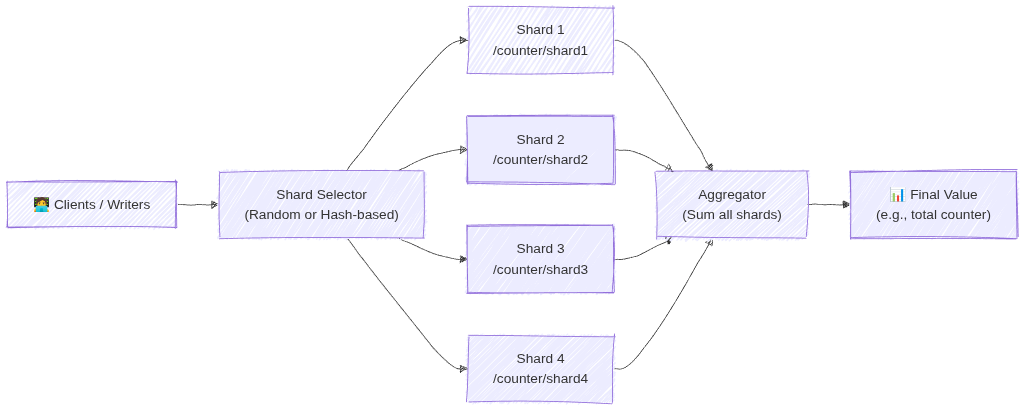
Image source: Own work (Mermaid diagram).
For more details see What is Database Sharding? - Anton Putra - Youtube.
12. Queries and Aggregations (2026 Update)
Firestore supports:
- Range, Compound, and Collection group queries.
- Server-side Aggregations:
COUNT(),SUM(), andAVG().Aggregations are highly efficient;
COUNT()costs 1 index read per 1,000 documents. - Vector Search: Supports similarity searches (KNN) for GenAI/LLM embeddings.
13. Backups and Exports
Firestore supports:
- Scheduled backups
- On-demand backups
- Stored in Cloud Storage
- Can restore to a new database
14. Data Retention and Recovery (Critical for ACE)
14.1. TTL (Time To Live)
- Automatically deletes documents based on a timestamp field.
- Used for cost optimization and cleaning up stale data (e.g., sessions, logs).
- Deletion typically happens within 24 hours of expiration.
14.2. PITR (Point-in-Time Recovery)
- Allows data recovery to any version from the last 7 days.
- Protects against accidental deletion or corruption.
- Must be explicitly enabled at the database level.
14.3. Named Databases
- You can create multiple Firestore databases in one project (e.g., (
default),test-db,prod-db). - Databases can be in different locations and even different modes (Native vs. Datastore).
15. Using in a Spring Boot App (Example)
Add the dependency: com.google.cloud:spring-cloud-gcp-starter-data-firestore.
@Service
public class FirestoreService {

    private final Firestore db;

    public void addDocument(String coll, String id, Map<String, Object> data) {
        db.collection(coll).document(id).set(data);
    }

    public DocumentSnapshot getDocument(String coll, String id) throws Exception {
        ApiFuture<DocumentSnapshot> query = db.collection(coll).document(id).get();
        return query.get();
    }
}
16. Common ACE Exam Scenarios
- Scenario: Automate deletion of 30-day-old logs? → Use TTL on a timestamp field.
- Scenario: Recover data from a mistake made 4 hours ago? → Use PITR (7-day window).
- Scenario: Isolate Dev/Prod data in one project? → Use Named Databases.
- Scenario: Count 1 million documents cheaply? → Use the native
COUNT()aggregation query. - Scenario: Build a GenAI chatbot with Firestore? → Use Vector Search for embeddings.
- Scenario: Migrate legacy Datastore app? → Firestore in Datastore mode.
- Scenario: Native vs Datastore mode? → Choose Native for mobile/web (real-time/offline).
- Scenario: Change database location after creation? → Not possible (must recreate).
17. Quick Summary Table
| Topic | Key Points |
|---|---|
| Data model | Collections to Documents to Fields (Max 1 MB) |
| Write limit | 1 write/sec per document |
| Consistency | Strong Consistency |
| Security | IAM (Admin) + Security Rules (Data Access) |
| Recovery | PITR (7 days) + Scheduled Backups (GCS) |
| Cleanup | TTL (Time-to-Live) via timestamps |
| Modes | Native (Real-time/Offline) vs Datastore (High-volume server) |
18. Final ACE Tips
- Firestore is the default NoSQL choice for most GCP apps.
- TTL = Cost savings (auto-delete).
- PITR = Disaster recovery (7-day window).
- Named Databases allow multiple DBs per project.
- Native mode is for mobile/web; Datastore mode is for high-volume server apps.
- Location is permanent once the database is created.
- Aggregations (
COUNT,SUM,AVG) are now built-in and server-side.