Cloud Scheduler: ACE Exam Study Guide (2026)

Image source: Google Cloud Documentation
1. Cloud Scheduler Overview
Cloud Scheduler is a fully managed enterprise-grade cron job service. It allows you to schedule virtually any job, including batch, big data, and cloud infrastructure operations.
- Key Characteristics:
- Fully Managed: No infrastructure to manage or scale.
- Reliability: Guaranteed at-least-once delivery to your targets.
- Unified: Provides a single interface to manage all your scheduled jobs.
- PaaS Nature: It is a serverless product; you pay per job per month.
2. Target Types (How it triggers work)
Cloud Scheduler can trigger three main types of targets:
- HTTP/S Targets:
- Triggers any publicly accessible URL or an internal URL (if configured correctly).
- Supports custom HTTP headers and methods (GET, POST, PUT, etc.).
- Standard for triggering Cloud Run or Cloud Functions.
- Pub/Sub Targets:
- Publishes a message to a specific Pub/Sub topic.
- Ideal for decoupled architectures where multiple services subscribe to the same trigger.
- App Engine HTTP Targets:
- Sends an HTTP request to a specific service and handler within an App Engine app.
- Uses App Engine’s internal task queue infrastructure.
3. Schedule Syntax (Cron Format)
Cloud Scheduler uses the standard Unix cron format: * * * * * (Minute, Hour, Day of Month, Month, Day of Week).
- Example:
0 9 * * 1runs every Monday at 9:00 AM. - Timezone: You can specify a timezone for the job (e.g.,
UTC,America/New_York). If not specified, it defaults toUTC.
For more details on cron see the Crontab Guru.
4. Reliability and Retries
- At-least-once delivery: Google guarantees that the job will be sent at least once. Your code should be idempotent to handle potential duplicate triggers.
- Retry Config: You can configure:
- Max Retries: Number of times to try again if the target returns an error.
- Min/Max Backoff: The delay between retry attempts.
- Max Doublings: How many times the backoff interval is doubled.
5. Security and Authentication
-
Auth for HTTP Targets:
- OIDC Token: Used for services that require OpenID Connect (e.g., Cloud Run, Cloud Functions).
OIDC is an identity layer built on top of OAuth 2.0 that adds user authentication and provides ID tokens containing user identity information.
- OAuth Token: Used for Google APIs.
OAuth 2.0 is an authorization framework that lets an application access a user’s resources (APIs, data) on another service without needing the user’s password.
- Service Account: You must specify a service account that has the permissions to invoke the target service (e.g.,
roles/run.invoker).
OAuth handles authorization (permissions), while OIDC adds authentication (identity) on top of OAuth.
- OIDC Token: Used for services that require OpenID Connect (e.g., Cloud Run, Cloud Functions).
-
IAM Roles:
roles/cloudscheduler.admin: Full control.roles/cloudscheduler.jobRunner: Permission to run jobs manually.roles/cloudscheduler.viewer: View-only access.
6. Essential gcloud Commands
- Create a Pub/Sub Job:
gcloud scheduler jobs create pubsub [JOB_NAME] --schedule="0 9 * * 1" --topic=[TOPIC_NAME] --message-body="Hello world" - Create an HTTP Job:
gcloud scheduler jobs create http [JOB_NAME] --schedule="0 0 * * *" --uri=[URL] --oidc-service-account-email=[SA_EMAIL] - Run a Job Manually (for testing):
gcloud scheduler jobs run [JOB_NAME] - List Jobs:
gcloud scheduler jobs list - Pause/Resume Job:
gcloud scheduler jobs pause [JOB_NAME]/gcloud scheduler jobs resume [JOB_NAME]
7. Exam Tips
- The “Cron” Keyword: If a question asks how to run a task on a schedule (e.g., “daily at 2 AM”), look for Cloud Scheduler.
- Idempotency: Because Cloud Scheduler guarantees “at-least-once” delivery, your backend logic must be able to handle receiving the same request twice without side effects.
- Triggering Serverless: For Cloud Run or Cloud Functions, use the HTTP target with an OIDC token and a service account with the Invoker role.
- App Engine Region: Cloud Scheduler requires an App Engine application to be initialized in the project (it uses the same underlying location). You cannot change this location later.
- Cron Format: Be familiar with the 5-field cron syntax for basic scheduling questions.
8. Limitations and Quotas
- Jobs per project: Limited to a certain number per project (check current quotas in Cloud Console).
- Frequency: Minimum interval is 1 minute between job executions.
- App Engine Dependency: Requires App Engine to be enabled in the project for location assignment.
- Payload size: Pub/Sub message body has size limits (typically 256KB).
9. Cloud Scheduler vs Cloud Tasks
| Feature | Cloud Scheduler | Cloud Tasks |
|---|---|---|
| Type | Fully managed cron service | Task queue service |
| Use case | Time-based triggers | Work queue processing |
| Target control | Simple HTTP/Pub/Sub | More control over task execution |
| Retry behavior | Configurable backoff | Queue-based with automatic retry |
| Best for | Scheduled jobs, periodic tasks | Decoupled async workloads |
When to use Cloud Tasks: If you need to process large volumes of tasks, want finer control over queue behavior, or need to throttle task execution rate.
10. Troubleshooting
- Job not triggering: Check job status (
gcloud scheduler jobs describe), verify the schedule syntax, ensure the target service is accessible. - Authentication failures: Verify the service account has the correct IAM roles (e.g.,
roles/run.invokerfor Cloud Run). - Location errors: Confirm App Engine is initialized in the project with the correct region.
- Use Logs: Cloud Scheduler logs executions in Cloud Logging - check for error messages under the specific job.
11. Job States and Lifecycle
- Enabled: Job is active and will execute on schedule.
- Disabled: Job exists but won’t execute (can be re-enabled).
- Paused: Job is temporarily paused (can be resumed).
- Job History: Use Cloud Logging to view past executions, success/failure status, and error details.
While both
disabledandpausedstates stop a job from running, the difference lies in intent and behavior regarding missed schedules.
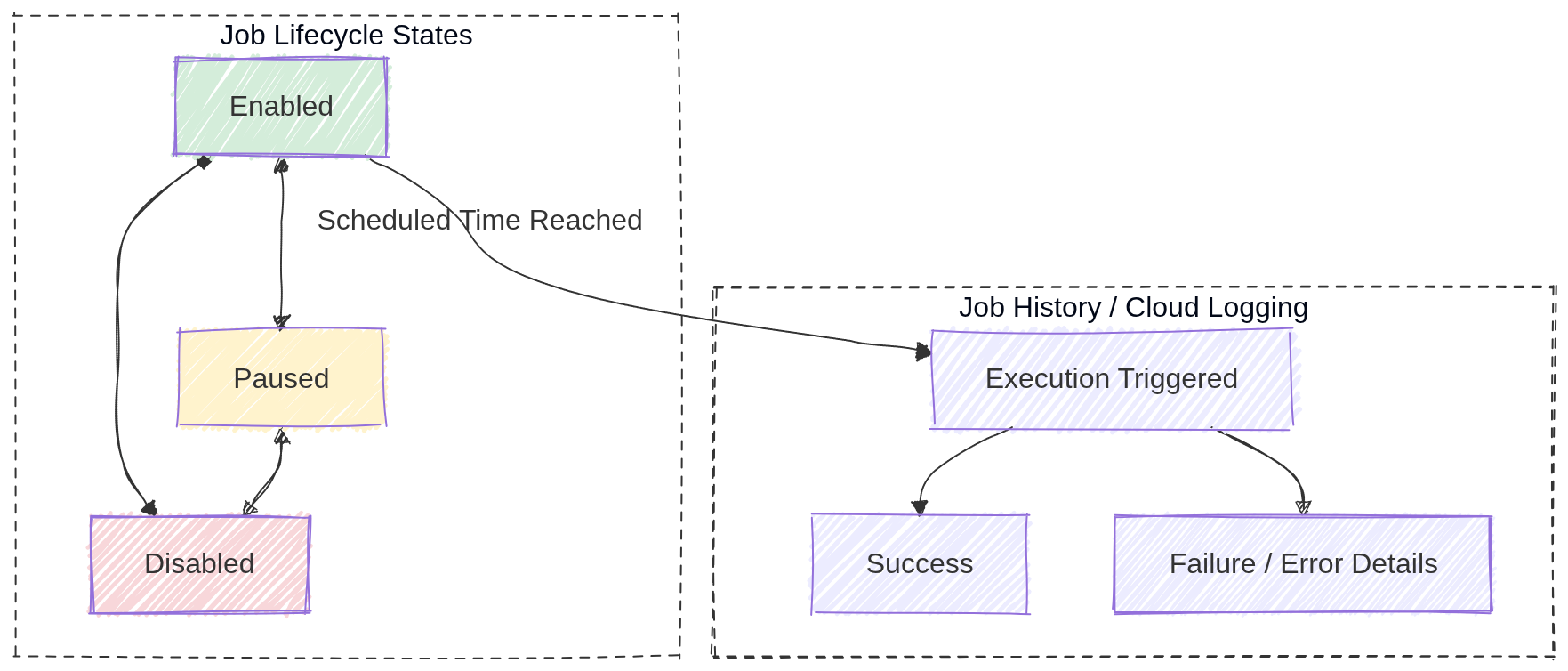
Image source: Own work (Mermaid diagram).
12. Real-World Use Cases
- Data pipeline automation: Trigger a Cloud Function or Dataflow job nightly to process daily data.
- Database maintenance: Run a scheduled script to clean up old records or optimize tables.
- Report generation: Send a daily email report by triggering a Cloud Run service that generates and emails reports.
- Resource cleanup: Automatically delete old temporary files from Cloud Storage every week.
- Instance scheduling: Start/stop Compute Engine instances during business hours to save costs.
13. Additional IAM Roles
roles/iam.serviceAccountUser: Required to impersonate or use a service account for job authentication.roles/pubsub.publisher: Needed when creating Pub/Sub target jobs to publish messages to topics.