Cloud Interconnect: ACE Exam Study Guide

Image source: Google Cloud Documentation
1. Overview
Cloud Interconnect provides a direct physical connection between your on-premises network and Google’s network. Unlike Cloud VPN, traffic bypasses the public internet.
Key Characteristics:
- No public internet: Traffic travels over dedicated physical links
- Predictable performance: Consistent latency, no jitter from internet congestion
- High bandwidth: 10 Gbps or 100 Gbps (Dedicated) or smaller (Partner)
- Not encrypted by default: Must use MACsec (Dedicated) or HA VPN over Interconnect
- Requires BGP: Uses Cloud Router for dynamic routing
MACsec (Media Access Control Security) is a Layer‑2 encryption standard (IEEE 802.1AE) that protects traffic on physical links. In Google Cloud, MACsec is used to encrypt traffic on Dedicated Interconnect connections between your on‑premises router and Google’s edge router.
It provides hop‑by‑hop, hardware‑level encryption directly on the fiber link — unlike IPsec, which is Layer‑3 and tunnel‑based.
2. Interconnect Types
Dedicated Interconnect
| Aspect | Details |
|---|---|
| What | Physical connection at Google’s colocation facility |
| Requirement | Must be present at an Interconnect location |
| Bandwidth | 10 Gbps or 100 Gbps circuits |
| Encryption | MACsec available (encrypts data in transit) |
| Best for | High data volume, organizations with colocation presence |
Partner Interconnect
| Aspect | Details |
|---|---|
| What | Connection via third-party service provider |
| Requirement | Connect to Partner who already has Google link |
| Bandwidth | 50 Mbps up to 10 Gbps (or 50 Gbps) |
| Encryption | Not via MACsec (use VPN if needed) |
| Best for | Lower bandwidth needs, no colocation access |
Cross-Cloud Interconnect
| Aspect | Details |
|---|---|
| What | Direct link between GCP and other clouds (AWS, Azure) |
| Requirement | No physical hardware setup |
| Best for | Multi-cloud architectures requiring low latency |
3. Deployment Components
- Physical Link: Fiber connecting your equipment to Google (Dedicated) or Partner
- Interconnect Resource: The physical circuit (visible in GCP console)
- VLAN Attachment: Logical connection (VLAN) between Interconnect and VPC
- Cloud Router: Manages BGP sessions for dynamic routing
- Border Gateway Protocol (BGP): Exchanges routes between on-prem and GCP
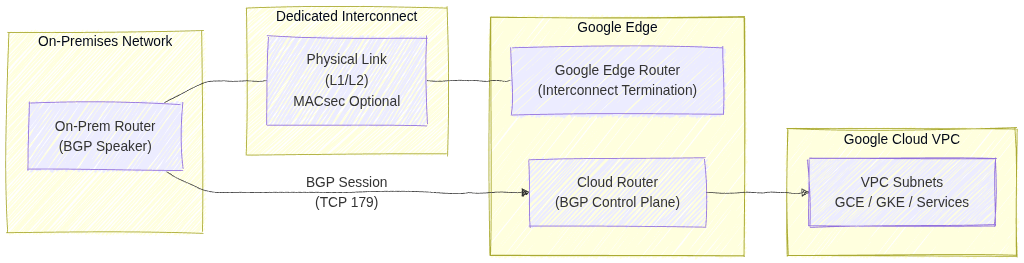
Image source: Own work (Mermaid diagram).
This diagram shows how an on‑premises network connects to a Google Cloud VPC using Dedicated Interconnect and BGP routing.
- The On‑Prem Router establishes a BGP session (TCP 179) with Cloud Router in Google Cloud. This BGP session exchanges routes so both environments know how to reach each other.
- The physical connectivity is provided by Dedicated Interconnect, represented by the fiber link between the on‑prem router and Google’s Edge Router. This link operates at Layer 1/2, and can optionally be protected with MACsec for encryption.
- Google’s Edge Router terminates the physical Interconnect circuit and hands traffic to Cloud Router, which handles the control plane (routing decisions).
- Cloud Router injects learned routes into the VPC, making on‑prem networks reachable to GCE VMs, GKE clusters, and other services inside the VPC.
4. VLAN Attachments
- What: Logical connections that carry your VLAN traffic over the Interconnect
- MTU: Default 1440 bytes (smaller than standard 1500 due to encapsulation)
- Limits:
- Up to 50 VLAN attachments per Interconnect
- Each VLAN attachment needs a unique VLAN ID (802.1Q tag)
- Requirements:
- Must be in the same region as your Cloud Router
- BGP session configured with peer IP addresses
5. High Availability & SLA
| SLA | Requirement |
|---|---|
| 99.99% | 4+ VLAN attachments across 2+ Interconnect locations + 2+ Cloud Routers |
| 99.9% | 2+ VLAN attachments + 2 Cloud Routers (single location) |
Important: Single Interconnect = no SLA (0%)
6. Direct Peering vs Carrier Peering
These are NOT the same as Cloud Interconnect:
| Type | Purpose | Reaches |
|---|---|---|
| Direct Peering | Reach Google services directly | Google Workspace, YouTube only (NOT VPC) |
| Carrier Peering | Via partner for Google services | Google Workspace via partner |
Key point: Neither reaches VPC resources. Use Interconnect or VPN for VPC.
7. Encryption
| Method | Availability | Notes |
|---|---|---|
| MACsec | Dedicated Interconnect only | Encrypts physical link |
| HA VPN over Interconnect | Both types | Add VPN tunnel over VLAN attachment |
| Default (none) | Both types | Traffic is unencrypted |
Exam tip: If encryption is required, use HA VPN over Interconnect (most common answer).
8. Common Exam Gotchas
- No encryption by default: Interconnect does not encrypt traffic
- Single Interconnect = no SLA: Must have redundancy for SLA
- MTU 1440: VLAN attachments have lower MTU than standard (1500)
- BGP required: All Interconnect types need Cloud Router and BGP
- VLAN limits: Maximum 50 VLAN attachments per Interconnect
- Cross-Cloud is GCP-to-cloud: Not for connecting to on-premises directly
- Peering ≠ Interconnect: Direct/Carrier Peering only reaches Google services, not VPC
- Partner bandwidth flexibility: Can start small (50 Mbps), unlike Dedicated
9. Interconnect vs VPN Comparison
| Factor | Cloud Interconnect | Cloud VPN |
|---|---|---|
| Transport | Dedicated physical link | Public internet |
| Bandwidth | Up to 100 Gbps | Up to 3 Gbps per tunnel |
| Latency | Lower, consistent | Higher, variable |
| Setup time | Weeks (physical) | Minutes |
| Cost | Higher | Lower |
| Encryption | None (use MACsec/VPN) | Built-in (IPsec) |
| Use case | Migration, high-volume | Quick setup, lower volume |
Choose Interconnect when: Migrating large datasets, need consistent performance, acceptable to wait for physical setup.
Choose VPN when: Need quick connectivity, lower budget, can tolerate internet variability.
10. Essential gcloud Commands
Create Dedicated VLAN Attachment:
gcloud compute interconnects attachments dedicated create [NAME] \
  --interconnect=[INTERCONNECT] \
  --router=[ROUTER] \
  --region=[REGION] \
  --vlan=[VLAN_ID]
Create Partner VLAN Attachment:
gcloud compute interconnects attachments partner create [NAME] \
  --router=[ROUTER] \
  --region=[REGION] \
  --interconnect-region=[PARTNER_REGION]
List VLAN Attachments:
gcloud compute interconnects attachments list
11. Practice Questions
Q1: What provides 99.99% SLA for Cloud Interconnect?
Answer: 4+ VLAN attachments across 2+ Interconnect locations and 2+ Cloud Routers
Q2: You need to connect on-premises to VPC with encryption. What do you use?
Answer: HA VPN over Interconnect (or MACsec with Dedicated)
Q3: What’s the maximum VLAN attachments per Interconnect?
Answer: 50
Q4: Direct Peering can reach which GCP resources?
Answer: Google Workspace and YouTube only (NOT VPC resources)
Q5: A company needs 500 Mbps bandwidth but has no colocation presence. Which Interconnect type?
Answer: Partner Interconnect
Q6: What is the default MTU for a VLAN attachment?
Answer: 1440 bytes
12. Quick Reference Summary
| Feature | Value |
|---|---|
| Dedicated bandwidth | 10 Gbps or 100 Gbps |
| Partner bandwidth | 50 Mbps to 50 Gbps |
| VLAN attachments max | 50 per Interconnect |
| VLAN MTU | 1440 bytes |
| 99.99% SLA requires | 4+ VLANs, 2+ locations, 2+ routers |
| Encryption by default | No (use MACsec or VPN) |
| BGP required | Yes (via Cloud Router) |
| Reaches VPC | Yes |
| Reaches Google Workspace | Yes |